















































If you are already using the ZBBridge-P, you have surely experienced the stable Zigbee 3.0 connection and the convenience of device interoperation within the eWeLink App. It supports up to 128 Zigbee sub‑devices, three custom security modes, and can execute local schedules and Zigbee device automations even when offline. The ZBBridge-P is a reliable bridge that quietly connects all your Zigbee devices.
But in daily use, have you ever faced these issues?
- “The automation runs, but you're not sure what's happening?” A sensor detects someone passing by, the light turns on – but family members don’t know if it's an automation or someone actually there, nor how to manually override it. The smart experience becomes “invisible.”
- “The learning curve for family members is too high?” Parents or kids just want to turn on a light, but they have to find a phone, download an app, and pair the device – making the smart home more complicated than a traditional switch.
- “A flood of app notifications, but the important one gets missed.” Multiple device notifications keep popping up on your phone. Critical alerts get buried, and you never feel fully at ease when you're away.
The root of these pain points is that the ZBBridge-P is an “invisible bridge”. It quietly connects devices, but its role is “connection”, not “interaction”. It lacks a screen that every family member can intuitively see and directly operate.
That's why we need to turn our attention to the NSPanel Pro.
Below, we show you how your smart home experience changes when the NSPanel Pro becomes your Zigbee gateway.
When the Gateway Gets a "Face"
🚪 Arrival Automation – From “Lights turn on automatically” to “See the whole home at a glance”
- Current experience with ZBBridge‑P:
You open the door → door sensor triggers → motion sensor detects presence → lights turn on automatically. Convenient, but if you want to check the indoor temperature or confirm the status of other devices, you still need to find your phone, unlock it, and open the app.
- NSPanel Pro experience:
The moment you step inside, the NSPanel Pro’s touchscreen automatically lights up and displays a scene‑triggered message. At the same time, you can see the status of all smart home devices – lights, indoor temperature, security arming mode, and more – at a glance. The NSPanel Pro can also act as a thermostat: select a temperature/humidity sensor (e.g., SNZB‑02P) as the temperature source, and it will automatically turn heating/cooling devices on or off based on the set temperature.
🚶 Away Mode – From “Invisible peace of mind” to “Visible reassurance”
- Current experience with ZBBridge‑P:
While the ZBBridge-P supports three custom security modes (Home, Away, and Sleep), it offers no intuitive way to control or switch between them.
- NSPanel Pro experience:
Before leaving home, a glance at the screen on the wall clearly shows the status – "Armed / Disarmed / Alarm" – and the peace of mind that comes from seeing it on-screen is something a phone notification cannot replace. In addition, you can flexibly switch security modes directly on the panel to enter the armed state.
🎬 Scene Control – From App Menus to Physical Touch
- Current experience with ZBBridge‑P:
To activate a "Movie Mode" or "Good Night" scene, you have to open the eWeLink App → navigate to the scene tab → tap run. There is no intuitive physical control interface.
- NSPanel Pro experience:
The NSPanel Pro's home screen can display user‑defined scene widgets. With a single tap on "Movie Mode", curtains gently close, lights dim to a warm hue – everything flows smoothly under your fingertips.
📹 Doorbell Integration – Making the Doorbell “Visible”
- Current experience with ZBBridge‑P:
When someone rings the doorbell (e.g., a SNZB‑01P wireless switch), the buzzer sounds an alert, but you have no idea who is at the door – a courier or a stranger?
- NSPanel Pro experience:
When a visitor presses the doorbell, the NSPanel Pro screen automatically lights up and shows a live feed from the door camera. With the built‑in microphone and speaker, you can have two‑way audio communication with the visitor. The NSPanel Pro supports not only SONOFF cameras but also other RTSP‑compatible cameras and even ESP32‑CAM, giving you complete peace of mind.
🌡️ Temperature Control – From “Background Automation” to “Visual Thermostat”
- Current experience with ZBBridge‑P:
The ZBBridge‑P can connect temperature sensors and trigger automations, but you cannot see the current temperature locally, nor can you adjust the target temperature on the fly.
- NSPanel Pro experience:
The NSPanel Pro acts as a visual thermostat – the screen shows the current indoor temperature in real time, and you can manually adjust the target temperature at any moment. The system then automatically controls heating/cooling devices accordingly. Need the nursery at a constant 24°C? Or want to set the living room to 22°C for guests? Just a few taps on the screen.
🌱 More Advanced Scenarios – Infinite Possibilities with a Visual Control Hub
Once you adopt the NSPanel Pro as your single visual control hub, the smart home experience goes far beyond the scenarios above:
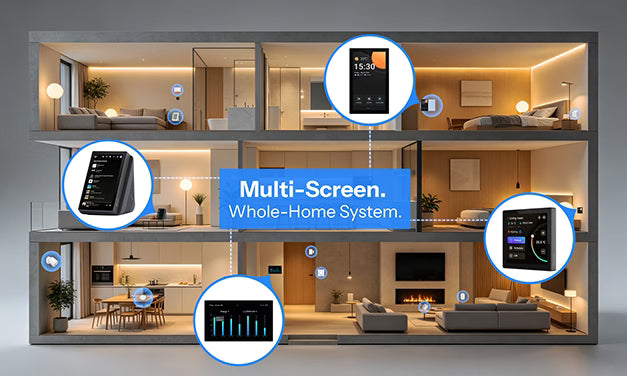
- Whole‑home status at a glance: Family members, young or old, just walk up to the panel and see the status of every light, the indoor temperature, and the security arming mode – zero learning curve.
- Visual energy monitoring: Pair with SONOFF smart power metering switches to view real‑time energy consumption data for your entire home on the NSPanel Pro.
- Ecosystem expansion: The NSPanel Pro supports the Matter Bridge feature, seamlessly bridging non‑Matter devices into the Matter ecosystem. You can then control them via Siri, Alexa, Google Home, and other Matter‑certified apps. It also comes with the F‑Droid app store built‑in, allowing you to download the official Home Assistant app and turn the panel into a true smart hub.
- Lifestyle & entertainment: The NSPanel Pro is not just for unified control – you can also download various apps to play music, browse videos, and more, bringing the smart hub closer to your daily life.
The NSPanel Pro is more than just a Zigbee gateway. It is a smart control panel that integrates a touchscreen, Zigbee 3.0 gateway, Matter bridge, security hub, and multiple apps – moving whole‑home intelligence from “background operation” to “front‑and‑center control”.
Add to cart and experience it now 👇

Leave a comment
All comments are moderated before being published.
This site is protected by hCaptcha and the hCaptcha Privacy Policy and Terms of Service apply.