










Introdução
O Home Assistant pode reunir dispositivos de diferentes marcas num único sistema, automatizar tarefas repetitivas e proporcionar uma visão detalhada da sua casa. Contudo, à medida que o sistema cresce, a forma como as pessoas interagem com ele pode tornar-se menos conveniente. Um painel com dezenas de dispositivos e painéis pode ser útil quando está a configurar a sua casa inteligente, mas raramente é a interface que alguém quer utilizar quando sai de casa, ajusta uma divisão ou verifica se uma porta continua aberta.
O seu telemóvel está sempre disponível — até deixar de estar. Pode estar a carregar noutra divisão, bloqueado com uma palavra-passe ou indisponível quando outro membro da família precisa de controlar as luzes. Um computador é ainda menos prático para uma verificação rápida. Um painel de parede dedicado do Home Assistant preenche esta lacuna ao disponibilizar uma interface partilhada e sempre acessível no local onde ocorrem as interações do dia a dia.
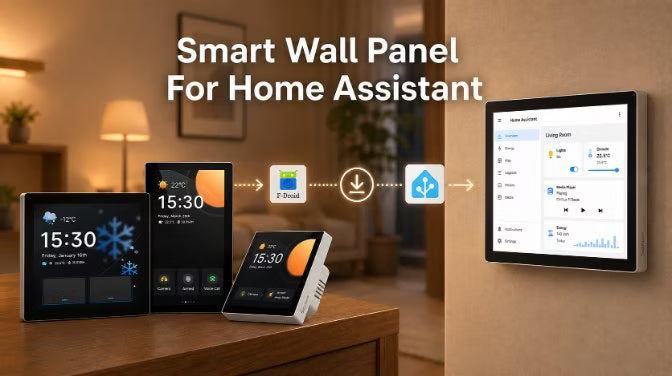
Este guia explica quando é útil utilizar um painel de parede, compara as principais abordagens de hardware, mostra como a série SONOFF NSPanel Pro pode funcionar com o Home Assistant e ilustra onde se enquadra um painel nas rotinas diárias.
O que é um painel de parede do Home Assistant?
Um painel de parede do Home Assistant é um ecrã tátil fixo que proporciona uma interface dedicada para visualizar e controlar a sua casa inteligente através do Home Assistant.
Ao contrário de um smartphone, que é pessoal e está sempre a circular entre diferentes utilizadores, um painel de parede permanece num local específico e proporciona um ponto de controlo partilhado para todos em casa.
Um painel de parede não é um produto de hardware oficial do Home Assistant. Em vez disso, é um termo genérico utilizado pela comunidade para designar ecrãs que executam painéis do Home Assistant através de métodos como a aplicação do Home Assistant, um navegador Web ou o modo quiosque.
Porquê utilizar um painel de parede do Home Assistant?
Um painel de parede proporciona à sua casa um local fixo e partilhado para controlar o Home Assistant, sem ter de pegar no telemóvel sempre que o faz.
Uma interface partilhada para todos: Se foi você que configurou o Home Assistant, provavelmente sabe onde está tudo. O seu companheiro, os seus filhos, os seus pais ou os seus convidados podem não saber. Um painel de parede proporciona a todos uma interface simples e partilhada para os comandos de que realmente precisam, sem terem de aprender toda a sua configuração do Home Assistant ou instalar outra aplicação.
Acesso mais rápido às ações diárias: Para tarefas que faz várias vezes por dia — ligar ou desligar as luzes, ajustar o termóstato ou abrir os estores — usar o telemóvel pode implicar desbloqueá-lo, abrir a aplicação e encontrar o comando certo. Um painel de parede elimina esses passos adicionais, dando-lhe acesso mais rápido aos comandos que mais utiliza.
Informação essencial num relance: Por vezes, não precisa de controlar nada; quer apenas verificar se a porta da frente está trancada, qual é a temperatura da divisão ou quanta energia a casa está a consumir. Um painel de parede mantém estas informações visíveis, para que possa consultá-las de relance ao passar.
Precisa de um? Nem toda a gente precisa. Se se sente confortável com a aplicação do telemóvel, se a maioria dos seus dispositivos funciona automaticamente ou se instalar um painel for inconveniente ou dispendioso, pode prescindir dele. Um painel de parede é mais útil quando pretende que a sua casa inteligente seja mais fácil de aceder, mais fácil de compreender para os membros da família e esteja mais naturalmente ligada à vida quotidiana.
Soluções comuns de painéis de parede para o Home Assistant: qual deve escolher?
Não existe uma única solução de painel de parede para o Home Assistant que seja a melhor. A escolha certa depende da forma como pretende utilizá-la — se precisa de um painel grande e personalizável, de um ecrã permanente montado na parede ou de um simples ponto de controlo para as rotinas diárias.
|
Tipo |
Mais indicado para |
Principal vantagem |
Principal limitação |
|
Painel baseado em tablet |
Painéis grandes e personalizáveis |
Económico e altamente flexível |
Exige montagem, alimentação e gestão de cabos separados |
|
Ecrãs inteligentes para a casa montados na parede |
Instalações permanentes de casas inteligentes |
Instalação fixa mais limpa e alimentação contínua |
Menos opções de hardware em comparação com os tablets |
|
Ecrã DIY |
Projetos personalizados ou especializados |
Máxima personalização |
Exige mais configuração, parametrização e manutenção |
1. Painéis de parede baseados em tablet
Utilizar um tablet Android ou um iPad é uma das formas mais comuns de criar uma instalação de painel do Home Assistant na parede. Os tablets são populares porque oferecem ecrãs grandes, painéis flexíveis e opções de hardware económicas. Podem executar o Home Assistant através da aplicação Companion, de um navegador ou de aplicações de quiosque, como o Fully Kiosk Browser.
No entanto, uma instalação permanente exige trabalho adicional para a montagem, o fornecimento de energia e a gestão dos cabos.

2. Ecrãs inteligentes para a casa montados na parede
Os ecrãs inteligentes para a casa montados na parede são painéis táteis fixos, concebidos para uma instalação permanente. Normalmente utilizam alimentação contínua e incluem acessórios de montagem, proporcionando uma instalação mais limpa e integrada do que um tablet fixado à parede.
Tal como os tablets, estes dispositivos funcionam com um sistema Android ou baseado na Web e apresentam o seu painel do Home Assistant através de um navegador ou da aplicação Companion – não incluem uma interface personalizada específica do HA.
Alguns ecrãs montados na parede também funcionam como painéis de controlo da casa inteligente, combinando o acesso ao painel do Home Assistant com funções integradas, como o controlo do termóstato, a monitorização do consumo de energia e a apresentação de informações dos sensores, como acontece com a série SONOFF NSPanel Pro.

3. Ecrãs DIY para o Home Assistant: Raspberry Pi, ESPHome e papel eletrónico
As soluções DIY oferecem a máxima flexibilidade, permitindo aos utilizadores criar ecrãs personalizados com ecrãs táteis Raspberry Pi, ecrãs compatíveis com ESPHome ou ecrãs de papel eletrónico para criar interfaces personalizadas do Home Assistant. A contrapartida é a necessidade de mais configuração, seleção de hardware e manutenção.

SONOFF NSPanel Pro: Painéis de controlo doméstico inteligente para Home Assistant
Para os utilizadores que pretendem uma alternativa mais permanente e adequada a toda a família aos dashboards baseados em tablets, os painéis de controlo doméstico inteligente dedicados oferecem outra opção.
O SONOFF NSPanel Pro é um exemplo desta abordagem, combinando uma interface de ecrã tátil montada na parede com acesso ao dashboard do Home Assistant e funcionalidades de controlo doméstico inteligente, proporcionando um ponto de controlo dedicado para as interações do dia a dia.
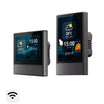
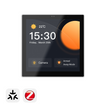
A série inclui três modelos concebidos para diferentes requisitos de instalação e controlo: NSPanel Pro Gen2 com controlo de relé de dois canais, NSPanel Pro tipo 120 e NSPanel Pro tipo 86.

Painel de controlo doméstico inteligente SONOFF NSPanel Pro Gen2 com relé de dois canais, tipo 86
$134.90
Executar o Home Assistant através da loja F-Droid integrada sem acesso root, controlo de relé de dois canais, instalação na parede de tipo 86, bridge Matter integrado, hub Matter e hub Zigbee, 2 GB de RAM + 32 GB de armazenamento, controlo inteligente da temperatura e monitorização do consumo de energia.
Ver produto
Painel de controlo doméstico inteligente SONOFF NSPanel Pro, tipo 120
$109.90
Acesso ao dashboard do Home Assistant através do F-Droid, ecrã tátil de 4,7 polegadas, instalação na parede de tipo 120, hub Zigbee 3.0 integrado, compatibilidade com o ecossistema Matter, visualização de câmaras em direto, controlo inteligente do termóstato e monitorização do consumo de energia.
Ver produto
Painel de controlo doméstico inteligente SONOFF NSPanel Pro, tipo 86
$99.90
Acesso ao dashboard do Home Assistant através do F-Droid, instalação na parede de tipo 86, hub Zigbee 3.0 integrado, compatibilidade com o ecossistema Matter, controlo de cenas inteligentes, monitorização de câmaras e gestão de dispositivos domésticos inteligentes a partir de uma única interface de ecrã tátil.
Ver produto
Executar o dashboard do Home Assistant diretamente no NSPanel Pro
Com a atualização de firmware mais recente, o NSPanel Pro permite aos utilizadores instalar a aplicação Home Assistant através da loja F-Droid integrada. Com o Home Assistant a funcionar no NSPanel Pro, o painel de controlo transforma-se num ecrã tátil dedicado, montado na parede, para dashboards, estado dos dispositivos e controlo diário.
Em vez de abrirem a aplicação Home Assistant num telemóvel, os utilizadores podem aceder diretamente a partir de um local fixo aos painéis e controlos utilizados com mais frequência.
👉 Para obter informações sobre a configuração, consulte Como instalar a aplicação Home Assistant no NSPanel Pro através do F-Droid?
Sincronizar dispositivos entre o NSPanel Pro e o Home Assistant
Para além de funcionar como ecrã de painel, o NSPanel Pro também pode fazer parte de um ecossistema de casa inteligente mais abrangente.
Dependendo do método de integração, os dispositivos Zigbee compatíveis ligados através do NSPanel Pro podem ser sincronizados com o Home Assistant, enquanto os dispositivos Home Assistant suportados também podem ser controlados a partir do painel.
Isto permite que o NSPanel Pro funcione em conjunto com o Home Assistant, tanto como interface de controlo montada na parede como enquanto ecossistema de dispositivos de casa inteligente.
Para obter informações sobre a configuração, consulte:
👉 Integre diretamente os dispositivos Zigbee do NSPanel Pro no Home Assistant
👉 Leve os seus dispositivos Home Assistant para o NSPanel Pro
👉 Lista de dispositivos suportados pelo SONOFF NS Panel Pro
🔎 Tutorial de sincronização bidirecional entre o NSPanel Pro e o Home Assistant:
Integre o Home Assistant e dispositivos sem Matter em ecossistemas Matter
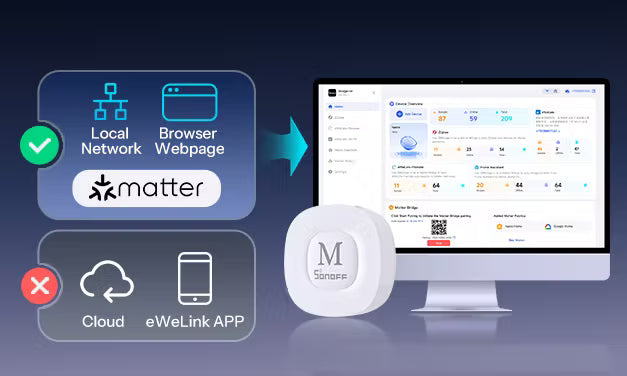
A ponte Matter do NSPanel Pro pode integrar dispositivos suportados sem Matter no ecossistema Matter.
Através da ponte Matter, dispositivos Zigbee suportados, dispositivos Wi-Fi e dispositivos ligados através do Home Assistant podem ser integrados em plataformas Matter, como Alexa, Google Home, Apple Home e Samsung SmartThings.
Isto permite-lhe controlar mais dispositivos de casa inteligente que já possui a partir das plataformas que utiliza, mesmo quando esses dispositivos não suportam Matter por si só.
👉 Para obter informações sobre a configuração, consulte Utilize a ponte Matter do NSPanel Pro para uma integração de casa inteligente entre plataformas
Mais do que um painel: funcionalidades adicionais de casa inteligente
Para além dos painéis do Home Assistant e do controlo de dispositivos, o NSPanel Pro também suporta cenários adicionais de casa inteligente, incluindo visualização de câmaras, cenas inteligentes e monitorização da casa, dependendo da configuração.
Por exemplo, os utilizadores podem explorar funcionalidades avançadas, como a integração de câmaras RTSP, a compatibilidade com dispositivos suportados e opções de configuração adicionais através de guias relacionados.
👉 Para mais detalhes, consulte: Adicionar câmaras RTSP ao NSPanel Pro
👉 Funcionalidades e coleção de tutoriais do NSPanel Pro
Casos de utilização reais de um painel de parede do Home Assistant
Um painel de parede torna-se mais útil quando se integra naturalmente nas suas rotinas diárias. Os cenários seguintes mostram como um ponto de controlo dedicado do Home Assistant pode facilitar tarefas comuns de uma casa inteligente.
Entrada: ver visitantes e o estado da casa num relance
Um painel de parede do Home Assistant pode transformar a entrada num ponto de controlo prático, reunindo campainhas, câmaras e automações num só local.
Por exemplo, pode criar uma automação do Home Assistant em que premir o botão da campainha ativa a visualização de uma câmara ou apresenta uma notificação no painel de parede. Quando alguém chega, pode verificar quem está lá fora e falar com essa pessoa antes de abrir a porta. Quer seja uma entrega de uma encomenda, de comida ou a chegada inesperada de um amigo, pode ver rapidamente o que está a acontecer à entrada sem ter de abrir outra aplicação.
A entrada também pode tornar-se um local prático para gerir a sua casa quando sai ou regressa. Antes de sair, pode verificar o estado de dispositivos importantes, ligar ou desligar dispositivos conectados e ativar cenas utilizadas com frequência a partir do painel do Home Assistant. Quando regressa a casa, o mesmo painel proporciona acesso rápido aos controlos do dia a dia sem ter de pegar no telemóvel.
Quarto: torne as manhãs e a hora de deitar mais confortáveis
Um painel de parede junto à cama proporciona uma forma prática de interagir com as suas rotinas do Home Assistant nos momentos em que mais as utiliza — quando acorda e quando se vai deitar.
- Antes de se deitar, pode utilizar o painel para ativar uma cena noturna personalizada a partir do Home Assistant. Por exemplo, com um toque pode reduzir a intensidade das luzes do quarto, ajustar a temperatura para um nível confortável, fechar os estores inteligentes e preparar a divisão para dormir.
- De manhã, o mesmo painel pode ajudá-lo a começar o dia com mais conforto. Em vez de ligar imediatamente uma luz de teto intensa, pode ativar uma cena de iluminação que aumenta gradualmente a luminosidade da divisão até um nível mais confortável. Também pode verificar as condições da divisão, ajustar a temperatura ou abrir os cortinados inteligentes sem ter de pegar no telemóvel.
Com um painel do Home Assistant disponível num ecrã montado na parede, como o NSPanel Pro, estes controlos estão sempre ao alcance.
Sala de estar: dê a todos uma forma mais simples de utilizar o Home Assistant
Uma casa inteligente não deve estar limitada à pessoa que a configurou. O seu parceiro, os seus pais, os seus filhos ou os seus convidados podem não querer navegar por painéis de controlo complexos ou utilizar várias aplicações.
Um painel do Home Assistant montado na parede proporciona uma interface visual partilhada que todos podem utilizar. Os membros da família podem aceder aos controlos comuns, ajustar a iluminação, alterar a temperatura da divisão, ativar cenas ou consultar imagens de câmaras compatíveis a partir de um único ecrã.
Por exemplo, em vez de lhe pedir para preparar a divisão sempre que necessário, alguém pode simplesmente utilizar o painel para preparar a sala de estar para uma noite de cinema — ajustando as luzes ligadas e outros dispositivos através dos controlos que já configurou no Home Assistant.
Com um ponto de controlo dedicado disponível na parede, o Home Assistant torna-se mais fácil de utilizar por toda a família — e não apenas pela pessoa que o configurou.
Cozinha: torne a preparação das refeições mais confortável com um controlo inteligente
Enquanto prepara as refeições, pode estar com as mãos ocupadas e não querer interromper a confeção apenas para abrir uma aplicação. Um painel montado na parede mantém os controlos e as cenas do Home Assistant utilizados com frequência ao seu alcance.
Por exemplo, depois de chegar a casa e começar a preparar o jantar, pode ativar uma cena de cozinha a partir do painel para ajustar a iluminação da cozinha, ajustar os dispositivos ligados e desfrutar da sua música preferida enquanto prepara a refeição.
Também pode utilizar o painel do Home Assistant para controlar dispositivos ligados ou verificar condições importantes da divisão sem interromper a preparação da refeição.
Vários painéis de parede do Home Assistant: expanda a sua experiência de controlo da casa inteligente
Um único painel de parede do Home Assistant já pode proporcionar um ponto de controlo conveniente para as suas rotinas diárias. Em casas maiores ou para utilizadores que pretendam um acesso mais fácil em diferentes áreas, podem ser adicionados painéis ao longo do tempo, permitindo um acesso conveniente a mais zonas da sua casa.
Conclusão
Um painel de parede do Home Assistant não se destina a substituir o seu smartphone. Proporciona uma forma dedicada, partilhada e conveniente de interagir com a sua casa inteligente.
Para utilizadores que pretendem um painel personalizável de grandes dimensões, uma configuração baseada num tablet pode ser a escolha certa.
Para quem pretende um ponto de controlo simples e sempre disponível, que toda a família possa utilizar, um painel de controlo de casa inteligente pode ser a opção mais adequada. Soluções como o SONOFF NSPanel Pro combinam uma experiência de ecrã tátil montado na parede com acesso ao painel do Home Assistant, integração com a casa inteligente e funcionalidades de controlo diário, tornando-as uma opção prática para criar uma casa inteligente mais acessível.
O melhor painel de parede é aquele que se adapta à sua casa, às suas rotinas e à forma como a sua família interage com a tecnologia.

Deixe um comentário
Todos os comentários são moderados antes de serem publicados.
Este site está protegido pela Política de privacidade da hCaptcha e da hCaptcha e aplicam-se os Termos de serviço das mesmas.