














































Introdução
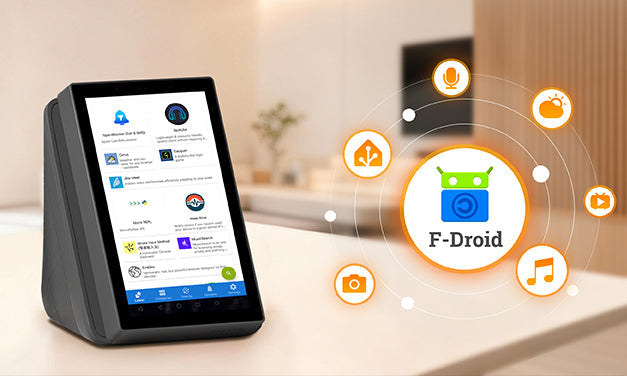
Agora, a atualização de firmware para o NSPanel Pro traz a nova loja F‑Droid, juntamente com otimizações de desempenho ao nível do framework nativo. Basta atualizar o seu NSPanel Pro para V4.0.0 ou superior, desfrutar de uma rolagem mais suave, tempos de resposta mais rápidos e melhor suporte para as funcionalidades recém-introduzidas do F‑Droid. Já não é apenas um terminal de controlo—é uma plataforma de aplicações inteligentes que oferece uma experiência totalmente nova!

Grande Atualização: Suporte para Home Assistant & Aplicações Diversas!
O que é o F-Droid?
F‑Droid é uma loja de aplicações gratuita e open source que oferece aplicações sem anúncios e que respeitam a privacidade, verificadas pela comunidade open source. Cobrindo aplicações personalizadas e criativas, permite-lhe enriquecer a sua vida com o NSPanel Pro de forma simples.
- Uma Experiência Revolucionária: Diga adeus a carregamentos lentos e problemas de compatibilidade. Desfrute de controlo tátil suave como uma aplicação nativa, interações responsivas e geração de calor significativamente reduzida.
- Uma Experiência Elevada: Agora pode instalar a aplicação oficial do Home Assistant e uma variedade de outras aplicações diretamente do F‑Droid—prontas para explorar e desenvolver.
O Que Significa o Suporte F‑Droid para o NSPanel Pro?
NSPanel Pro + F‑Droid transforma o ecrã montado na parede de um simples “controlo remoto” no verdadeiro “Cérebro da Casa Inteligente” e “Centro de Informação em Tempo Real.”
É hora de libertar todo o potencial do seu ecrã de controlo central!
Exemplos Divertidos
Cenário 1: O Centro de Comando do Home Assistant
- Se é um utilizador experiente do Home Assistant, um entusiasta de tecnologia ou alguém que adora personalizar a casa inteligente, o NSPanel Pro é o painel de controlo ideal para personalização avançada e experimentação livre.
- Exemplo: Instale e execute a aplicação oficial do HA diretamente no NSPanel Pro. O ecrã mostra o estado em tempo real de todos os seus dispositivos domésticos e, com a poderosa automação do HA, pode controlar localmente os dispositivos geridos pelo HA diretamente do ecrã central—sem necessidade de depender de um telemóvel ou computador.
-
Passos para Instalar o Home Assistant:
a. Instalar a Aplicação
- Atualize o seu NSPanel Pro para a versão mais recente do sistema.
- Deslize para baixo a partir do topo do ecrã para abrir o menu suspenso, encontre e toque no “F‑Droid” ícone para entrar na loja de aplicações open source.
- Pode localizar “Home Assistant” sob “Últimas” ou “Categorias”, ou simplesmente toque no ícone de pesquisa no canto inferior direito para procurar.
- Depois de encontrado, entre na página de detalhes da aplicação e toque no “Instalar” botão.
- Após a instalação, pode encontrar e abrir o Home Assistant quer na secção "Aplicações Instaladas" do F-Droid, quer diretamente na sua lista de aplicações.

b. Configurar Ligação
- No primeiro arranque, a aplicação irá guiá-lo na configuração. Certifique-se de que o seu NSPanel Pro está ligado à mesma rede local que o seu servidor Home Assistant.
- A aplicação irá automaticamente procurar e listar os servidores Home Assistant disponíveis na rede. Basta selecionar o seu servidor e iniciar sessão para estabelecer a ligação.
- Se o seu servidor não for detetado automaticamente, toque na opção “Introduzir Endereço manualmente” na parte inferior e insira o endereço IP local do seu servidor Home Assistant.


c. Começar a Usar
- Após uma ligação bem-sucedida, será levado diretamente para a interface familiar do Home Assistant. Agora, o seu NSPanel Pro montado na parede transformou-se num centro de controlo doméstico inteligente local, sempre ao seu alcance, facilitando a gestão de tudo.

Cenário 2: O “Painel de Informação & Entretenimento” da Família
Se valoriza a qualidade de vida e um ambiente acolhedor em casa, o NSPanel Pro ainda tem muito para oferecer. Aqui estão algumas aplicações que vale a pena experimentar:


🎧 AntennaPod: A Sua Estação de Podcasts em Casa
Quer ouvir os seus programas favoritos enquanto faz tarefas domésticas? Instale o AntennaPod, uma aplicação de podcast open source muito conceituada. Oferece uma vasta coleção de podcasts, permitindo-lhe mergulhar em conhecimento ou histórias a qualquer momento em casa.
Mas o potencial não fica por aqui. A loja F‑Droid abre a porta à “liberdade de aplicações”:
- Para Entusiastas: Instalar “Termux” para transformar o NSPanel Pro num computador Linux leve—execute scripts, desenvolva e depure diretamente.
- Para Famílias: Instalar “K-9 Mail” para verificar rapidamente notificações de entrega, ou “Musekit” para encher a sua casa com música.
- Para Todos: Explore um mar de ferramentas, aplicações de produtividade e software criativo para tornar o seu ecrã de controlo verdadeiramente único.
Dicas Úteis
Definições Avançadas (v4.x e posteriores):
O NSPanel Pro agora suporta definições ao nível do sistema Android através das “Definições Avançadas” funcionalidade:
- Personalize a barra de navegação inferior para controlos rápidos—diga adeus a operações complicadas. Navegue flexivelmente para trás, alterne ou limpe aplicações em segundo plano, e ajuste o volume com facilidade.

- Personalize totalmente os sons de alarme, reprodução de mídia e notificações.
- Use a entrada Armazenamento para monitorizar o uso do armazenamento do dispositivo em tempo real e limpar a cache com um toque para uma gestão de espaço sem esforço.
Botão Flutuante de Regresso:
Ao usar aplicações de terceiros, pressione o botão lateral para voltar instantaneamente à interface inicial do NSPanel Pro. O botão transforma-se numa bola flutuante que pode ser arrastada livremente e colocada em qualquer lugar fora do caminho. Sempre que precisar de voltar, basta tocar na bola flutuante para regressar instantaneamente ao ecrã inicial do NSPanel Pro.

Nota: O idioma apresentado no F‑Droid segue a configuração de idioma definida nas definições recentemente atualizadas do NSPanel Pro “Definições Avançadas.”
Adquira já o seu—Experimente hoje!
Descubra ainda mais funcionalidades avançadas e definições à espera de serem exploradas!
https://sonoff.tech/en-us/products/sonoff-nspanel-pro-smart-home-control-panel-120-type
https://sonoff.tech/en-us/products/sonoff-nspanel-pro-smart-home-control-panel-86-type
Anúncio
Nota:A versão V4.x está a ser continuamente atualizada e otimizada. Continuaremos a aprimorar a experiência com base no seu feedback. Para se manter informado sobre as últimas versões lançadas, por favor visite o link abaixo. Se encontrar algum problema após a atualização, também pode enviar feedback através do mesmo link. A nossa equipa de desenvolvimento comunicará diretamente consigo para ajudar a identificar e resolver problemas rapidamente.
https://forum.ewelink.cc/c/sonoffnspanel-pro/47

Deixe um comentário
Todos os comentários são moderados antes de serem publicados.
Este site está protegido pela Política de privacidade da hCaptcha e da hCaptcha e aplicam-se os Termos de serviço das mesmas.