


Introdução
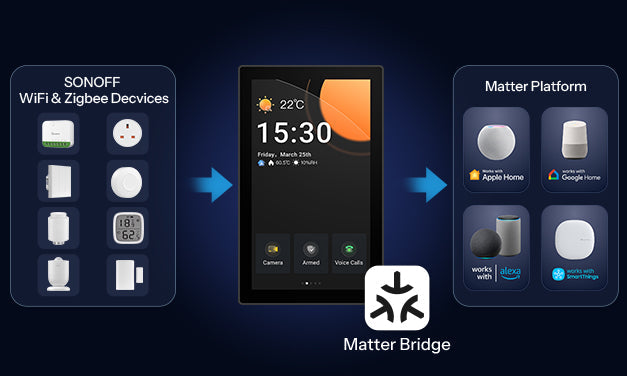
O firmware mais recente para o NSPanel Pro agora oficialmente suporta o recurso Matter Bridge. Como um gateway Matter Bridge, ele permite o pareamento único para sincronizar seus dispositivos Zigbee e dispositivos SONOFF WiFi existentes com ecossistemas de terceiros que suportam o padrão Matter, incluindo Apple Home, Google Home, Amazon Alexa e Home Assistant. Não é necessário adicionar dispositivos repetidamente em diferentes ecossistemas, e todos os dispositivos podem ser controlados em tempo real e integrados em automações dentro das plataformas Matter de terceiros.
Com o lançamento do v4.1.0, o NSPanel Pro evoluiu além do controle local para se tornar um gateway central inteligente que suporta integração entre ecossistemas, oferecendo uma experiência de automação residencial aberta, multiplataforma e unificada.
- Requisito de Versão
Para sincronizar dispositivos SONOFF WiFi com o Apple Home, atualize seu app eWeLink para a v5.22.0 e o NSPanel Pro para a v4.2.0.
*Nota: Versões anteriores à v5.22.0 suportam apenas a sincronização de subdispositivos Zigbee com o Apple Home.*
- Detalhes de Suporte do Sistema
-
- Usuários Android: O app eWeLink v5.22.0 já está disponível para atualização.
- iOS Usuários: A versão v5.22.0 está prevista para ser lançada em Janeiro de 2026Fique atento para atualizações.

Como Alcançar a Integração Entre Ecossistemas?
Passo 1: Encontre a Entrada Matter Bridge e Ative o Código de Pareamento Matter
- Entrada no NSPanel Pro

- Entrada no app eWeLink
Na interface de configurações do NSPanel Pro no app eWeLink, você pode acessar a Matter Bridge por meio dos seguintes dois pontos de entrada.

Passo 2: Conecte o NSPanel Pro a uma Plataforma Matter de Terceiros
Escaneie o código QR ou insira o código numérico de pareamento no Apple Home (ou Google Home/Alexa) para adicionar o NSPanel Pro como um Hub Matter ao Apple Home.
Passo 3: Sincronização em Lote dos Subdispositivos
Subdispositivos Zigbee e WiFi SONOFF só podem ser sincronizados via Bridge Matter entrada no APP eWeLink.
Passo 4: Visualize e Controle os Subdispositivos em Tempo Real
No NSPanel Pro: Exibe nomes, números de ID e ícones dos subdispositivos sincronizados em tempo real.

No Apple Home: Habilita o controle e o acesso às informações dos subdispositivos.

Gerenciar Conectado
Uma vez que o NSPanel Pro esteja pareado com uma plataforma Matter de terceiros, você pode gerenciar as plataformas pareadas na seção "Plataformas Matter Adicionadas".
● Clique em Remover para remover a plataforma Matter correspondente.
● Clique em Remover Todos para remover todas as Plataformas Matter conectadas.

Resumo
O NSPanel Pro agora integra o recurso Matter Bridge, permitindo sincronização local com um clique dos subdispositivos Zigbee e WiFi para o ecossistema Matter. A partir de agora, seja Apple Home, Google Home ou Alexa, você pode controlar todos os dispositivos a partir de um único ponto de entrada, eliminando a necessidade de alternar entre plataformas.
Melhore sua experiência agora e desbloqueie a verdadeira conectividade inteligente para toda a casa.
Link para Compra🔗
https://sonoff.tech/en-us/products/sonoff-nspanel-pro-smart-home-control-panel-120-type
Anúncio
👉 Atualizações e otimizações contínuas da versão V4.x estão em andamento. Estamos continuamente melhorando com base no seu feedback. Você pode seguir o link abaixo para se manter atualizado sobre as últimas versões lançadas. Se encontrar algum problema após a atualização, também pode enviar feedback pelo mesmo link. Nossa equipe de desenvolvimento se comunicará diretamente com você para ajudar a identificar e resolver os problemas de forma mais eficiente.
[Click to Learn More]
https://forum.ewelink.cc/t/nspanel-pro-roadmap-and-co-created-future/206240
Recebemos calorosamente você para compartilhar seu experiência e insights aqui—suas sugestões e histórias serão nossa maior motivação!
https://forum.ewelink.cc/c/sonoffnspanel-pro/47
Lista de Dispositivos Suportados
-
Dispositivos Zigbee
-
- SONOFF Zigbee
|
Tipo de Produto |
Modelo |
Capacidades na Plataforma Matter |
|
Interruptor Inteligente DIY |
ZBMINI |
Controle Liga/Desliga |
|
BASICZBR3 |
Controle Liga/Desliga |
|
|
ZBMINI-L |
Controle Liga/Desliga |
|
|
ZBMINL2 |
Controle Liga/Desliga |
|
|
MINI-ZBRBS |
Controle Liga/Desliga |
|
|
ZBMicro |
Controle Liga/Desliga |
|
|
ZBMINIR2 |
Controle Liga/Desliga |
|
|
Interruptor de Parede Inteligente |
ZBM5 1C/3C |
Controle Liga/Desliga |
|
Sensores |
SNZB-01 |
Clique |
|
SNZB-01P |
Clique |
|
|
SNZB02DR2 |
Dados de temperatura e umidade |
|
|
SNZB-02D |
Dados de temperatura e umidade |
|
|
SNZB-02WD |
Dados de temperatura e umidade |
|
|
SNZB-02LD |
Dados de temperatura |
|
|
SNZB-02P |
Dados de temperatura e umidade |
|
|
SNZB-02 |
Dados de temperatura e umidade |
|
|
SNZB-03 |
Movimento detectado、Nenhum movimento detectado |
|
|
SNZB-03P |
Movimento detectado、Nenhum movimento detectado |
|
|
SNZB-04 |
Aberto、Fechado |
|
|
SNZB-04P |
Aberto、Fechado |
|
|
SNZB-05P |
1. Vazamento detectado、Nenhum vazamento detectado |
|
|
SNZB-06P |
Movimento detectado、Nenhum movimento detectado |
|
|
Eletrodoméstico |
ZBCurtain |
1. Abrir/Fechar |
|
TRVZB |
1. Controle Liga/Desliga |
|
|
SWV-NH |
1. Configuração e Controle de Válvula |
|
|
SWV-BSP |
1. Configuração e Controle de Válvula |
|
|
Plugue Inteligente |
S26R2ZB |
Controle Liga/Desliga |
|
S31 Lite ZB |
Controle Liga/Desliga |
|
|
S40ZB Lite |
Controle Liga/Desliga |
|
|
Série S60ZB |
Controle Liga/Desliga |
-
-
Dispositivos Zigbee 3.0 de Terceiros
-
|
Categoria |
Tipo de Dispositivo |
Capacidades na Plataforma Matter |
|
Plugue |
Unidade Plug-in Liga/Desliga Matter |
Controle Liga/Desliga |
|
Interruptor |
Unidade Plug-in Liga/Desliga Matter |
Controle Liga/Desliga |
|
Sensor |
Sensor de Movimento |
Detecção de Ocupação |
|
Sensor Elétrico |
1.Medição de Potência Elétrica 2.Medição de Energia Elétrica |
|
|
Sensor de Vibração |
Detecção de Ocupação |
|
|
Sensor de Qualidade do Ar |
1.Qualidade do Ar 2.Medição de Temperatura 3.Medição de Umidade Relativa 4.Medição de Concentração de PM2.5 5.Medição de Concentração Total de Compostos Orgânicos Voláteis 6.Medição de Concentração de Monóxido de Carbono 7.Medição de Concentração de Dióxido de Carbono |
|
|
Sensor de Contato |
Estado Booleano |
|
|
Sensor de Temperatura |
Medição de Temperatura |
|
|
Sensor de Umidade |
Medição de Umidade Relativa |
|
|
Sensor de Luz/Iluminação |
Medição de Iluminância |
|
|
Sensor de Fumaça/ |
1.Alarme de Fumaça e CO 2.Medição de Concentração de Monóxido de Carbono |
|
|
Detector de Vazamento de Água |
Estado Booleano |
|
|
Luz |
Luz Dimerizável |
1.Controle Liga/Desliga 2.Controle de Nível |
|
Luz de Temperatura de Cor Luz de Cor Estendida |
1.Controle Liga/Desliga 2.Controle de Nível 3.Controle de Cor |
|
|
Interruptor Dimmer de Cor |
Interruptor Genérico |
Interruptor |
|
Cortina |
Cobertura de Janela |
Cobertura de Janela |
|
Termostato |
Termostato |
1.Termostato 2.Interface do Usuário do Termostato 3.Configuração 4.Preferência de Energia 5.Controle de Ventilador 6.Medição de Temperatura 7.Medição de Umidade Relativa 8.Deteção de Ocupação |
|
Botão |
Interruptor Genérico |
Interruptor |
-
Dispositivos WiFi SONOFF
|
Tipo de Produto |
Modelo |
Capacidades na Plataforma Matter |
|
Interruptor Inteligente DIY |
BASICR2 |
Controle Liga/Desliga |
|
BASICR4 |
Controle Liga/Desliga |
|
|
RFR2 |
Controle Liga/Desliga |
|
|
MINIR2 |
Controle Liga/Desliga |
|
|
MINIR4 |
Controle Liga/Desliga |
|
|
MINIR4M |
Controle Liga/Desliga |
|
|
4CHR3 |
Controle Liga/Desliga |
|
|
4CHPROR3 |
Controle Liga/Desliga |
|
|
POWR3 |
Controle Liga/Desliga |
|
|
Micro |
Controle Liga/Desliga |
|
|
THR316/316D |
Controle Liga/Desliga |
|
|
THR320/320D |
Controle Liga/Desliga |
|
|
DUALR3 Lite |
Controle Liga/Desliga |
|
|
POWR316/POWR316D |
Controle Liga/Desliga |
|
|
POWCT |
Controle Liga/Desliga |
|
|
DUALR3 |
Modo Interruptor: Controle Liga/Desliga; |
|
|
iFan04 |
Controle Liga/Desliga |
|
|
Plugue Inteligente |
S26R2 |
Controle Liga/Desliga |
|
S31 |
Controle Liga/Desliga |
|
|
S31 Lite |
Controle Liga/Desliga |
|
|
S40TPB |
Controle Liga/Desliga |
|
|
S40TPA |
Controle Liga/Desliga |
|
|
S40TPB Lite |
Controle Liga/Desliga |
|
|
S40TPA Lite |
Controle Liga/Desliga |
|
|
S60TPF/TPG |
Controle Liga/Desliga |
|
|
Interruptor de Parede Inteligente |
TX1C/2C/3C |
Controle Liga/Desliga |
|
Série T5 |
Controle Liga/Desliga |
|
|
Série M5 |
Controle Liga/Desliga |
|
|
Painel de Controle Central |
NSPanel |
Controle Liga/Desliga |
|
Conector de emenda de fio |
D1 |
1. Controle Liga/Desliga |
|
Iluminação Inteligente |
B02-F-A19/B02-F-A60 |
1. Controle Liga/Desliga |
|
B05-B-A60 |
1. Controle Liga/Desliga |
|
|
B05-BL-A60/B05-BL-A19 |
1. Controle Liga/Desliga |


Deixar comentário
Os comentários precisam ser aprovados antes da publicação.
Este site é protegido por hCaptcha e a Política de privacidade e os Termos de serviço do hCaptcha se aplicam.