














































Bevezetés
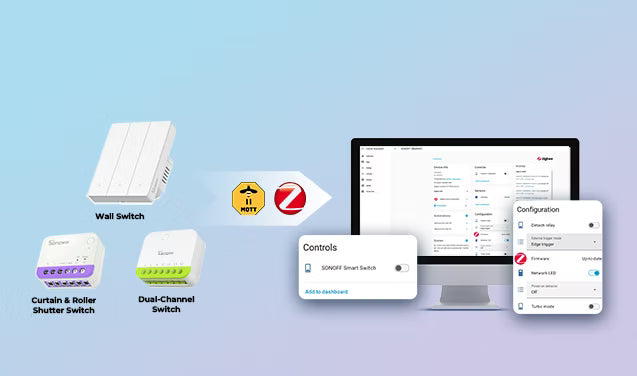
Az okoskapcsolók általában az elsők között vannak, amelyeket az emberek hozzáadnak a Home Assistanthez. Egyszerű módot kínálnak a világítás automatizálására, az eszközök távoli vezérlésére és mindennapi rutinok kialakítására otthonában.
De a megfelelő kapcsoló kiválasztása gyorsan összezavarhatja az embert. Egyes eszközök túlzottan a felhőszolgáltatásokra támaszkodnak, mások nem integrálódnak zökkenőmentesen a Home Assistanttel, és vannak, amelyek eleinte jól működnek, de a rendszer bővülésével megbízhatatlanná válnak.
Ebben az útmutatóban megvizsgáljuk a Zigbee, Matter és Wi-Fi okoskapcsolók közötti különbségeket, mit kell ellenőrizni vásárlás előtt, hogyan csatlakoznak a Home Assistanthez, és néhány gyakorlati automatizálási ötletet, amelyeket az emberek naponta használnak.

Okoskapcsoló vásárlása előtt: 5 dolog, amit a legtöbben figyelmen kívül hagynak
A Home Assistant okoskapcsolókkal kapcsolatos legtöbb probléma nem magukból az eszközökből, hanem a rossz előzetes választásokból ered. Dolgozza végig az alábbi öt kérdést, hogy elkerülje a gyakori kompatibilitási és telepítési problémákat.
1. Van nulla vezetéke?
Sok régebbi otthon az Egyesült Királyságban, Európában és Ázsia egyes részein nem rendelkezik nulla vezetékkel a kapcsolódobozban. A legtöbb szabványos okoskapcsoló nullára van szüksége az áramellátáshoz.
Nincs nulla? Nem gond. A nulla nélküli kapcsolók, mint például a SONOFF ZBMINIL2 (egysávos) és a MINI-ZB2GS-L (kétcsatornás) kifejezetten átalakításhoz készültek, új vezetékezés nélkül. Kis EU/86/120 típusú szerelődobozokba illeszkednek, és működnek a meglévő falikapcsolóival.
🎯Gyors ellenőrzés: Nyissa ki a kapcsolódobozt. Sok otthonban a nulla nélküli kapcsolódobozban csak két vezeték csatlakozik közvetlenül a kapcsolóhoz (fázis be + kapcsolt fázis ki). Ha a doboz hátuljában további vezetékeket lát összecsomagolva, amelyek nincsenek közvetlenül a kapcsolóhoz csatlakoztatva, azok lehetnek a nulla vezetékek.
*A vezeték színe önmagában nem megbízható módja a nulla vezeték azonosításának, mivel a vezetékek szabványai országonként és telepítésenként eltérnek. Azonban a nulla vezetékeket gyakran külön csoportba rendezik, és eltérő színt használhatnak a kapcsolóhoz csatlakozó vezetékektől. Ha bizonytalan, ellenőrizze otthona vezetékezési rajzát, vagy kérjen tanácsot egy szakképzett villanyszerelőtől a telepítés előtt.
2. Kapcsoló cseréje vagy relémodul elrejtése?
● Falra szerelhető okoskapcsolók — Teljesen cserélje le meglévő kapcsolóit egy tiszta, modern megjelenésért. Ideális új építkezésekhez, teljes felújításokhoz vagy bárhol, ahol a végeredmény szándékosnak tűnik.
👉 M5 Matter, ZBM5 (120-típus), ZBM5 (86/80-típus), TX Gen2 (érintős fali kapcsoló)
● Rejtett relé modulok — Közvetlenül a meglévő kapcsolók mögé telepítve, megőrizve az eredeti falikárpitokat és gombokat. Ideális bérleményekhez vagy műemlék jellegű otthonokhoz, ahol fejleszteni szeretne anélkül, hogy megváltoztatná az épület eredeti karakterét.
👉 Zigbee: ZBMINIR2, MINI-ZB2GS (kétcsatornás)
👉 Matter: MINIR4M, MINI-2GS (kétcsatornás)
3. Hagyományos izzók vagy okos izzók?
● Ha hagyományos izzókat használ, bármilyen okos kapcsoló megfelelő. Nincs különleges megfontolás.
● Ha okos izzókat használ, a hagyományos okos kapcsoló kikapcsoláskor megszakítja az áramot. Az izzó offline lesz, és az automatizálások nem érik el többé. Olyan okos kapcsolóra van szüksége, amely támogatja a Leválasztott relé módot. Ez folyamatosan áram alatt tartja az izzót. A fizikai kapcsoló csak jelet küld a Home Assistantnak, amely eldönti, mit tegyen — kikapcsolja az izzót, fényerőt állít, színt vált vagy jelenetet futtat.
4. Milyen típusú terheléseket vezérel?
A rossz kapcsolótípus használata meghibásodást vagy akár károsodást is okozhat. Vásárlás előtt egyeztesse a kapcsolót a terheléssel.
|
Eszközök |
Amire figyeljen |
Ajánlott okos kapcsoló |
|
Szabványos világítás (LED, izzó, halogén stb.) |
Szinte bármilyen szabványos kapcsoló |
ZBMINIR2, MINI-ZB2GS, MINIR4M, TX Gen2, MINI-2GS, ZBM5 (120-típus), ZBM5 (86/80-típus), BASIC-1GS |
|
Okos izzók |
Támogatás Leválasztott relé mód |
|
|
Általános háztartási készülékek (mennyezeti ventilátorok, elszívó ventilátorok, párásítók, kis szivattyúk, kávéfőzők, elektromos vízforralók stb.) |
Válasszon induktív terhelésre alkalmas kapcsolók amely bírja a beinduló áramot |
|
|
Száraz érintkezős eszközök (garázskapuk, kazánok, elektromos kapuk, vízszivattyúk, tűzjelző rendszerek stb.) |
Szüksége van száraz érintkezős relé (szigetelt, terhelés nélküli áram – biztonságos vezérlőjelekhez) |
|
|
Fényerőszabályozható világítás (fényerőszabályozható LED lámpa, izzó és halogén izzó, fényerőszabályozható elektronikus transzformátor stb.) |
Használat okos fényerőszabályzó kapcsolók simább és stabilabb fényerőszabályozáshoz * Ellenőrizze, hogy a dimmer névleges watt- és feszültségértéke megfelel-e a lámpáinak, és győződjön meg róla, hogy a lámpák dimmer-kompatibilisek. |
|
|
Függönyök, rolók, redőnyök, vetítővásznak stb. |
Függöny/roló vezérlők motorral és iránytámogatással (nyitás/leállítás/zárás) |
⚠️ Figyelem: Mindig ellenőrizd az eszköz névleges teljesítményét, áramát és feszültségét, mielőtt bármilyen okoskapcsolóhoz csatlakoztatnád. A kapcsoló maximális terhelésének (pl. 10A/16A) túllépése túlmelegedést vagy tüzet okozhat.
5. Mekkora az otthonod?
Az otthon mérete és elrendezése befolyásolja a vezeték nélküli lefedettséget.
- Nagyobb otthonoknál a Zigbee az előnyösebb, mert a legtöbb hálózatról működő Zigbee eszköz — beleértve a fali kapcsolókat és relé modulokat — routerként működik, jeleket továbbítva a koordinátortól távolabb lévő eszközök felé (az egyvezetékes (semleges nélküli) eszközök és a semleges nélküli mód általában nem képesek routingra). 200 négyzetméter feletti vagy vastag falú otthonokban legalább 3–5 vezetékes Zigbee eszközt érdemes elosztani a térben.
- Kisebb lakások vagy egyszobás rendszerek esetén a Wi-Fi vagy a Matter elegendő lehet mesh infrastruktúra nélkül.
Zigbee vs Matter vs Wi-Fi: Melyik a legjobb a Home Assistanthoz?
A megfelelő kommunikációs protokoll kiválasztása legalább olyan fontos, mint maga a kapcsoló kiválasztása. Minden lehetőség más-más előnyökkel rendelkezik az okosotthon méretétől és céljaitól függően.
📌Gyors összehasonlítás:
|
Protokoll |
✅ Előnyök |
❌ Hátrányok |
Legalkalmasabb |
|
Zigbee |
Helyi vezérlés, gyors válaszidő, stabil hálózat, alacsonyabb energiafogyasztás |
Zigbee koordinátort igényel |
Nagy okosotthon rendszerek, több eszközt használó rendszerek |
|
Matter |
Platformok közötti kompatibilitás, helyi vezérlés, egyszerű párosítás |
Kisebb ökoszisztéma a Zigbee-hez képest; néhány funkció még fejlődés alatt áll |
Különböző ökoszisztémákat használó háztartások, akik nem akarnak dedikált Zigbee hubot, és egyszerűbb rendszerek |
|
Wi-Fi |
Nem szükséges hub vagy koordinátor, közvetlenül a meglévő routerhez csatlakozik, egyszerű beállítás |
Sok eszköz felhőalapú kommunikációt használ, ami késéseket, korlátozott helyi vezérlést vagy internetkimaradás esetén működésképtelenséget okozhat, valamint magas energiafogyasztást eredményez |
Kis rendszerek, gyors fejlesztések |
Tippek: Ha Wi-Fi okoskapcsolókat tervezel használni a Home Assistanttal, érdemes előre meggyőződni arról, hogy a márka hivatalos Home Assistant integrációt vagy aktív közösségi támogatást nyújt-e vásárlás előtt.
👉 Kezdj a Zigbee-vel. A legtöbb Home Assistant rendszerhez a Zigbee még mindig a leggyakoribb választás, mert jól egyensúlyozza a megbízhatóságot, a helyi vezérlést és az eszközök elérhetőségét. A Matter gyorsan fejlődik, míg a Wi-Fi eszközök általában egyszerűbbek kisebb rendszerekhez.
Mi a helyzet a Z-Wave és a Thread technológiákkal?
A Z-Wave és a Thread is támogatott a Home Assistantban, bár okoskapcsolók esetén kevésbé használatosak, mint a Zigbee, Matter vagy Wi-Fi.
● A Z-Wave megbízható mesh hálózatot és erős eszközök közötti kompatibilitást kínál, de a Z-Wave kapcsolók általában drágábbak, mint a Zigbee alternatívák, és az eszközök ökoszisztémája kisebb.
● A Thread egy alacsony fogyasztású mesh hálózati réteg, amelyet néhány Matter-eszköz használ (ezeket "Matter over Thread"-nek hívják). A Thread jobb mesh hálózatot és alacsonyabb energiafogyasztást kínál, mint a Matter Wi-Fi-n keresztül, de szükség van egy Thread Border Routerre, és ma még kevés okoskapcsoló támogatja.
Hogyan adjunk okoskapcsolókat a Home Assistanthez
Miután kiválasztotta a kapcsolót, az integráció a vezeték nélküli protokolltól függ. Az alábbiakban egy gyors, gyakorlati útmutató található a Zigbee, Matter és Wi-Fi okoskapcsolók Home Assistanthez való csatlakoztatásához.
Zigbee okoskapcsolók → ZHA vagy Zigbee2MQTT
A legtöbb Zigbee okoskapcsoló ZHA (Zigbee Home Automation) vagy Zigbee2MQTT segítségével csatlakozik a Home Assistanthez.
Integrációs lehetőségek:
- ZHA (Zigbee Home Automation) — A kezdők számára a legegyszerűbb megoldás, mert közvetlenül be van építve a Home Assistantbe, és gyors beállítást tesz lehetővé natív eszköztámogatással.
- Zigbee2MQTT — Egy erőteljes, nyílt forráskódú alternatíva, amely MQTT szerveren keresztül kapcsolja össze az eszközöket. Több mint 3000 eszközt támogat, és fejlett vezérlést kínál.
Amire szüksége van:
- Zigbee koordinátor: Egy Zigbee koordinátor, például a SONOFF Zigbee Dongle (ZBDongle-P, ZBDongle-E).
- Csak Z2M esetén: telepíteni kell a Mosquitto MQTT szervert és a Zigbee2MQTT kiegészítőt.
👉 Kapcsolódó beállítási útmutatók:
- Hogyan adjunk Zigbee eszközöket a Home Assistanthez ZHA és Zigbee2MQTT segítségével
- Hogyan integráljuk a SONOFF ZBM5 okoskapcsolót a Home Assistantbe ZHA használatával
Matter okoskapcsolók → Natív Matter integráció
A legtöbb Matter eszköz Wi-Fi vagy Thread hálózaton kommunikál, és helyileg működik, nem támaszkodik zárt felhőplatformokra.
Integrációs lehetőségek:
- A Matter okoskapcsolók közvetlenül hozzáadhatók a Home Assistanthez a beépített Matter integráción keresztül.
● Amire szüksége van:
- Home Assistant OS (győződjön meg róla, hogy a legfrissebb Home Assistant verzió van telepítve).
- A Home Assistantben telepítve legyen a Matter integráció.
- Home Assistant Companion alkalmazás az okostelefonján.
- Matter-kompatibilis eszköz QR-kóddal vagy 11 jegyű beállítási kóddal.
👉 Kapcsolódó beállítási útmutató: Hogyan adhatunk Matter okoskapcsolót a Home Assistanthez
Wi-Fi okoskapcsolók → Márkaintegráció vagy HACS
A Wi-Fi egy vezeték nélküli hálózati protokoll, de nem határozza meg, hogyan vezérelhetők az okoseszközök. A gyártók általában saját, zárt kommunikációs megoldásokat alkalmaznak, ezért a Home Assistant integrációs támogatása márkánként eltérő. A legtöbb Wi-Fi eszköz hivatalos márkaintegráción vagy közösségi integráción keresztül csatlakozik a Home Assistanthez.
Integrációs lehetőségek:
- Hivatalos márkaintegrációk (ha a gyártó támogatja)
- Közösségi integrációk a HACS (Home Assistant Community Store) segítségével
Alapvető integrációs lépések:
- Először csatlakoztassa az eszközt Wi-Fi hálózathoz a márka hivatalos alkalmazásával
- Telepítsd a megfelelő integrációt a Home Assistantból vagy a HACS-ból
- A Home Assistant-ban menj a Beállítások → Eszközök és szolgáltatások menüpontra
- Add hozzá az integrációt és kövesd a beállítási utasításokat
👉 Kapcsolódó beállítási útmutatók:
Ha rendelkezel SONOFF Wi-Fi eszközökkel, nézd meg hivatalos bővítmény integrációnkat és oktatóanyagunkat:
- eWeLink okosotthon bővítmény felhasználói útmutató
- SONOFF Wi-Fi eszközök hozzáadása a Home Assistant-hoz útmutató
Okos kapcsoló automatizálási ötletek Home Assistant-hoz
Az egyszerű be- és kikapcsoláson túl az okos kapcsolóid automatizálhatják a világítást, klímát, energiatakarékosságot és a mindennapi rutinokat az egész otthonodban.
Mozgásérzékelős világítás
Használj mozgásérzékelőt okos kapcsolókkal együtt a világítás automatizálásához forgalmas helyeken.
- Mozgás észlelve → a lámpa bekapcsol
- Nincs mozgás 1–2 percig → a lámpa kikapcsol
💡 Legjobb: bejáratok, folyosók, lépcsők – bárhol, ahol gyorsan áthaladsz.
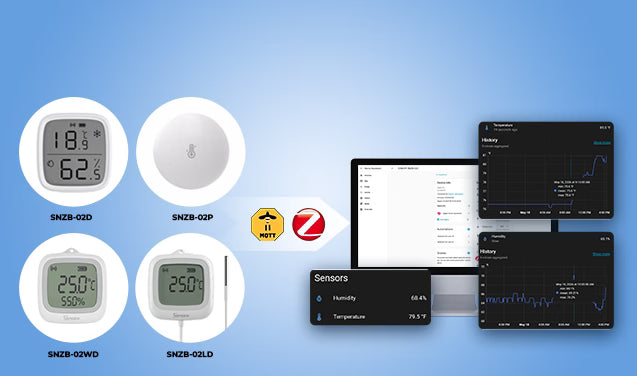
Tippek: Hosszabb tartózkodási helyeken (nappalik, fürdőszobák, irodák) egy emberi jelenlét érzékelő pontosabb észlelést biztosít.
👉 Hogyan adjunk mozgásérzékelőt a Home Assistant-hoz
👉 Hogyan adjunk emberi jelenlét érzékelőt a Home Assistant-hoz
Adaptív éjszakai világítás
Okos fényerőszabályzó kapcsolókkal, amelyek Home Assistant-hoz csatlakoznak, automatikusan állíthatod a világítás fényerejét a nap folyamán.
- Nappal → 100% fényerő
- Este 11 után → automatikusan 15–20%-ra tompítva
Ez segít elkerülni a túl erős világítást késő este, miközben elegendő fényt biztosít a biztonságos közlekedéshez.
Példák helyzetekre:
- A folyosói lámpák nappal 100%-on lehetnek, de éjjel középen csak 5%-on.
- A hálószobai vagy gyerekszobai lámpák éjszakai etetésekhez kb. 10% fényerőn maradhatnak, majd visszaállnak 80%-ra, amikor mindenki felébred.
💡 Legjobb: fürdőszobák, folyosók, hálószobák, konyhák és lépcsőházak – növeli a kényelmet és csökkenti az energiafogyasztást
Okos függönyök és világítás automatizálása
Az okos függöny- vagy redőnykapcsolók idő, napfény vagy jelenetek alapján automatizálhatók a jobb kényelem, magánélet és világítási vezérlés érdekében.
- Reggel → a függönyök automatikusan kinyílnak, hogy a természetes fény felébressze a szobát
- Naplemente → a függönyök bezáródnak a magánélet és a jobb alvási kényelem érdekében
💡 Használati esetek:
- Javítja a természetes fényt a beltéri növények számára
- Éjszakai ébredések természetesebb észlelése – ha a sötétítő függönyök még zárva vannak, általában még korán van, így vissza tudsz aludni anélkül, hogy megnéznéd az időt.
Garázskapu világítás és biztonsági emlékeztető
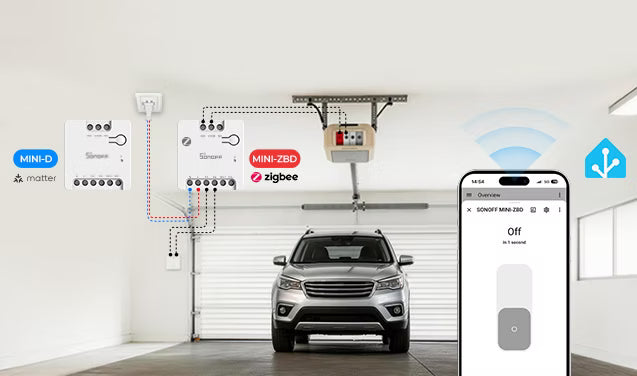
Egy száraz érintkezős okoskapcsolóval, amely a garázskapu nyitójához van csatlakoztatva, a Home Assistant segítségével automatizálhatod a garázskapu vezérlését és a biztonsági emlékeztetőket is.
- Garázskapu nyit → világítás BEKAPCSOLVA
- 10 perc után → világítás KIKAPCSOLVA
- Ajtó nyitva > 30 perc → telefonos értesítés
💡 Hasznos, amikor éjszaka hazaérsz, bevásárlást cipelsz, szerszámokat pakolsz ki vagy gyenge fényviszonyok között parkolsz.
Összefoglalás
Nincs egyetlen „legjobb” okoskapcsoló mindenki számára. Ez igazán az otthoni beállításaidtól és attól függ, mi a legfontosabb számodra.
Ha valami stabilat és könnyen bővíthetőt szeretnél, a Zigbee általában a legbiztonságosabb választás. Ha platformok közötti okosotthont építesz, a Matter gyorsan fejlődik és sok esetben jól működik. Ha pedig csak néhány egyszerű kapcsolóra van szükséged, a Wi-Fi még mindig a legegyszerűbb opció lehet.
A legtöbben végül mindhárom keverékét használják a Home Assistantban, ami teljesen rendben van, amíg minden eszköz támogatja a helyi vezérlést.
GYIK
K1: Melyik okoskapcsoló működik a legjobban a Home Assistanttal: Zigbee, Matter vagy Wi-Fi?
- A Zigbee okoskapcsolók a legnépszerűbbek a Home Assistantban, mert stabil mesh hálózatot, helyi vezérlést, gyors reakciót és alacsonyabb energiafogyasztást kínálnak.
- A Matter kapcsolók is gyorsan növekednek, különösen a platformok közötti okosotthonok esetén.
- A Wi-Fi okoskapcsolók kisebb rendszerekhez a legjobbak, de egyes modellek nem kompatibilisek a Home Assistanttal a korlátozott vagy hiányzó hivatalos integráció miatt.
K2: Az okoskapcsolók helyileg működnek a Home Assistanttal?
Néhány igen, mások nem. A Zigbee kapcsolók általában teljesen helyileg működnek. A Matter eszközök is támogatják a helyi vezérlést. Sok Wi-Fi kapcsoló még mindig részben felhőszolgáltatásoktól függ, ezért érdemes vásárlás előtt ellenőrizni.
K3: A Zigbee jobb a Wi-Fi-nél a Home Assistant számára?
Nagyobb okosotthonokban a Zigbee általában stabilabb, mert az eszközök hálózati hálózatot (mesh) alkotnak, nem csak a Wi-Fi routerre támaszkodnak. A Wi-Fi több hozzáférési ponttal is lefedheti a nagy otthonokat, de a kulcsfontosságú különbség az, hogy az eszközparancsok nyilvános protokollutasításokat használnak-e, és vezérelhetők-e különböző márkák átjáróival.
K4: A Matter jobb a Zigbee-nél a Home Assistant számára?
Nem feltétlenül. A Matter újabb, és jobb platformok közötti kompatibilitást kínál, de a Zigbee jelenleg nagyobb eszközökörnyezetet és érettebb Home Assistant támogatást nyújt.
K5: Tudja a Home Assistant internet nélkül vezérelni az okoskapcsolókat?
Igen, amennyiben a helyi hálózatod (LAN) működik. A Zigbee és Matter eszközök helyileg működnek, és nincs szükségük internetre. A felhőfüggő Wi-Fi kapcsolók viszont meghibásodhatnak.
K6: Keverhetem a Zigbee, Matter és Wi-Fi kapcsolókat a Home Assistantban?
Igen. A Home Assistant úgy van tervezve, hogy egyszerre több protokollt is támogasson. Kombinálhatod a Zigbee-t a megbízhatóságért, a Matter-t a kompatibilitásért, és a Wi-Fi-t a kényelemért.

Hagyjon megjegyzést
Minden hozzászólást moderálnak a közzététel előtt.
Ezt a webhelyet a hCaptcha rendszer védi, és a hCaptcha adatvédelmi szabályzata, valamint szolgáltatási feltételei vonatkoznak rá.