














































Bevezetés
Gondolkodtál már azon, miért magasabb a villanyszámlád a vártnál, de nem tudod, melyik készülék a felelős?
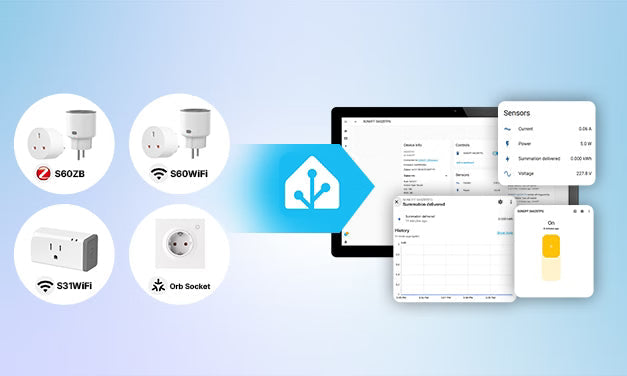
Az energiafigyelő okos konnektor segít megválaszolni ezt a kérdést azáltal, hogy méri a csatlakoztatott eszközök valós idejű teljesítményét (W) és összesített energiafogyasztását (kWh). Ha integrálva van a Home Assistantba, nemcsak azt segít megérteni, hol használják az áramot, hanem lehetővé teszi az automatizálásokat valós idejű teljesítményadatok alapján — például a készülék ciklusának befejezésének észlelése, készenléti áramfogyasztás azonosítása vagy riasztások küldése, ha az energiafogyasztás rendellenessé válik.
Ebben az útmutatóban megtanulod, hogyan működnek az energiafigyelő okos konnektorok, hogyan válaszd ki a megfelelőt a Home Assistant számára, hogyan integráld őket, és hogyan építs gyakorlati automatizálásokat valós energiaadatok alapján.

Mi az az Energiafigyelő Okos Konnektor?
Az energiafigyelő okos konnektor mindent tud, amit egy szabványos okos konnektor — például távoli vezérlés, ütemezés és automatizálás —, miközben méri, mennyi áramot fogyaszt a csatlakoztatott eszköz.
Ha integrálva van a Home Assistantba, akkor teljesítményhez kapcsolódó adatokat szolgáltat, mint például valós idejű teljesítmény (W), feszültség (V), áramerősség (A) és összesített energia (kWh), amelyeket irányítópultokhoz, automatizálási indítókhoz és hosszú távú energiafigyeléshez lehet használni.
Teljesítmény vs Energia: Mi a Különbség?
A Home Assistantban fontos megérteni a teljesítmény (W) és az energia (kWh) közötti különbséget:
- Teljesítmény (W) – Mennyi áramot használ az eszköz éppen most.
- Energia (kWh) – Mennyi áramot fogyasztott idővel.
Például egy eszköz, amely 100W-ot vesz fel 10 órán át, 1 kWh energiát fogyaszt.
A Home Assistant automatizálások általában teljesítményt (W) használnak, míg az Energia Irányítópult az összesített energiát (kWh).
Miért Használjunk Energiafigyelő Okos Konnektort a Home Assistantban?
Az energiafigyelő okos konnektor nemcsak az áramfogyasztást méri. Segít megérteni, hogyan használják az eszközök az energiát, okosabb automatizálásokat építeni, és jobb energiahatékonysági döntéseket hozni valós adatok alapján.
Kövesd Nyomon az Energiafogyasztást Készülékenként
Lásd pontosan, mennyi áramot használ minden készülék, a havi számla helyett. A valós idejű teljesítmény (W) és az összesített energia (kWh) adatok megkönnyítik a készülékek összehasonlítását és a legnagyobb energiafogyasztók azonosítását.
Csökkentsd az Áramköltségeket
Az energiaadatok segítenek észrevenni azokat az eszközöket, amelyek tovább működnek a vártnál, vagy készenléti módban is fogyasztanak áramot. A Home Assistant automatizálásaival automatikusan kikapcsolhatod az inaktív eszközöket, vagy értesítéseket kaphatsz, mielőtt a felesleges energiafogyasztás összeadódna.
Építs Okosabb Automatizálásokat
A teljesítményváltozások gyakran tükrözik, hogy egy készülék valójában mit csinál. Az időzítők helyett a Home Assistant valós idejű teljesítményadatokat használhat események, például a készülék ciklusának befejezése, töltés befejezése vagy készenléti mód észlelésére, így az automatizálások pontosabbak és megbízhatóbbak lesznek.
Potenciális készülékproblémák észlelése
A váratlan energiafogyasztás-változások rendellenes készülékműködésre utalhatnak. A hosszú távú energiafogyasztási minták figyelése segíthet az abnormális működés vagy potenciális hibák korai felismerésében, mielőtt súlyosabbá válnának.
Milyen készülékeket érdemes okos konnektorral figyelni?
Nem minden eszköz alkalmas okos konnektoros energiafigyelésre. Kezdd azokkal, amelyek jelentős áramot fogyasztanak, hosszú ideig működnek, vagy előre jelezhető energiafogyasztási mintázatuk van, ami hasznos az energiafigyeléshez és automatizáláshoz.
|
Kategória |
Tipikus eszközök |
Miért érdemes figyelni? |
|
Nagy energiafogyasztású készülékek |
Szárítók, elektromos vízmelegítők, hordozható fűtők |
A legnagyobb áramfogyasztók azonosítása |
|
Folyamatosan bekapcsolt eszközök |
Routerek, NAS, asztali számítógépek, monitorok, játékkonzolok |
Alapvonal és készenléti energiafogyasztás követése |
|
Ciklus alapú készülékek |
Kávéfőzők, kenyérsütők, rizsfőzők, lassú főzők, mosogatógépek, 3D nyomtatók |
Energia becslése ciklusonként és befejezési automatizmusok indítása |
|
Töltő eszközök |
Telefonok, táblagépek, hordozható áramforrások, e-kerékpár töltők, elektromos szerszámok |
Töltés befejezésének érzékelése és automatikus áramtalanítás |
⚠️Biztonsági megjegyzés: Kerüld a fogyasztói okos konnektorok használatát olyan készülékekkel, amelyek meghaladják a konnektor névleges feszültségét, áramerősségét vagy teljesítményhatárát. Kritikus orvosi eszközök, ipari berendezések, háromfázisú készülékek, valamint nagy indítási terhelésű motorok vagy kompresszoros eszközök csak kifejezetten ezekhez tervezett és minősített hardverrel használhatók.
Hogyan válassz energiafigyelő okos konnektort Home Assistanthoz?
Energiafigyelő okos konnektor választásakor négy kulcsfontosságú tényezőre összpontosíts: pontos energiafigyelés, Home Assistant kompatibilitás, megfelelő kommunikációs protokoll és helyi vezérlés. Ezután vedd figyelembe a frissítési gyakoriságot, a teljesítményértéket, a konnektor kompatibilitását és a fizikai méretet a régiód szerint.
Melyik kommunikációs protokollt válasszam?
A kommunikációs protokoll befolyásolja a beállítás bonyolultságát, megbízhatóságát és azt, hogy a konnektor hogyan integrálódik a Home Assistantba.
- Zigbee — Támogatja a helyi vezérlést, alacsony késleltetést, stabil mesh hálózatot és alacsony energiafogyasztást, ideális Home Assistant rendszerekhez, de Zigbee koordinátort igényel.
- Wi-Fi — Közvetlenül a meglévő routereddel működik, és könnyen beállítható hub nélkül, de az integráció minősége és a helyi vezérlés a megvalósítástól függ. (Tipp: Wi-Fi eszközök esetén ellenőrizd, hogy a gyártó hivatalos vagy közösség által támogatott Home Assistant integrációt kínál-e.)
- Matter — Keresztplatformos együttműködésre tervezve, helyi vezérléssel és egyszerű párosítással. A Home Assistant támogatása folyamatosan javul, bár az elérhető funkciók eszközönként eltérhetnek.
-
Z-Wave — Helyi vezérlést, alacsony késleltetést és stabil mesh hálózatot biztosít, hasonlóan a Zigbee-hez, de magasabb költséggel és kevesebb piaci termékválasztékkal.
Megbízható energia (kWh) adatokat szolgáltat?
Győződj meg róla, hogy a konnektor megbízható kumulatív energiaadatokat (kWh) szolgáltat, nem csak valós idejű teljesítményt (W). A pontos kWh adatok elengedhetetlenek a hosszú távú energiafigyeléshez és a Home Assistant Energia Műszerfalához.
Teljes mértékben kompatibilis a Home Assistanttal?
Győződj meg róla, hogy az eszköz zökkenőmentesen integrálható a Home Assistant rendszerbe ZHA, Zigbee2MQTT, Matter vagy hivatalos/közösségi integrációkon keresztül. A jó kompatibilitás biztosítja, hogy a teljesítmény-, energia-, feszültség-, áram- és kapcsoló entitások (az eszköztől függően) elérhetők legyenek a műszerfalakon és automatizálásokban.
Támogatja a helyi vezérlést?
A helyi vezérlés gyorsabb reakciót, jobb stabilitást és nagyobb adatvédelmet biztosít. A felhőfüggő eszközökkel ellentétben internetkapcsolat hiányában is működik, így megbízhatóbb az automatizálásokhoz.
Milyen gyakran frissülnek az energiaadatok?
A gyorsabb jelentés pontosabb automatizálást tesz lehetővé, különösen az energia alapú automatizálásoknál, mint például a készülék befejezésének vagy a töltés befejezésének érzékelése. A hosszabb frissítési intervallum késleltetheti az automatizálás indítását vagy csökkentheti az érzékelés pontosságát.
Illeszkedik a régiódhoz és az aljzatokhoz?
Ellenőrizd, hogy a konnektor megfelel-e a helyi aljzat típusának és feszültség szabványainak (US, UK, EU vagy AU). A fizikai méret is számít — egyes konnektorok eltakarhatják a szomszédos aljzatokat vagy nem férnek el szűk helyeken.
Tipp: Ha nem vagy biztos benne, hogy melyik konnektor típust használják az országodban, nézd meg az IEC World Plugs útmutatót, ahol megtalálhatod a helyi konnektor típusokat, feszültséget és frekvenciát.
Biztonságos és alkalmas a régiód számára?
Győződj meg róla, hogy a konnektor támogatja a készüléked névleges terhelését (általában 10A–16A, a modelltől függően).
Keress beépített védelmi funkciókat, mint például túlterhelés-, túlmelegedés- és túlfeszültség-védelem, hogy növeld a biztonságot nagy terhelésű készülékek használatakor.
Ellenőrizd azt is, hogy a termék rendelkezik-e a régiódnak megfelelő biztonsági tanúsítványokkal, például CE vagy UL.
Ajánlott SONOFF okos konnektorok Home Assistant energiafigyeléshez
A fenti kiválasztási szempontok alapján az alábbi SONOFF modellek támogatják az energiafigyelést és integrálhatók a Home Assistant rendszerrel Zigbee, Wi-Fi vagy Matter protokollon keresztül, így különböző régiókhoz és telepítési igényekhez alkalmasak.
Gyors összehasonlítás
Tipp: Ha új Home Assistant rendszert indítasz, először válaszd ki a kommunikációs protokollt (Zigbee, Wi-Fi vagy Matter), majd válassz olyan okos konnektort, amely megfelel a régiódnak és a telepítési igényeidnek.
|
Modell |
Protokoll |
Régió |
Maximális terhelés |
Energiafigyelés |
Legalkalmasabb |
|
Zigbee |
E/F típus, G típus |
16A / 4000W (E/F) |
✅Igen |
Zigbee felhasználók, akik helyi vezérlést és mesh hálózatot szeretnének |
|
|
Wi-Fi |
E/F típus, G típus |
16A / 4000W (E/F) |
✅Igen |
Felhasználók, akik egyszerű Wi-Fi beállítást preferálnak hub nélkül |
|
|
Wi-Fi |
Észak-Amerika |
15A / 1800W |
✅Igen |
US felhasználók számára, akik egyszerű plug-and-play megoldást keresnek |
|
|
Matter Wi-Fi-n keresztül |
EU (E/F típus) |
16A / 4000W |
✅Igen |
Európai felhasználók számára, akik beépített fali aljzatot preferálnak Matter-rel |
S60 ZB

SONOFF iPlug Zigbee okos konnektor | S60 sorozat
$14.90
【Energiafigyelés】Kövesd nyomon a valós idejű és történelmi energiafogyasztást közvetlenül a Home Assistant-on keresztül. Szerezz betekintést az energiahasználatodba, növeld az eszközök hatékonyságát, és csökkentsd az áramköltségeket könnyedén...
Termék megtekintése- Zigbee 3.0 ZHA és Zigbee2MQTT támogatással.
- Beépített Zigbee router a mesh lefedettség kiterjesztéséhez.
- Helyi vezérlés a megbízható Home Assistant automatizálásokhoz.
- Energiafigyelés valós idejű teljesítmény- és összesített energiaadatokkal.
✅ Ajánlott: Zigbee-alapú Home Assistant rendszert építő felhasználóknak, akik megbízható helyi vezérlést, Zigbee mesh bővítést és energiafigyelést szeretnének.
S60 Wi-Fi

SONOFF iPlug Wi-Fi okos konnektor | S60 sorozat
$12.90
【Energiafigyelés】Napi, havi és éves összesített energiafogyasztás ellenőrzésével segít pénzt megtakarítani az energiaszámlákon...
Termék megtekintése- Közvetlenül csatlakozik Wi-Fi-hez, átjáró nélkül.
- Energiafigyelés napi, havi és éves fogyasztási statisztikákkal.
- Támogatja a LAN vezérlést helyi működéshez, ha elérhető.
- Kompakt kialakítás (E/F típus) amely a legtöbb aljzathoz illeszkedik anélkül, hogy elzárná a szomszédos konnektorokat.
✅ Ajánlott: Felhasználók számára, akik könnyen beállítható Wi-Fi okos konnektort szeretnének energiafigyeléssel, további átjáró nélkül.
S31 WiFi

SONOFF S31 – WiFi okos konnektor energiafigyeléssel, US típus
$12.90
【Könnyen használható】Csak csatlakoztass egy eszközt az okos konnektorba, és csatlakozz a Wi-Fi hálózatodra...
Termék megtekintése- Kifejezetten az észak-amerikai aljzatokhoz tervezve.
- Kompakt forma (E/F típus), amely segít elkerülni a szomszédos aljzatok elzárását.
- Wi-Fi kapcsolat energiafigyeléssel.
- Egyszerű plug-and-play beállítás.
✅ Ajánlott: US Home Assistant felhasználóknak, akik megfizethető Wi-Fi okos konnektort keresnek energiafigyeléssel és egyszerű beállítással.
Orb Socket

SONOFF Orb Socket Matter Over WiFi okos európai fali aljzat | WS01TPE-E/WS01TPF-E
$19.90
【Valós idejű energiafigyelés】Az okos fali konnektor pontosan követi az energiafogyasztást, és intuitív vizuális diagramokon jeleníti meg azt. Támogatja a történelmi energiaadatok áttekintését, egy érintéssel visszaállítható, amikor készüléket cserél, így tiszta, pontos megfigyelést biztosít...
Termék megtekintése- Beépített EU fali aljzat (E/F típus) a tiszta, állandó telepítéshez.
- Matter Wi-Fi-n keresztül a széles körű ökoszisztéma-kompatibilitásért.
- Energiafelügyelet beépítve a fali aljzatba.
- Túlterhelés- és túlfeszültség-védelem, gyermekbiztos kialakítás.
- Kompatibilis a Home Assistant és más Matter-kompatibilis platformokkal, beleértve az Apple Home-ot, a Google Home-ot, az Amazon Alexát és a SmartThings-et.
✅ Ajánlott: Európai felhasználóknak, akik beépített falialjzatot részesítenek előnyben dugóadapter helyett, és Matter kompatibilitást szeretnének a jövőbeli okosotthon fejlesztésekhez.
Melyiket válassza?
- Válassza az S60 ZB-t, ha már Zigbee hálózatot használ ZHA vagy Zigbee2MQTT segítségével.
- Válassza az S60 Wi-Fi-t, ha hub nélküli Wi-Fi megoldást és egyszerű telepítést szeretne.
- Válassza az S31 Wi-Fi-t, ha Észak-Amerikában van, és kompakt energiafigyelő okos konnektorra van szüksége.
- Válassza az Orb Socket-et, ha Európában van, és beépített Matter falialjzatot szeretne dugóadapter helyett.
Hogyan adjunk hozzá energiafigyelő okos konnektorokat a Home Assistanthoz?
Az alábbiakban három gyakori protokoll segítségével mutatunk be beállítási útmutatókat az energiafigyelő okos konnektorok Home Assistantba integrálásához: Zigbee, Matter és Wi-Fi.
Zigbee okos konnektorok: ZHA vagy Zigbee2MQTT
A Zigbee okos konnektorok ZHA vagy Zigbee2MQTT segítségével csatlakoznak a Home Assistanthoz.
- ZHA (kezdőknek ajánlott): Beépített a Home Assistantba, könnyen beállítható.
- Zigbee2MQTT (haladó): MQTT-alapú, több eszközt és fejlettebb funkciókat támogat
Szüksége van:
- Zigbee koordinátor: Egy Zigbee koordinátor (pl. ZBDongle-P, ZBDongle-E).
- MQTT broker (Mosquitto) és Zigbee2MQTT kiegészítő (csak Z2M esetén)
Párosítsa az okos konnektort, majd adja hozzá a preferált Zigbee integráción keresztül. A Home Assistant automatikusan létrehozza az olyan entitásokat, mint az áramfogyasztás, energia, feszültség, áramerősség és kapcsolóvezérlés (az eszköztől függően).
👉 Kapcsolódó beállítási útmutatók: Zigbee eszközök hozzáadása a Home Assistanthoz ZHA és Zigbee2MQTT segítségével
Matter okos konnektorok: Matter integráció
A legtöbb Matter okos konnektor közvetlenül hozzáadható a Home Assistanthoz a beépített Matter integráción keresztül.
Szüksége van:
- Home Assistant OS (győződjön meg róla, hogy a legfrissebb Home Assistant verzió van telepítve).
- A Home Assistantban telepítve legyen a Matter integráció.
- Home Assistant Companion App az okostelefonján.
- Matter-kompatibilis eszköz QR-kóddal vagy 11 jegyű beállítási kóddal.
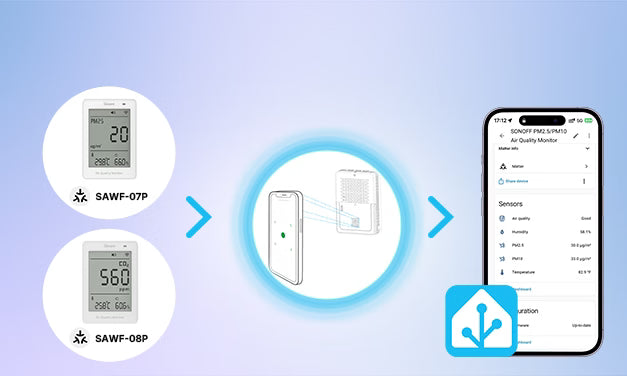
Nyissa meg a Home Assistant mobilalkalmazást, olvassa be a Matter QR-kódot, és fejezze be a párosítási folyamatot. A párosítás után az eszköz elérhetővé válik a műszerfalakon és az automatizálásokban.
👉 Kapcsolódó beállítási útmutató: Hogyan adjunk Matter okos konnektorokat a Home Assistanthoz
Wi-Fi okos konnektorok: Márkaintegráció vagy HACS kiegészítők
A Wi-Fi egy vezeték nélküli hálózati protokoll, de nem határozza meg, hogyan vezérelhetők az okoseszközök. A gyártók általában saját kommunikációs módszereket alkalmaznak, ezért a Home Assistant integráció támogatása márkánként változik. A legtöbb Wi-Fi eszköz hivatalos márkaintegrációkon vagy közösségi integrációkon keresztül csatlakozik a Home Assistanthoz.
Integrációs opciók:
- Hivatalos gyártói integrációk (ha a gyártó támogatja)
- HACS közösségi integrációk
Alapvető integrációs lépések:
- Először csatlakoztasd az eszközt Wi-Fi-re a gyártó hivatalos alkalmazásával
- Telepítsd a megfelelő integrációt a Home Assistantból vagy a HACS-ból
- A Home Assistantben menj a Beállítások → Eszközök és szolgáltatások menüpontra
- Add hozzá az integrációt, és kövesd a beállítási utasításokat
👉 Ha rendelkezel SONOFF Wi‑Fi eszközökkel, nézd meg hivatalos bővítmény integrációnkat és oktatóanyagunkat:
- eWeLink Smart Home bővítmény felhasználói útmutató
- SONOFF Wi-Fi eszközök hozzáadása a Home Assistanthez – útmutató
A legjobb Home Assistant automatizálások energiafigyelő okos konnektorokhoz
Az energiafigyelő okos konnektorok sokkal többet tudnak, mint csak az áramfogyasztás jelentése. A teljesítmény (W) és energia (kWh) adatok automatizálási triggerként való használatával a Home Assistant a valódi eszközhasználatra reagálhat, nem pedig fix ütemtervekre.
Készülék befejezésének értesítése
Az áramfogyasztás változásait használva észleld, mikor fejeződött be egy készülék ciklusa.
Hogyan működik:
- Az áramfogyasztás növekszik → a készülék elindul.
- Az áramfogyasztás több percre alacsony vagy készenléti szintre csökken → a ciklus befejeződött.
- A Home Assistant értesítést küld vagy kikapcsolja a konnektort
Gyakori eszközök: 3D nyomtatók, kenyérsütők, rizsfőzők, lassú főzők és szárítók (csak akkor, ha a készülék névleges terhelése megfelel az okos konnektor specifikációinak).
Miért hasznos: Nem kell többé ellenőrizni, hogy egy ciklus befejeződött-e.
💡Megjegyzés: Sok készülék rövid szünetet tart működés közben, ezért egy 3–5 perces késleltetés segít elkerülni a téves riasztásokat.
Készenléti áramfogyasztás és automatikus kikapcsolás
Sok eszköz továbbra is fogyaszt áramot készenléti módban.
Hogyan működik:
- Észleld, amikor az áramfogyasztás egy meghatározott készenléti küszöbérték alatt marad
- Automatikusan áramtalanítsd az eszközt
- Igény szerint küldj értesítést
Gyakori eszközök: TV-k, számítógép-monitorok, játékkonzolok, hangszórók stb.
Miért hasznos: Csökkenti a kísértetenergia-fogyasztást és a szükségtelen energia költségeket.
Töltés befejezésének érzékelése
Figyeld a töltési teljesítményt, és automatikusan állítsd le a töltést, amikor a teljesítmény egy meghatározott küszöbérték alá esik.
Hogyan működik:
- A töltési teljesítmény egy meghatározott küszöbérték alá csökken → a töltés befejeződött.
- A Home Assistant érzékeli a befejezést.
- Kapcsold ki az okos konnektort vagy küldj értesítést.
Gyakori eszközök: Telefonok, táblagépek, hordozható áramforrások, elektromos kerékpárok és elektromos szerszámok.
Miért hasznos: Energiát takarít meg, csökkenti a szükségtelen töltési időt, és extra biztonsági réteget ad.
Magas energiafogyasztás figyelmeztetések
Az összesített energiafogyasztás (kWh) figyelése, és értesítések fogadása, ha a fogyasztás meghalad egy meghatározott határt.
Hogyan működik:
- Az eszköz vagy időszak összesített energiafogyasztásának (kWh) nyomon követése.
- Értesítés küldése, ha a fogyasztás meghalad egy előre meghatározott küszöbértéket vagy energiahatárt.
Gyakori eszközök: vízmelegítők, hordozható elektromos fűtők, párátlanítók, EV töltők (csak ha a töltési terhelés a konnektor névleges kapacitásán belül van), és más nagy energiafogyasztású készülékek.
Miért hasznos: Segít nyomon követni az áramköltségeket, azonosítani az energiaigényes készülékeket, és elkerülni a váratlan közüzemi számlákat.
Teljesítmény vagy energia: melyik mérőszámot használja az egyes automatizálás?
|
Automatizálás |
Elsődleges mérőszám |
|
Készülék befejezésének értesítése |
Teljesítmény (W) |
|
Készenléti teljesítmény érzékelése |
Teljesítmény (W) |
|
Töltés befejezésének érzékelése |
Teljesítmény (W) |
|
Magas energiafogyasztás figyelmeztetések |
Energia (kWh) |
⚠️ Biztonsági tipp: Mindig győződj meg róla, hogy a csatlakoztatott készülék a konnektor névleges feszültségén, áramerősségén és teljesítményén belül van, mielőtt engedélyezed az automatizálásokat.
Összegzés
Az energiafigyelő okos konnektor az egyik legegyszerűbb módja annak, hogy javítsd az energiaátláthatóságot és az automatizálást a Home Assistantban. Ha olyan eszközt választasz, amely pontos kWh-jelentést, megbízható Home Assistant támogatást és megfelelő kommunikációs protokollt kínál, nyomon követheted az áramfogyasztást, okosabb automatizálásokat építhetsz, és jobban megértheted, hogyan használja otthonod az energiát.
👉 Készen állsz a kezdésre? Fedezd fel a SONOFF S60 ZB, S60 Wi-Fi, S31 Wi-Fi és az Orb Socket közül, hogy megtaláld a Home Assistant rendszeredhez leginkább illő energiafigyelő okos konnektort.
GYIK
1. kérdés: Működnek-e az energiafigyelő okos konnektorok a Home Assistanttal?
Igen, sok energiafigyelő okos konnektor működik a Home Assistanttal, de a kompatibilitás a kommunikációs protokolltól és az elérhető integrációktól függ.
A Zigbee eszközök általában ZHA vagy Zigbee2MQTT-n keresztül csatlakoznak, a Matter eszközök a beépített Matter integrációt használják, a Wi-Fi eszközök pedig általában a gyártó hivatalos vagy közösségi integrációjára támaszkodnak.
2. kérdés: Zigbee vagy Wi-Fi okos konnektorok a Home Assistant számára – melyik jobb?
Egyik sem jobb univerzálisan – a beállításaidtól függ. A Zigbee-t gyakran előnyben részesítik nagyobb Home Assistant rendszerekhez, mert helyi vezérlést, alacsony késleltetést és hálózati mesh kapcsolatot kínál, míg a Wi-Fi konnektorok általában könnyebben telepíthetők, mivel közvetlenül a routerhez csatlakoznak. Wi-Fi eszközök esetén érdemes megerősíteni, hogy elérhető-e Home Assistant integráció vásárlás előtt.
3. kérdés: Tudja-e a Home Assistant nyomon követni az energiafogyasztást okos konnektorokkal?
Igen, ha az okos konnektor mind a valós idejű teljesítményt (W), mind a összesített energiafogyasztást (kWh) jelzi. A Home Assistant ezeket az adatokat használhatja műszerfalakhoz, hosszú távú statisztikákhoz és teljesítményalapú automatizálásokhoz, például készülék befejezésének vagy töltés befejezésének érzékeléséhez.
Q4: Szükségem van energiafigyelő smart plugra a Home Assistant Energia Irányítópultjához?
Igen. A Home Assistant Energia Irányítópultja kumulatív energia (kWh) adatokat igényel, nem pedig valós idejű teljesítményt (W). Ha egy smart plug csak teljesítményt jelent, akkor is használható automatizálásokhoz, de nem biztosít teljes Energia Irányítópult funkciót.
Q5: Hogyan adhatok hozzá smart plugot a Home Assistanthoz?
A beállítás a kommunikációs protokolltól függ.
● A Zigbee plugokat általában a ZHA vagy Zigbee2MQTT segítségével adják hozzá.
● A Matter plugok a beépített Matter integrációt használják.
● A Wi-Fi plugok általában a gyártó hivatalos integrációján vagy egy támogatott közösségi integráción keresztül csatlakoznak.
Q6: Szükségem van Zigbee koordinátorra Zigbee smart plugokhoz?
Igen. A Zigbee smart plugokhoz Zigbee koordinátor szükséges a Home Assistanttal való kommunikációhoz. Használhatja a beépített ZHA integrációt vagy a Zigbee2MQTT-t egy kompatibilis USB koordinátorral (pl. ZBDongle-P, ZBDongle-E). Ha Wi-Fi vagy Matter smart plugokat használ, Zigbee koordinátor nem szükséges.
Q7: Érzékelhetik a smart plugok, mikor fejeződik be egy készülék működése?
Igen, sok készüléknek előre jelezhető teljesítménymintázata van, amelyet a Home Assistant használhat a ciklus befejezésének érzékelésére. Ilyen eszközök például a kávéfőzők, kenyérsütők, mosogatógépek, 3D nyomtatók vagy töltők, bár a pontos küszöbök készülékenként változnak.
👀 Nézze meg a fenti automatizálási példákat a gyakori teljesítményküszöbökre és beállítási ötletekre.
Q8: Segíthetnek a smart plugok az áramszámla csökkentésében?
Lehetséges, igen — de a megtakarítás abból származik, hogyan használja az adatokat. Az energiafigyelés segít azonosítani a nagy energiafogyasztású készülékeket, a készenléti áramfelvételt és az automatizálási lehetőségeket, így idővel csökkentheti a felesleges áramfelhasználást.
Q9: Biztonságos-e smart plugokat használni nagy teljesítményű készülékekkel?
Igen, feltéve, hogy a készülék a smart plug névleges feszültség, áram és teljesítmény határain belül marad. Mindig ellenőrizze a gyártó specifikációit, és kerülje a fogyasztói smart plugok használatát olyan készülékekkel, amelyek meghaladják a névleges terhelést vagy speciális elektromos berendezést igényelnek.
Q10: Miért nem jelenik meg az energiadat a smart plugom a Home Assistantban?
Ez általában azért történik, mert az eszköz csak teljesítményt (W) jelent, nem pedig kumulatív energiát (kWh), az integráció nem teszi elérhetővé a szükséges entitást, vagy hosszú távú statisztikák nem állnak rendelkezésre. Az integráció beállításainak, a firmware verziójának és a Home Assistant entitás konfigurációjának ellenőrzése általában segít az ok azonosításában.
Ha az eszköz csak teljesítményt (W) támogat, akkor is használható automatizálásokhoz, de nem a teljes Energia Irányítópult funkcióhoz.

Hagyjon megjegyzést
Minden hozzászólást moderálnak a közzététel előtt.
Ezt a webhelyet a hCaptcha rendszer védi, és a hCaptcha adatvédelmi szabályzata, valamint szolgáltatási feltételei vonatkoznak rá.