









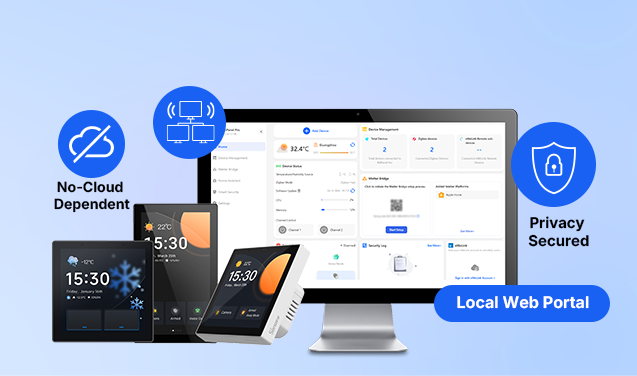
A frissítés (V4.6.0) legfontosabb újdonsága a helyi webportál támogatása, amely új szintre emeli az eszköz helyi használatát. Ahogy az okosotthonok egyre elterjedtebbé válnak, a helyi vezérlés és az adatvédelem a felhasználók legfontosabb szempontjaivá váltak az eszközök kiválasztásakor. Ez a frissítés azok számára készült, akiknek különösen fontos a helyi adatvédelem, és csökkenteni szeretnék a felhőfüggőséget – önállóbb és megnyugtatóbb megoldást kínálva.
💡Miért jelentős ez a frissítés?
Az adatvédelmet és a helyi vezérlést előnyben részesítő okosotthon-rajongók számára ez a frissítés a következőket jelenti:
- Jelentősen kisebb felhőfüggőség – az alapvető funkciók mostantól a helyi webportálon keresztül is használhatók, így adatai helyben maradnak, és nem kerülnek feltöltésre a felhőbe.
- Az adatok feletti tulajdonjog visszakerül a felhasználóhoz – eszközadatai és konfigurációs információi mindig a helyi hálózaton belül maradnak.
- Gyorsabb válaszidő – a közvetlen helyi kapcsolatok megszüntetik a felhő késleltetését.
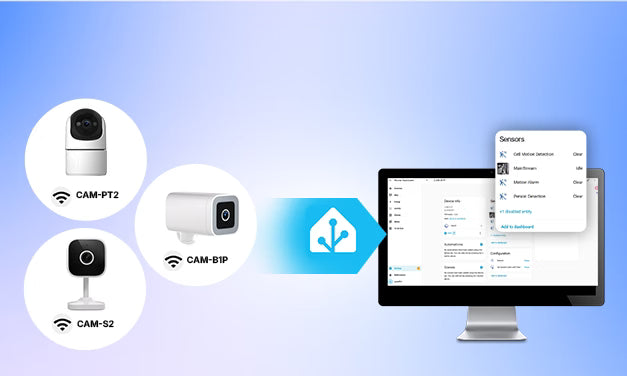
- Home Assistant-kompatibilis – zökkenőmentes integráció a Home Assistanttal, a Matter szabvány támogatásával, így az NSPanel Pro valóban helyi okosotthon-központtá válik.

🌐 Helyi webportál-hozzáférés – nincs szükség alkalmazásra, kezelés böngészőből
A V4.6.0 verziótól kezdve az NSPanel Pro közvetlenül böngészőből is elérhető, és az alárendelt eszközök hozzáadásához és vezérléséhez nincs szükség eWeLink-fiók összekapcsolására – egyszerűen írja be a böngészőbe a tartománynevet vagy a helyi IP-címet.
Mit kínál ez a funkció?
- Kényelmesebb helyi eszközkezelés – Nincs szükség az eWeLink alkalmazásra. Az NSPanel Pro közvetlenül a számítógépe vagy telefonja böngészőjéből kezelhető. Minden művelet az otthoni helyi hálózaton belül történik, így helyi adatai valóban védve maradnak.
-
A legfontosabb funkciók kéznél:
- Eszközkezelés: Adjon hozzá és kezeljen Zigbee- és eWeLink-Remote-alárendelt eszközöket, például kapcsolókat, aljzatokat és érzékelőket közvetlenül a helyi webportálon keresztül, valós idejű képernyő-szinkronizációval, így a mindennapi használat megbízhatóbbá válik.
- Matter-híd: Egyszerű helyi integrációt tesz lehetővé az ökoszisztémák között – minden beállítás a helyi webportálon keresztül végezhető el.
- Home Assistant-integráció: Nincs szükség az alkalmazás összekapcsolására. Szinkronizálja az NSPanel Pro-t és alárendelt eszközeit a HA-val, valamint a HA-entitásokat a Matterrel – ezzel valóban lehetővé téve a helyi, ökoszisztémák közötti együttműködést.
- Intelligens biztonság: Tekintse meg helyben és valós időben a biztonsági naplókat, az ajtó- és ablakérzékelők jelzéseit, a mozgáseseményeket és még sok mást – az adatvédelem valóban az Ön kezében marad.
- Bővített beállítások: Szabja személyre a háttérképeket, képernyővédőket és csengőhangokat, hogy egyedi vezérlőközpontot alakítson ki.
Emellett további funkciók, például az intelligens jelenetek is hamarosan elérhetők lesznek – folyamatosan továbbfejlesztve a helyi okosotthon-élményt.
*A funkciók részletes összehasonlítását a helyi webportál funkcióinak szinkronizálási táblázata tartalmazza.

A konkrét hozzáférési módok a következők:
-
1. módszer – IP-címen keresztül:
xxx.xx.xx.xxx - 2. módszer – Tartománynéven keresztül: http://nspanelpro.local / http://nspanelpro-deviceid.local
*Ha több NSPanel Pro eszköz található ugyanazon a helyi hálózaton, a kívánt egység eléréséhez használja a tartománynevet az eszközazonosítóval együtt.

🔒 Helyi alárendelt eszközbeállítás

Ez azt jelenti, hogy a hozzáadott Zigbee-alárendelt eszközök közvetlenül az NSPanel Prón vezérelhetők, felhőkommunikáció nélkül. Az eszköz gyorsabban reagál, működése stabilabb, és ami a legfontosabb – az eszköz adatai mindig helyben maradnak.
🎨 Személyre szabás – most már teljesen helyben is
A helyi webportál emellett számos személyre szabott beállítást támogat, amelyek mind helyben elvégezhetők:
- Töltsön fel egyéni csengőhangokat, képernyővédőket és háttérképeket.
- Konfigurálja a weboldalakat, a hőmérséklet- és páratartalom-adatforrásokat, a biztonsági jelszavakat, a vendégmódot, a Zigbee módot és még sok mást.
Tegye az NSPanel Prót ne csupán okosotthon-vezérlőközponttá, hanem saját stílusát tükröző, személyre szabott eszközzé.
📌 Fedezzen fel többet
Az NSPanel Pro frissítéséhez és a helyi webportál használatára való felkészítéséhez keressen firmware-frissítéseket az Eszközbeállításokban.
👇Az alábbi linkre kattintva többet tudhat meg, illetve megoszthatja tapasztalatait és visszajelzését:
https://forum.ewelink.cc/t/nspanel-pro-v4-6-0-officially-released-local-web-portal-local-setup-and-enhanced-integrations/208771
Vásárlási link: https://sonoff.tech/collections/central-control-panel
Az NSPanel Pro elkötelezett amellett, hogy minden felhasználó számára biztonságosabb, nyitottabb és lokalizáltabb okosotthon-élményt nyújtson.
A helyi webportál funkcióinak szinkronizálási táblázata – v4.7.0-s verzió
Az alábbi táblázat a funkciók elérhetőségét mutatja a helyi webportálon, a képernyőn és az alkalmazásban.
|
Funkciómodul |
Leírás |
Helyi webportál |
Képernyőn |
Alkalmazás |
|
Eszközkezelés |
Zigbee-eszköz hozzáadása/törlése |
✔ Teljes |
✔ Csak hozzáadás |
✔ Teljes |
|
Zigbee-eszköz átnevezése/csoportosítása |
✔ Teljes |
✘ Nem támogatott |
✔ Teljes |
|
|
eWeLink-Remote-alárendelt eszközök hozzáadása/törlése |
✔ Teljes |
✘ Nem támogatott |
✔ Teljes |
|
|
Kameraeszköz hozzáadása/törlése/átnevezése |
✘ Nem támogatott |
✘ Nem támogatott |
✔ Teljes |
|
|
Eszköz vezérlése (be-/kikapcsolás/szintbeállítás) |
✘ Nem támogatott |
✔ Teljes |
✔ Teljes |
|
|
Eszközállapot megtekintése |
Csak az utolsó jelentett időpont |
✔ Teljes |
✔ Teljes |
|
|
Alárendelt eszköz firmware-ének frissítése |
✔ Teljes |
✘ Nem támogatott |
✔ Teljes |
|
|
Energiaáttekintő |
Energiaáttekintő |
✘ Nem támogatott |
✔ Teljes |
✔ Teljes |
|
Termosztát |
Termosztát |
A jövőbeli frissítésekben érkezik |
A jövőbeli frissítésekben érkezik |
A jövőbeli frissítésekben érkezik |
|
Központi termosztát |
✘ Nem támogatott |
✔ Teljes |
✘ Nem támogatott |
|
|
Intelligens jelenet |
Helyi jelenet létrehozása/szerkesztése/törlése |
A jövőbeli frissítésekben érkezik |
✔ Teljes |
✔ Teljes |
|
Jelenetnaplók |
A jövőbeli frissítésekben érkezik |
✔ Teljes |
✔ Teljes |
|
|
Jelenet manuális aktiválása |
A jövőbeli frissítésekben érkezik |
✔ Teljes |
✔ Teljes |
|
|
Intelligens biztonság |
Biztonsági mód konfigurálása |
✔ Teljes |
✔ Teljes |
✔ Teljes |
|
Biztonsági naplók |
✔ Teljes |
✔ Teljes |
✔ Teljes |
|
|
Egygombos élesítés/hatástalanítás |
✔ Teljes |
✔ Teljes |
✔ Teljes |
|
|
Matter Bridge |
Matter Bridge konfigurálása |
✔ Teljes |
✔ Teljes |
✔ Teljes |
|
Zigbee-alárendelt eszközök szinkronizálása |
A jövőbeli frissítésekben érkezik |
✔ Teljes |
✔ Teljes |
|
|
Home Assistant |
MQTT-konfiguráció és -szinkronizálás |
✔ Teljes |
✔ Teljes |
✔ Teljes |
|
HA-hitelesítés és -szinkronizálás |
✔ Teljes |
✔ Teljes |
✔ Teljes |
|
|
Beállítások |
Egyéni háttérképek, képernyővédők, csengőhangok |
✔ Teljes |
✘ Nem támogatott |
✔ Teljes |
|
Turbó mód |
✘ Nem támogatott |
✘ Nem támogatott |
✔ Teljes |
|
|
Zigbee mód |
✔ Teljes |
✘ Nem támogatott |
✔ Teljes |
|
|
Gateway-firmware frissítése |
✔ Teljes |
✔ Teljes |
✔ Teljes |
|
|
Rendszer-újraindítás/gyári visszaállítás |
A jövőbeli frissítésekben érkezik |
✔ Teljes |
✔ Teljes |
|
|
Felhőkapcsolat kezelése |
Csak eWeLink-bejelentkezés/-hozzárendelés |
Csak állapotkijelzés |
✔ Teljes |
|
|
Vendégmód |
✔ Teljes |
✔ Teljes |
✔ Teljes |
|
|
Ne zavarjanak mód |
✔ Teljes |
✔ Teljes |
✔ Teljes |
|
|
A kezdőlap hőmérséklet- és páratartalom-forrása |
✔ Teljes |
✔ Teljes |
✔ Teljes |
|
|
Hőmérséklet-mértékegység |
✔ Teljes |
✔ Teljes |
✔ Teljes |
|
|
Biztonsági jelszó |
✔ Teljes |
✔ Teljes |
✔ Teljes |
|
|
Témabeállítások |
A jövőbeli frissítésekben érkezik |
✔ Teljes |
✔ Teljes |

Hagyjon megjegyzést
Minden hozzászólást moderálnak a közzététel előtt.
Ezt a webhelyet a hCaptcha rendszer védi, és a hCaptcha adatvédelmi szabályzata, valamint szolgáltatási feltételei vonatkoznak rá.