


Introdução
A maioria das casas inteligentes pode avisar quando uma porta é aberta ou uma luz fica acesa — mas muito poucas sabem quando o ar interno se torna insalubre. No entanto, segundo a Agência de Proteção Ambiental dos EUA (EPA), passamos cerca de 90% do nosso tempo em ambientes internos, onde os níveis de poluição do ar podem ser 2 a 5 vezes maiores do que ao ar livre.
Um monitor de qualidade do ar interno ajuda a tornar essas mudanças invisíveis visíveis ao acompanhar métricas-chave como CO₂, PM2.5, temperatura e umidade. Quando integrado ao Home Assistant, ele faz mais do que exibir leituras dos sensores — pode visualizar tendências de longo prazo e acionar automações automaticamente para melhorar a ventilação e o conforto interno.
Neste guia, você aprenderá o que um monitor de qualidade do ar mede, como escolher o sensor inteligente de qualidade do ar certo que funciona com o HA, e ideias práticas de automação para criar um ambiente interno mais saudável.

Por que Usar um Sensor de Qualidade do Ar com o Home Assistant?
A má qualidade do ar interno nem sempre é óbvia — mas seus efeitos são. A OMS relaciona a exposição de curto prazo a poluentes do ar interno com irritação nos olhos e garganta, dores de cabeça, tontura e fadiga. A exposição a longo prazo é ainda mais preocupante, associada a doenças respiratórias, doenças cardíacas, câncer e agravamento de alergias.
Sem monitoramento, os problemas muitas vezes passam despercebidos. Os níveis de CO₂ podem aumentar gradualmente enquanto você trabalha ou dorme, o PM2.5 pode aumentar durante o cozimento ou eventos de incêndio florestal, e a alta umidade pode criar condições ideais para o crescimento de mofo.
Um monitor de qualidade do ar interno muda isso ao tornar o invisível visível. O monitoramento ajuda você a:
- Proteja sua saúde — saiba quando os níveis de CO₂, PM2.5 ou umidade entram em faixas preocupantes.
- Melhore o conforto — otimize temperatura e umidade para um sono e foco melhores
- Acompanhe tendências — veja como as atividades diárias (cozinhar, limpar, ocupação) afetam sua qualidade do ar ao longo do tempo
- Atue cedo — receba alertas antes que os poluentes atinjam níveis prejudiciais, não depois que os sintomas aparecem
Em vez de simplesmente exibir leituras dos sensores, o Home Assistant ajuda a transformar dados em tempo real da qualidade do ar em automações práticas que criam um lar mais saudável e confortável.
O que um Monitor de Qualidade do Ar Mede (CO₂, PM2.5, Temperatura ou Umidade)?
A maioria dos monitores de qualidade do ar domésticos mede múltiplos fatores ambientais em vez de um único valor. Medições comuns incluem CO₂, material particulado (PM2.5/PM10), temperatura, umidade e às vezes compostos orgânicos voláteis (VOCs). Cada métrica oferece diferentes insights sobre seu ambiente interno, ajudando a identificar problemas como ventilação inadequada, partículas no ar ou excesso de umidade.
Para a maioria das casas, estas são as medições mais importantes:
|
Métrica |
Casos de uso comuns |
Por que é importante |
|
CO₂ |
Quartos, escritórios, salas de estudo |
Indica se um cômodo tem ar fresco e ventilação suficientes. |
|
PM2.5 / PM10 |
Cozinhas, quartos de bebê, casas com animais de estimação, casas em áreas propensas a incêndios florestais |
Detecta partículas minúsculas e inaláveis emitidas por cozinha, fumaça, velas e poluição externa como veículos, fábricas e incêndios. |
|
Umidade |
Banheiros, porões |
Ajuda a reduzir o risco de mofo e manter o conforto interno. |
|
Temperatura |
Qualquer cômodo |
Suporta um ambiente interno confortável e energeticamente eficiente. |
🔔Dicas: Se você está comprando seu primeiro monitor de qualidade do ar interno, priorize CO₂ e PM2.5. O CO₂ ajuda a entender se sua casa tem ventilação adequada, enquanto o PM2.5 detecta partículas no ar provenientes de cozinha, fumaça e poluição externa. Juntos, eles abordam os dois principais problemas de qualidade do ar interno que a maioria dos proprietários enfrenta.
Como escolher o sensor de qualidade do ar certo para o Home Assistant?
Nem todos os sensores de qualidade do ar monitoram os mesmos poluentes ou se encaixam na mesma configuração de casa inteligente — especialmente quando você os conecta ao Home Assistant. Antes de escolher um sensor, considere os seguintes fatores:
Quais poluentes ele mede
Comece com o que você realmente precisa monitorar. Se a ventilação for sua principal preocupação, priorize CO₂. Se quiser detectar fumaça de cozinha, fumaça ou poluição por incêndios florestais, PM2.5 é mais importante. Temperatura e umidade são úteis para melhorar o conforto e prevenir mofo.
Compatibilidade com Home Assistant e controle local
Procure sensores que se integrem facilmente com o Home Assistant através do Matter, Zigbee ou outros protocolos suportados. Dispositivos com conectividade local oferecem tempos de resposta mais rápidos, melhor privacidade e continuam funcionando mesmo se sua conexão com a internet estiver indisponível.
Uso interno ou externo
Sensores de qualidade do ar interno são ideais para quartos, salas de estar e escritórios domésticos, enquanto sensores externos ajudam a monitorar a poluição ao ar livre e comparar a qualidade do ar interna e externa.
Nota: A maioria dos sensores de uso doméstico é projetada apenas para uso interno — usar um sensor de qualidade do ar interno ao ar livre pode levar a leituras imprecisas ou danos permanentes. Se você precisar monitorar condições externas, escolha um sensor resistente às intempéries, especificamente projetado para ambientes externos.
Precisão e qualidade do sensor
A qualidade dos sensores varia muito. Para CO₂, prefira sensores NDIR (Infravermelho Não Dispersivo) — eles fornecem leituras confiáveis e consistentes ao longo do tempo. Evite sensores que "derivam" CO₂ de sensores VOC mais baratos; essas leituras são pouco confiáveis. Para PM2.5, sensores de partículas a laser oferecem leituras confiáveis.
Frequência de atualização
A qualidade do ar pode mudar rapidamente durante o cozimento, limpeza ou em eventos de fumaça de incêndios florestais. Intervalos de atualização mais rápidos permitem que o Home Assistant reaja antes com automações e notificações. Procure sensores que enviem atualizações a cada poucos segundos até um minuto — não aqueles que reportam apenas a cada 5-10 minutos.
Display e facilidade de uso
Para visibilidade rápida, um grande display integrado ajuda a verificar a qualidade do ar de relance, sem precisar abrir um aplicativo — nem sempre você quer pegar o celular só para checar os níveis de CO₂.
Sensores de Qualidade do Ar Matter Recomendados para Home Assistant
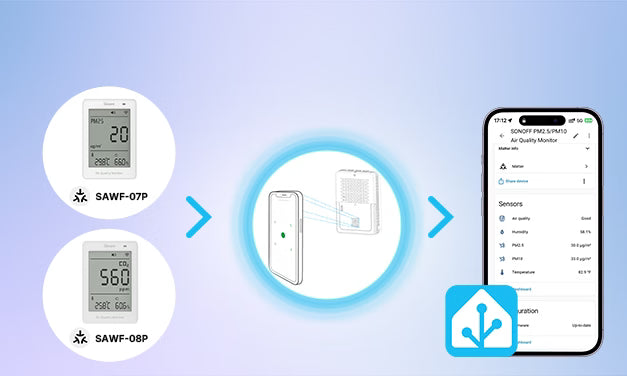
Se você procura sensores de qualidade do ar compatíveis com Matter que integrem perfeitamente com o Home Assistant, a série SONOFF AirGuard vale a pena considerar.
SONOFF AirGuard PM (SAWF-07P) e AirGuard CO₂ (SAWF-08P) oferecem monitoramento confiável em tempo real, respostas rápidas e configuração simples via Matter over Wi-Fi, sendo ideais para automações e painéis do Home Assistant.
Cada unidade possui um LCD de 3,73 polegadas com números grandes e em negrito, fáceis de ler à distância. Um indicador inteligente no canto superior muda de cor conforme os níveis de qualidade do ar. Alarmes integrados (alertas sonoros e visuais) e botões físicos permitem ajustar configurações de alarme e unidades de temperatura.
SONOFF AirGuard PM2.5/PM10

Monitor de Qualidade do Ar SONOFF AirGuard PM2.5/PM10 Matter via Wi-Fi | SAWF-07P
$39.90
【Monitoramento Multimétrico da Qualidade do Ar】Exibe simultaneamente temperatura, umidade e concentrações de PM2.5 (PM10), com suporte para alternar modos de detecção (PM2.5/PM10) e selecionar unidades de temperatura preferidas...
Ver ProdutoUm monitor de qualidade do ar 4 em 1 que acompanha PM2.5, PM10, temperatura e umidade. Usa um sensor de partículas a laser com precisão típica de ±10 µg/m³ (faixa de 0–100 µg/m³) e ±10% (faixa de 100–500 µg/m³).
✅ Melhor para monitorar partículas no ar provenientes de cozinha, trânsito e fumaça de incêndios florestais.
Escolha se:
● Você quer detectar fumaça de cozinha, velas ou partículas de incêndios florestais
● Você tem animais de estimação ou crianças pequenas e quer monitorar irritantes no ar
● Você mora em área propensa a fumaça de incêndios florestais ou perto de tráfego intenso
SONOFF AirGuard CO2

Monitor de Qualidade do Ar SONOFF AirGuard CO2 Matter Over Wi-Fi | SAWF-08P
$49.90
【Monitoramento Ambiental Multimétrico】Acompanha e exibe simultaneamente temperatura, umidade e níveis de CO2, com suporte para troca de unidades de temperatura conforme sua preferência...
Ver ProdutoUm monitor de qualidade do ar 3 em 1 que acompanha CO2, temperatura e umidade. Usa um sensor NDIR de CO2 com precisão típica de ±50 ppm ±5%, ajudando você a entender melhor a qualidade da ventilação interna.
✅ Ideal para monitorar a ventilação interna em quartos, escritórios domésticos, salas de aula, berçários e outros espaços fechados.
Escolha se:
● Você trabalha de casa e sente cansaço mental ou dores de cabeça à tarde
● Você quer saber quando um ambiente precisa de ventilação com ar fresco
● Você tem várias pessoas em um espaço fechado (reuniões, salas de aula)
Comparação Rápida
|
Característica |
AirGuard PM2.5/PM10 |
AirGuard CO2 |
|
Modelo |
SAWF-07P |
SAWF-08P |
|
Métricas Detectáveis |
PM2.5/PM10/Temperatura/Umidade |
CO2/Temperatura/Umidade |
|
MCU |
ESP32-D0WDR2-V3 |
ESP32-D0WDR2-V3 |
|
Protocolo |
Matter-over-Wi-Fi |
Matter-over-Wi-Fi |
|
Alimentação |
5V1A, USB-C |
5V1A, USB-C |
|
Tela |
LCD de 3,73″ |
LCD de 3,73″ |
|
Dimensões |
70 × 103 × 26 mm |
70 × 103 × 26 mm |
|
Peso |
127.6g |
101g |
|
Material da Carcaça |
PC+ABS |
PC+ABS |
|
Precisão de Temp./Umid. |
±0,5°C, ±3% |
±0,5°C, ±3% |
|
Precisão do CO₂ |
— |
±50 ppm ±5% |
|
Precisão do PM |
±10 µg/m³ (0–100 µg/m³) ±10% (100–500 µg/m³) |
— |
|
Calibração de Temp. e Umid. |
✅ |
✅ |
|
Alarme Sonoro e Luminoso |
✅ |
✅ |
|
Instalação |
Suporte |
Suporte |
Integração com Home Assistant via Matter
Os monitores Sonoff AirGuard PM e CO₂ utilizam o protocolo sem fio Matter-over-Wi-Fi, permitindo que sejam adicionados diretamente ao Home Assistant. Um código QR na parte traseira de cada dispositivo possibilita uma configuração rápida pelo processo de integração Matter.
Novo no Matter? Você pode consultar o guia: Como adicionar dispositivos Matter ao Home Assistant?
O Home Assistant pode monitorar a qualidade do ar interno usando sensores de CO₂, PM2.5, PM10, temperatura e umidade. Uma vez conectados via Matter, Zigbee ou Wi-Fi, esses sensores podem exibir dados em tempo real, acompanhar tendências históricas e automatizar ventilação, purificadores de ar e outros dispositivos inteligentes para casa.
Procurando Sensores de Temperatura e Umidade?
Se seu objetivo principal é monitorar a temperatura e umidade internas em vez de CO₂ ou material particulado, um sensor dedicado de temperatura e umidade pode ser mais adequado.
A SONOFF também oferece várias opções compatíveis com Home Assistant, incluindo:
- SNZB-02DR2 – Sensor Zigbee com LCD grande de 3,6" e suporte para colocação em pedestal ou pendurado em gancho.
- SNZB-02D – Sensor Zigbee com LCD de 2,5" e suporte para montagem em pedestal.
- SNZB-02WD – Sensor Zigbee com certificação IP65 e LCD de 2,2" para ambientes internos úmidos e molhados.
- SNZB-02LD – Sensor Zigbee com LCD de 2,2" e sonda à prova d'água de 1,5 m que alcança líquidos e espaços fechados onde o corpo do sensor não cabe (apenas temperatura — sem sensor de umidade).
- SNZB-02P – Sensor Zigbee compacto sem tela e com até 4 anos de vida útil da bateria
- SNZB-02B – Sensor Zigbee sem tela e design fino (apenas 27,8 mm de largura e 20 mm de espessura) para espaços estreitos
👉 Quer saber mais? Confira nosso guia completo: Guia de Configuração e Automação de Sensor de Temperatura e Umidade do Home Assistant.
Melhores automações de qualidade do ar para Home Assistant
Conectar um sensor de qualidade do ar ao Home Assistant é apenas o começo. Usando dados do sensor em tempo real para acionar automações, você pode melhorar automaticamente a ventilação, controlar purificadores de ar, reduzir o excesso de umidade e responder às mudanças nas condições do ar interno. Aqui estão quatro automações práticas que muitos usuários do Home Assistant criam.
Melhorar automaticamente a ventilação com base no CO₂
Níveis altos de CO₂ geralmente indicam ventilação inadequada. O Home Assistant pode melhorar automaticamente o fluxo de ar quando o CO₂ interno ultrapassa um limite definido.
Limiares sugeridos de CO₂:
|
Nível de CO₂ |
Qualidade do Ar |
Ação Recomendada |
|
< 800 ppm |
Excelente |
Nenhuma ação necessária |
|
800–1000 ppm |
Bom |
Ventilação recomendada |
|
1000–1500 ppm |
Ventilação ruim |
Ligar a ventilação |
|
> 1500 ppm |
Muito ruim |
Ventilar imediatamente |
Lógica típica de automação:
- Quando CO₂ > 1000 ppm → Ligar ventilador de ventilação / HRV / HVAC → (Opcional) Enviar notificação quando a ventilação começar
- Quando CO₂ < 800 ppm → Desligar a ventilação
✅ Melhor para: Quartos, escritórios domésticos, salas de estudo, berçários e salas de reunião.
Ligar automaticamente um purificador de ar com base no PM2.5
Cozinhar, velas, lareiras e fumaça de incêndios florestais podem aumentar rapidamente os níveis internos de PM2.5. O Home Assistant pode ligar automaticamente seu purificador de ar sempre que os níveis de partículas se tornarem insalubres.
Limiares Sugeridos para PM2.5:
|
PM2.5 |
Qualidade do Ar |
Ação Recomendada |
|
0–12 µg/m³ |
Bom |
Nenhuma ação necessária |
|
12–35 µg/m³ |
Moderado |
Monitorar qualidade do ar; indivíduos sensíveis podem considerar um purificador de ar |
|
> 35 µg/m³ |
Insalubre |
Ligue o purificador de ar imediatamente |
📘Nota: O Padrão Nacional de Qualidade do Ar Ambiente de 24 horas da EPA (NAAQS) para PM2.5 é 35 µg/m³, enquanto a OMS recomenda uma média de 24 horas ainda mais rigorosa, não excedendo 15 µg/m³.
Lógica típica de automação:
- Quando PM2.5 > 35 µg/m³ → Ligar purificador de ar por 30 min → Enviar notificação (opcional): "PM2.5 elevado — purificador de ar ativado"
- Quando PM2.5 < 12 µg/m³ → Desligar purificador de ar
✅ Melhor para: Casas com animais de estimação, famílias com crianças, alérgicos, residências próximas a ruas movimentadas, cozinhas e regiões propensas a incêndios florestais.
🔔Dicas: Adicione um tempo mínimo de funcionamento (ex.: 30 minutos) para garantir que o purificador limpe todo o ambiente.
Controle Automático do Exaustor do Banheiro Usando a Umidade
Alta umidade após o banho pode causar condensação e mofo. O Home Assistant pode controlar automaticamente um exaustor para manter a umidade em um nível saudável.
Limiares de Umidade Sugeridos:
|
Umidade Relativa |
Status do Ar |
Ação Recomendada |
|
< 30% UR |
Muito seco |
Considere um umidificador |
|
30 – 50% UR |
Ideal |
Nenhuma ação necessária |
|
50-60% UR |
Normal |
Monitorar de perto |
|
> 60% UR |
Alta umidade |
Ligar o exaustor ou desumidificador |
Lógica típica de automação:
- Quando o nível de umidade > 60% UR → Ligue o exaustor do banheiro → Envie notificação (opcional)
- Quando a umidade cair abaixo de 50% UR → Aguarde 10 minutos (para eliminar a umidade restante) → Desligue o exaustor
✅ Melhor para: Banheiros, porões, lavanderias e espaços com pouca ventilação.
Nota: A EPA recomenda manter a umidade relativa interna abaixo de 60%, idealmente entre 30% e 50%.
Proteja Sua Casa Durante a Fumaça de Incêndios Florestais
As temporadas de incêndios florestais estão se tornando mais longas e severas, especialmente no oeste dos Estados Unidos, Canadá e Austrália. Mesmo com as janelas fechadas, partículas finas (PM2.5) da fumaça dos incêndios podem entrar em sua casa através dos sistemas de ventilação e pequenas infiltrações de ar.
Se você mora em uma área afetada pela fumaça sazonal de incêndios florestais, o Home Assistant pode ajudar a reduzir a exposição interna respondendo automaticamente quando os níveis de PM2.5 aumentam.
Lógica típica de automação:
- Quando o PM2.5 interno aumenta rapidamente → Ligue o purificador de ar → Mude o sistema HVAC para Modo de Recirculação → Envie um alerta de qualidade do ar.
- (Opcional) Se sua casa suporta atuadores inteligentes para janelas, feche automaticamente as janelas durante eventos graves de fumaça.
✅ Ideal para: Residências em regiões propensas a incêndios florestais (Califórnia, Noroeste do Pacífico, Canadá, Austrália), casas próximas a florestas ou campos, e áreas afetadas por eventos sazonais de fumaça.
🔔Dicas: Combine o monitoramento interno de PM2.5 com dados de qualidade do ar externo do AirNow ou do serviço local de qualidade do ar do governo. Isso permite que o Home Assistant avise você antes que a fumaça de incêndios florestais impacte significativamente seu ambiente interno.
📖 Leitura Adicional: Durante eventos de incêndios florestais, o guia Incêndios Florestais e Qualidade do Ar Interno (IAQ) da EPA dos EUA oferece recomendações práticas para reduzir sua exposição à fumaça dentro de casa, incluindo o uso de purificadores de ar portáteis, a troca do sistema HVAC para modo de recirculação e manter janelas e portas fechadas.
Conclusão
A qualidade do ar interno nem sempre é visível — mas com os sensores certos, o Home Assistant pode responder automaticamente antes que o ar ruim afete seu conforto ou saúde.
Se sua prioridade é melhorar a ventilação, o SONOFF AirGuard CO₂ (SAWF-08P) ajuda a monitorar os níveis de CO₂ internos e acionar automações de ventilação. Se você está mais preocupado com fumaça de cozinha, partículas de incêndios florestais ou poeira no ar, o SONOFF AirGuard PM2.5/PM10 (SAWF-07P) é uma escolha melhor para monitorar PM2.5 e controlar purificadores de ar. Para o monitoramento mais completo da qualidade do ar interno, usar ambos os sensores juntos oferece a cobertura mais ampla e desbloqueia as automações mais úteis no Home Assistant.
Quer monitorar temperatura e umidade em vez disso? Explore nosso guia de sensores de temperatura e umidade para Home Assistant para encontrar o sensor certo para sua configuração Home Assistant.
Perguntas Frequentes
P1: Qual é o melhor sensor de qualidade do ar para Home Assistant?
O melhor sensor depende do que você deseja monitorar.
- Sensores de CO₂ são ideais para melhorar a ventilação, a qualidade do sono e a produtividade.
- Sensores de PM2.5 detectam fumaça de cozinha, partículas de incêndios florestais e outros poluentes no ar.
- Sensores de temperatura e umidade ajudam a melhorar o conforto e reduzir o risco de mofo.
Se você procura dispositivos compatíveis com Matter, a série SONOFF AirGuard integra-se diretamente ao Home Assistant via Matter.
Q2: Devo escolher um sensor de CO₂ ou um sensor de PM2.5?
- Escolha um sensor de CO₂ se seu objetivo for melhorar a ventilação e o conforto interno.
- Escolha um sensor de PM2.5 se quiser monitorar fumaça de cozinha, poluição do trânsito, fumaça de incêndios florestais ou outras partículas no ar.
Para o monitoramento mais completo da qualidade do ar interno, muitos usuários do Home Assistant usam ambos.
Q3: Como adiciono um sensor de qualidade do ar ao Home Assistant?
A configuração depende do protocolo de comunicação.
- Matter → Adicione através da integração Matter do Home Assistant.
- Zigbee → Emparelhe usando ZHA ou Zigbee2MQTT.
- Wi-Fi → Use a integração do fabricante ou uma integração compatível com HACS.
Uma vez emparelhados, as entidades dos sensores podem ser usadas para painéis, histórico e automações.
Q4: O Home Assistant pode controlar automaticamente um purificador de ar ou sistema de ventilação?
Sim. O Home Assistant pode usar leituras de sensores de qualidade do ar para controlar automaticamente purificadores de ar, sistemas de ventilação com ar fresco, equipamentos HVAC, exaustores de banheiro, desumidificadores e notificações baseadas em seus próprios limites.
Q5: Qual nível de CO₂ é considerado insalubre em ambientes internos?
Como diretriz geral:
- Abaixo de 800 ppm – Excelente
- 800–1000 ppm – Bom
- 1000–1500 ppm – Melhore a ventilação
- Acima de 1500 ppm – Ventilação ruim; ventile imediatamente
Muitos usuários do Home Assistant acionam a ventilação automaticamente quando o CO₂ ultrapassa 1000 ppm.
Q6: Em qual nível de PM2.5 devo ligar um purificador de ar?
Muitos usuários do Home Assistant ativam automaticamente um purificador de ar quando o PM2.5 ultrapassa 35 µg/m³, que está alinhado com o padrão de 24 horas para PM2.5 da EPA dos EUA.
Se sua casa inclui crianças pequenas, pessoas alérgicas ou asmáticas, considere usar um limite inferior.
Q7: Os monitores de qualidade do ar internos são precisos?
Sim — desde que usem sensores de qualidade.
Para a melhor precisão:
- Escolha sensores NDIR para monitoramento de CO₂.
- Escolha sensores de partículas a laser para monitoramento de PM2.5.
Monitores de qualidade do ar para consumidores podem não corresponder aos equipamentos de laboratório, mas são precisos o suficiente para acompanhar tendências e acionar automações no Home Assistant.
Q8: Qual é o melhor lugar para instalar um sensor de qualidade do ar?
Instale o sensor na altura da respiração no cômodo que deseja monitorar, longe de janelas, saídas de ar-condicionado, luz solar direta e do próprio purificador de ar. Isso ajuda a fornecer leituras mais representativas do ar que as pessoas realmente respiram.

Deixar comentário
Os comentários precisam ser aprovados antes da publicação.
Este site é protegido por hCaptcha e a Política de privacidade e os Termos de serviço do hCaptcha se aplicam.