


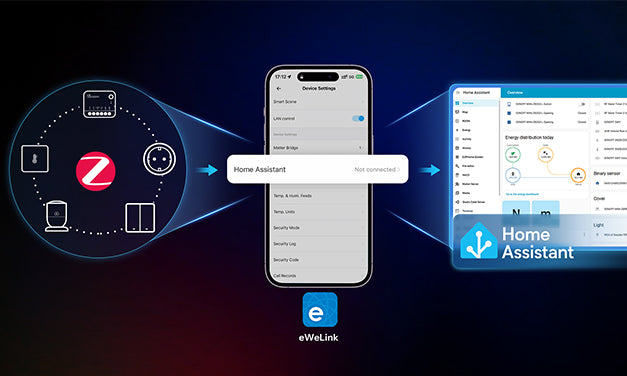
Cansado de comprar vários equipamentos e lidar com a integração ZHA complicada só para colocar seus dispositivos Zigbee no Home Assistant (HA)? Agora, uma atualização de firmware para o NSPanel Pro apresenta uma nova solução para integração Zigbee com Home Assistant – sem necessidade de novo hardware ou configuração complexa para integrar seus dispositivos inteligentes ao ecossistema HA.

Como funciona?
Atualização Principal
Agora, basta usar o novo portal "Home Assistant" para alcançar o seguinte:
✅ Sincronização em Massa: Sincronize todos os subdispositivos Zigbee dentro do ecossistema eWeLink em lote diretamente para seu Home Assistant.
✅ Redução de custos de hardware: Não é necessário comprar um conector Zigbee adicional, pois o NSPanel Pro pode lidar com a integração diretamente.
✅ Estabilidade em Nível Nativo: Dispositivos sincronizados suportam totalmente todos os recursos avançados do HA, como automações e painéis.
Três Passos para Configurar o NSPanel Pro para Integração Zigbee com Home Assistant
Passo 1: Atualização de Firmware
Primeiro, certifique-se de que a versão do firmware do seu NSPanel Pro esteja atualizada para v4.1.0 ou superior. Este é o ingresso para desbloquear todos os recursos seguintes.
Passo 2: Informações da Chave de Configuração
Este é o processo principal. No APP eWeLink, encontre seu dispositivo NSPanel Pro, acesse suas configurações e você descobrirá o novo portal "Home Assistant".
- Para alcançar a sincronização de dispositivos Zigbee, você precisa configurar as informações-chave. Você pode escolher entre Varredura Automática ou entrada manual. Se a auto-descoberta estiver selecionada, o endereço IP do HA e a porta do Broker MQTT serão preenchidos automaticamente nos campos de informação.

- Entrada Manual
-
- Abra um navegador e insira o endereço IPv4 LAN do roteador(ex.: 192.168.1.1) ao qual o Home Assistant está conectado. Faça login com sua senha para acessar o sistema de gerenciamento do roteador. Em "Concessão DHCP atribuída", você pode encontrar o endereço IPv4 correspondente ao Home Assistant.

-
- O Porta do Broker MQTT pode ser encontrado nas configurações do complemento Mosquitto broker no Home Assistant (ex.: 1883).

- Além de inserir o endereço IP do Home Assistant e a porta MQTT, você também deve configurar um nome de usuário e senha(crucial para uma conexão segura). Um guia detalhado para configurar isso está incluído abaixo.

Passo 3: Sincronização com Um Clique no Aplicativo
Uma vez que todas as informações estejam configuradas, você será direcionado para uma interface clara de Gerenciamento de Sincronização de Dispositivos. Nesta página, você pode gerenciar em lote todos os dispositivos Zigbee disponíveis prontos para sincronização.
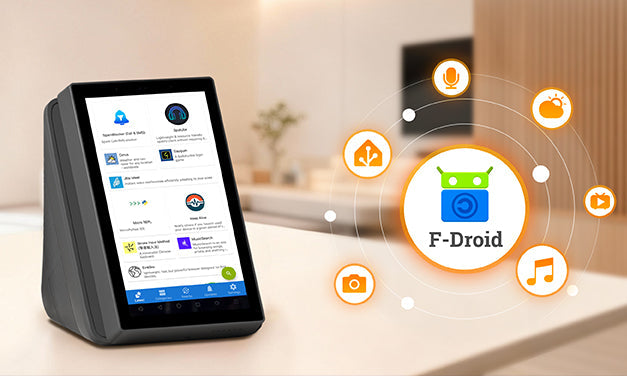
Potencializado pelo F-Droid! Transforme seu NSPanel Pro em um Hub HA Montado na Parede
- Gateway Local de Dispositivos: Gerencia diretamente dispositivos Zigbee sincronizados para uma resposta mais rápida.
- Terminal Completo de Controle HA: Projeta todo o seu painel do Home Assistant, automações e interface de controle de dispositivos no NSPanel Pro, permitindo controle centralizado, intuitivo e na ponta dos dedos.
Faça login com sua conta do Home Assistant—a experiência real está começando:
- Primeiro, navegue até integração "MQTT" para localizar os dispositivos que você acabou de sincronizar.

-
Aqui, você pode gerenciá-los como qualquer dispositivo nativo do HA: atribuir a cômodos, definir nomes amigáveis e criar cenários de automação, alcançando controle avançado totalmente local.

Comparação de Soluções: Tradicional vs. Nova
| Tradicional | NSPanel Pro | |
|
Requisitos de Hardware
|
Host HA + Dongle | Host HA + NSPanel Pro |
|
Complexidade da Configuração
|
Requer configuração de driver e integração | Pode ser configurado diretamente no app |
|
Método de Conexão
|
Deve ser adicionado via integração | Sincronização com um clique no app |
|
Método de Controle
|
Requer tablet/computador adicional | Controle na tela via F-Droid |
Pronto para experimentar por conta própria? Sincronize seus dispositivos Zigbee com o Home Assistant agora mesmo!
Anúncio
https://forum.ewelink.cc/t/nspanel-pro-roadmap-and-co-created-future/206240
Recebemos calorosamente você para compartilhar seu experiência e insights aqui—suas sugestões e histórias serão nossa maior motivação!
https://forum.ewelink.cc/c/sonoffnspanel-pro/47


Deixar comentário
Os comentários precisam ser aprovados antes da publicação.
Este site é protegido por hCaptcha e a Política de privacidade e os Termos de serviço do hCaptcha se aplicam.