















































Wprowadzenie
Termostatyczny zawór grzejnikowy kontroluje przepływ gorącej wody przez grzejnik, aby utrzymać docelową temperaturę w pomieszczeniu. Pozwala każdemu pokojowi mieć własne ustawienia temperatury i harmonogram ogrzewania, zamiast polegać na jednym centralnym termostacie.
Zawory Zigbee są dobrze przystosowane do takiej konfiguracji, ponieważ Zigbee używa niskomocowej komunikacji lokalnej i wspiera sieć mesh, która staje się bardziej niezawodna wraz z dodaniem kompatybilnych urządzeń zasilanych.
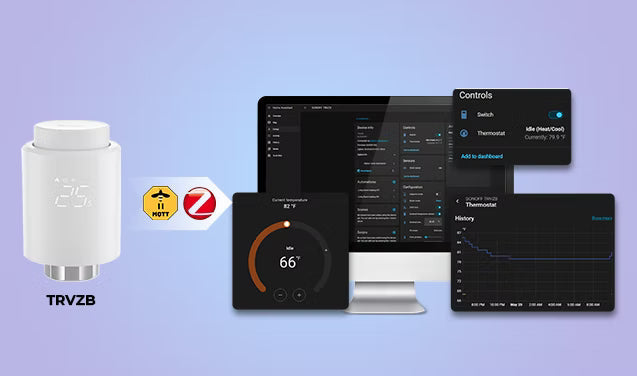
Po podłączeniu do Home Assistant przez ZHA lub Zigbee2MQTT kompatybilny TRV może być zarządzany lokalnie wraz z urządzeniami różnych marek. Umożliwia to lokalne automatyzacje, które mogą działać podczas braku internetu, zachowując większą kontrolę w sieci domowej.
Jednak kompatybilność i dostępne sterowania różnią się w zależności od modelu TRV i integracji. Niektóre urządzenia udostępniają tylko podstawowe sterowanie temperaturą, inne oferują także działanie HVAC, kalibrację temperatury, blokadę rodzicielską, wykrywanie otwartego okna lub dane o położeniu zaworu.
Ten przewodnik wyjaśnia, jak wybrać kompatybilny zawór termostatyczny Zigbee, podłączyć go do Home Assistant przez ZHA lub Zigbee2MQTT oraz skonfigurować praktyczne automatyzacje ogrzewania.
Na co zwrócić uwagę przed zakupem termostatycznego zaworu grzejnikowego Zigbee?
- Udostępnione encje — Minimum to aktualna temperatura, temperatura docelowa, tryb HVAC i poziom baterii. Bardziej zaawansowane TRV mogą także udostępniać stan działania HVAC, korektę temperatury.
- Funkcje dokładności temperatury — To wpływa na to, jak szybko i precyzyjnie TRV reaguje na rzeczywiste warunki w pomieszczeniu.
- Kompatybilność zaworu — M30×1,5 mm to najczęstszy rozmiar zaworu grzejnikowego w Europie, ale niektóre systemy używają innych mocowań, takich jak zawory RA, RAV lub Danfoss. Sprawdź, czy w zestawie są adaptery przed zakupem.
- Rodzaj baterii i żywotność — Baterie AA zazwyczaj działają dłużej niż AAA i są łatwiejsze do wymiany. Niektóre zawory TRV używają własnych pakietów baterii, co może być mniej wygodne na dłuższą metę.
- Hałas silnika — To ma większe znaczenie, niż wielu osobom się wydaje, zwłaszcza w sypialniach, gdzie częste regulacje zaworu mogą być zauważalne w nocy.
TRVZB: Niezawodny zawór termostatyczny Zigbee do Home Assistant

SONOFF Zigbee Termostatyczny Zawór Grzejnikowy | TRVZB
$27.90
【Inteligentna kontrola】SONOFF Zigbee Termostatyczny Zawór Grzejnikowy obsługuje pełne funkcje smart, w tym zdalne sterowanie przez aplikację, polecenia głosowe, harmonogramy i zarządzanie grupami...
Zobacz produktKluczowe cechy:
- Lokalna kontrola w Home Assistant — kompatybilny z ZHA i Zigbee2MQTT, nie wymaga konta w chmurze
- Encja działania HVAC — obsługuje automatyzację kotła opartą na zapotrzebowaniu od razu po wyjęciu z pudełka
- Żywotność baterii — zazwyczaj ponad 6 miesięcy na 3×AA bateriach alkalicznych (brak w zestawie)
- Tryb adaptacyjny PID — od wersji firmware v1.4.4+ automatycznie dostosowuje poziom otwarcia zaworu na podstawie zmian temperatury w pomieszczeniu zamiast prostego włącz/wyłącz, co pomaga utrzymać stabilniejszą temperaturę
- Wykrywanie otwartego okna — automatycznie zamyka zawór przy nagłym spadku temperatury
- Ochrona przed mrozem i blokada rodzicielska — przydatne zabezpieczenia działające nawet gdy HA jest offline
- Cicha praca silnika — ogólnie odpowiedni do sypialni i użytku nocnego
- Szeroka kompatybilność zaworów — natywnie pasuje do M30×1.5mm, w zestawie adaptery do innych popularnych typów 👉 Lista kompatybilnych zaworów TRVZB
Jak dodać termostatyczny zawór grzejnikowy Zigbee do Home Assistant?
ZHA kontra Zigbee2MQTT
- ZHA (Zigbee Home Automation) to natywna integracja wbudowana bezpośrednio w Home Assistant. Nie wymaga dodatkowego oprogramowania — proces parowania jest prosty, a wszystko działa w interfejsie HA. Dla większości początkujących to łatwiejszy punkt startowy.
- Zigbee2MQTT (Z2M) to osobna aplikacja, która komunikuje się z Home Assistant za pomocą MQTT. Konfiguracja jest bardziej złożona, ale istnieje dłużej i ma bardzo aktywną społeczność.
Co jest potrzebne przed konfiguracją
- Home Assistant — działający z ZHA lub skonfigurowanym Zigbee2MQTT
- Koordynator lub dongle Zigbee — zarządza Twoją siecią Zigbee (np. ZBDongle-P, ZBDongle-E, PoE Dongle | Dongle-M, Dongle Plus MG24, Dongle-LMG21). Jeśli jeszcze go nie skonfigurowałeś, te przewodniki obejmują wszystko:
- Zigbee TRV — kompatybilny z ZHA lub Zigbee2MQTT. W tym przewodniku jako przykład używamy TRVZB.
Uwaga:
- Przed parowaniem upewnij się, że Twój TRV jest fizycznie zamontowany na grzejniku i włączony. Większość urządzeń wykonuje krótką autokalibrację przy pierwszym uruchomieniu. Sprawdź instrukcje producenta, aby poznać dokładne kroki — zwykle zajmuje to mniej niż minutę.
- Jeśli nadal konfigurujesz swoją sieć Zigbee, warto najpierw wybrać niezawodnego koordynatora. Automatyzacje grzewcze działają najlepiej, gdy podstawowa sieć Zigbee jest stabilna.
Przez ZHA
- Wprowadź swój TRV w tryb parowania — zazwyczaj przez przytrzymanie przycisku przez kilka sekund, aż dioda LED zacznie migać. Zawsze sprawdzaj instrukcję urządzenia, aby poznać dokładne kroki parowania.
- Dodaj urządzenie w ZHA: przejdź do Ustawienia → Urządzenia i usługi → ZHA → Dodaj urządzenie. ZHA przeskanuje i znajdzie Twój TRV.


- Skonfiguruj encje klimatu — po sparowaniu zmień nazwę urządzenia na rozpoznawalną (np. „Grzejnik w salonie”) i przypisz je do pomieszczenia.

-
Zweryfikuj urządzenie w Home Assistant:
- Przejdź do Ustawienia → Urządzenia i usługi → ZHA → Urządzenia.
- Otwórz stronę urządzenia TRV.
- Twój TRV pojawi się jako encja klimatu, co pozwoli ustawiać konkretne temperatury, monitorować działanie ogrzewania, zmieniać tryby HVAC, dostosowywać temperatury docelowe, śledzić poziom baterii, tworzyć automatyzacje bezpośrednio z Home Assistant i więcej.


Przez Zigbee2MQTT
- Włącz permit join — w Z2M kliknij "Permit Join" na pulpicie. To otwiera Twoją sieć Zigbee na nowe urządzenia.
- Włącz tryb parowania TRV — tak jak wyżej, przytrzymaj przycisk parowania, aż zacznie nadawać.
- Zmień nazwę i sprawdź, czy encje klimatu są widoczne w Home Assistant.
- Udostępnij encje klimatu — po sparowaniu Z2M automatycznie utworzy encje klimatu dla Twojego TRV. Może być konieczne ich przemianowanie w HA dla łatwiejszej identyfikacji.
- 📖 Jak synchronizować urządzenia Zigbee z Home Assistant przez MQTT – kompletny przewodnik konfiguracji brokera MQTT i synchronizacji urządzeń.
- 📖 Urządzenia Zigbee współpracujące z Home Assistant przez Zigbee2MQTT – przewodnik instalacji i konfiguracji Zigbee2MQTT.
Jak zautomatyzować ogrzewanie za pomocą TRV w Home Assistant?
Skonfiguruj inteligentne harmonogramy ogrzewania
Użyj Pomocnika Harmonogramu w Home Assistant, aby określić, kiedy każde pomieszczenie powinno przełączać się między temperaturami komfortowymi a ekologicznymi. Pozwala to sypialniom, pokojom dziennym i domowym biurom stosować oddzielne harmonogramy temperatur zamiast ogrzewać cały dom jednocześnie.
- Obniż temperaturę w sypialniach na noc
- Ogrzej salon przed porankiem
- Zmniejsz ogrzewanie w godzinach pracy
- Automatycznie przełączaj na temperatury eco późno w nocy
👉 W Home Assistant przejdź do: Ustawienia → Urządzenia i usługi → Pomocnicy → Utwórz pomocnika → Harmonogram
Następnie użyj harmonogramu jako wyzwalacza lub warunku w automatyzacji, która zmienia docelową temperaturę TRV.
Wstrzymaj ogrzewanie, gdy okno jest otwarte
Połącz TRV z czujnikiem drzwi lub okna, aby zatrzymać niepotrzebne ogrzewanie podczas wietrzenia pokoju. Gdy okno się otworzy, Home Assistant może obniżyć docelową temperaturę lub przełączyć TRV na obsługiwany tryb eco lub wyłączony. Po zamknięciu okna przywróć poprzednią temperaturę po krótkim opóźnieniu.
Jest to zwykle bardziej niezawodne niż poleganie wyłącznie na nagłym spadku temperatury, ponieważ automatyzacja reaguje natychmiast na stan okna.
Niektóre TRV mają również wbudowane wykrywanie otwartego okna, ale metoda wykrywania, czas oczekiwania i dostępne ustawienia różnią się w zależności od modelu.
Użyj wykrywania obecności do inteligentnej kontroli ogrzewania
Użyj wykrywania obecności lub zajętości, aby zmniejszyć ogrzewanie, gdy pokój lub dom jest pusty. Home Assistant może przełączyć wybrane TRV na temperaturę ekologiczną po okresie bezczynności i przywrócić normalny punkt nastawy, gdy ktoś wróci lub gdy pokój ma być ponownie używany.
To sprawdza się dobrze w przypadku:
- Salony używane tylko o określonych porach
- Domowe biura z nieregularnym harmonogramem
- Pokoje gościnne
- Tryb nieobecności dla całego domu
Dodaj opóźnienie przed obniżeniem temperatury, aby krótkie okresy bezczynności nie wywoływały niepotrzebnych zmian.
Steruj centralnym ogrzewaniem za pomocą zapotrzebowania TRV
Jeśli używasz centralnego systemu grzewczego z kompatybilnym sterownikiem kotła, Home Assistant może korzystać z danych z Zigbee TRV jako sygnałów zapotrzebowania na ogrzewanie na poziomie pomieszczeń. Zamiast uruchamiać kocioł według stałego harmonogramu, system może ogrzewać tylko wtedy, gdy jeden lub więcej pokoi faktycznie potrzebuje ciepła.
W zależności od modelu TRV i integracji, Home Assistant może używać encji takich jak akcja HVAC, stan ogrzewania, zapotrzebowanie na ciepło, pozycja zaworu lub innych udostępnionych sygnałów.
Typowa konfiguracja działa w ten sposób:
- TRV zgłasza, że pokój wymaga ogrzewania.
- Home Assistant sprawdza, czy inne pokoje również potrzebują ciepła.
- Jeśli istnieje zapotrzebowanie na ogrzewanie, Home Assistant aktywuje kocioł lub przekaźnik grzewczy.
- Gdy żaden pokój nie wymaga dodatkowego ogrzewania, kocioł może przejść w tryb czuwania.
Wskazówka: Częste włączanie i wyłączanie może obniżyć wydajność i wpłynąć na działanie systemu. Dodaj odpowiednie opóźnienia lub minimalne czasy pracy i zachowaj zabezpieczenia producenta kotła.
Wniosek
Najczęściej zadawane pytania
Pytanie 1: Czy Zigbee termostatyczne zawory grzejnikowe działają z Home Assistant?
- Kontroluj temperaturę w pomieszczeniu lokalnie
- Buduj harmonogramy ogrzewania
- Twórz automatyzacje dla poszczególnych pomieszczeń
- Zmniejsz niepotrzebne ogrzewanie
- Monitoruj historię ogrzewania i poziomy baterii
Pytanie 2: Co jest lepsze dla TRV: ZHA czy Zigbee2MQTT?
Pytanie 3: Czy Zigbee TRV mogą działać bez internetu?
Pytanie 4: Czy mogę automatyzować mój kocioł za pomocą TRV w Home Assistant?
- Włącz kocioł tylko wtedy, gdy pomieszczenie zażąda ciepła
- Wyłącz kocioł, gdy wszystkie pomieszczenia osiągną docelową temperaturę
To jedna z największych zalet integracji TRV z Home Assistant zamiast korzystania z samodzielnych harmonogramów grzejników.
Pytanie 5: Dlaczego odczyt temperatury mojego TRV jest niedokładny?
Pytanie 6: Czy potrzebuję zewnętrznego czujnika temperatury?
Q7: Co się stanie z moim ogrzewaniem, gdy Home Assistant przestanie działać?
- Jeśli harmonogram jest przechowywany tylko w Home Assistant (np. za pomocą automatyzacji czasowych), harmonogram ogrzewania przestanie działać, gdy HA będzie offline. TRV zachowa ostatnio ustawioną temperaturę lub nie będzie nic robić, aż HA wróci.
- Jeśli Twój TRV ma własny wbudowany harmonogram, może kontynuować jego realizację niezależnie.
- Automatyzacje ogrzewania na żądanie (np. włączanie kotła tylko wtedy, gdy TRV wymaga ciepła) również przestaną działać, ponieważ zarówno logika decyzyjna, jak i wysyłanie poleceń zależą od Home Assistant.
Q8: Dlaczego mój TRV ciągle się otwiera i zamyka?
- Agresywna kalibracja temperatury
- Złe umiejscowienie czujnika
- Szybkie wahania temperatury w pomieszczeniu
- Silne przeciągi w pobliżu grzejnika
Q9: Dlaczego grzejnik pozostaje ciepły po osiągnięciu docelowej temperatury?
Q10: Czym jest tryb adaptacyjny PID w TRVZB?


Zostaw komentarz
Wszystkie komentarze są moderowane przed opublikowaniem.
Ta strona jest chroniona przez hCaptcha i obowiązują na niej Polityka prywatności i Warunki korzystania z usługi serwisu hCaptcha.