















































Introduzione
Una valvola termostatica controlla il flusso di acqua calda attraverso un radiatore per mantenere la temperatura target della stanza. Permette a ogni stanza di seguire la propria impostazione di temperatura e programma di riscaldamento invece di dipendere da un termostato centrale.
I TRV Zigbee sono particolarmente adatti a questo tipo di configurazione perché Zigbee usa comunicazione locale a basso consumo e supporta una rete mesh che diventa più affidabile man mano che si aggiungono dispositivi alimentati compatibili.
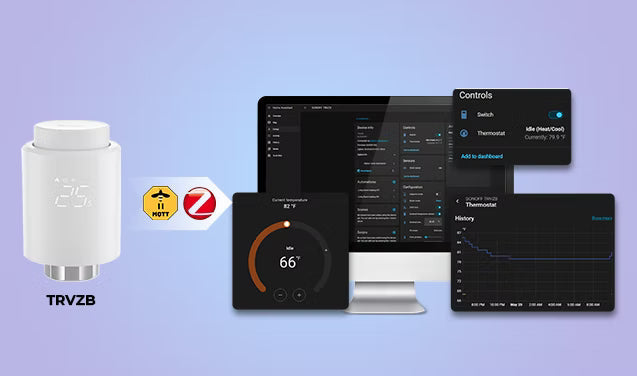
Collegato a Home Assistant tramite ZHA o Zigbee2MQTT, un TRV compatibile può essere gestito localmente insieme a dispositivi di marche diverse. Questo permette automazioni locali che continuano a funzionare anche senza internet, mantenendo più controllo all’interno della rete domestica.
Tuttavia, compatibilità e controlli disponibili variano a seconda del modello di TRV e dell’integrazione. Alcuni dispositivi espongono solo controlli base della temperatura, mentre altri forniscono anche azione HVAC, calibrazione temperatura, blocco bambini, rilevamento finestra aperta o dati sulla posizione della valvola.
Questa guida spiega come scegliere una valvola termostatica Zigbee compatibile, collegarla a Home Assistant tramite ZHA o Zigbee2MQTT e configurare automazioni di riscaldamento pratiche.
Cosa cercare prima di acquistare una valvola termostatica Zigbee?
- Entità esposte — Al minimo, cerca temperatura attuale, temperatura target, modalità HVAC e livello batteria. TRV più avanzati possono anche esporre stato azione HVAC, controlli di offset temperatura.
- Precisione della temperatura — Questo influisce su quanto il TRV risponde accuratamente alle condizioni reali della stanza.
- Compatibilità della valvola — M30×1.5mm è la dimensione più comune per le valvole dei radiatori in Europa, ma alcuni sistemi usano raccordi diversi come valvole RA, RAV o Danfoss. Verifica se sono inclusi adattatori prima di acquistare.
- Tipo di batteria e durata — Le batterie AA generalmente durano più a lungo delle AAA e sono più facili da sostituire. Alcuni TRV usano pacchi batteria proprietari, che possono essere meno comodi a lungo termine.
- Rumore del motore — Questo è più importante di quanto molti pensino, soprattutto nelle camere da letto dove frequenti regolazioni della valvola possono diventare fastidiose di notte.
TRVZB: Un affidabile termostato Zigbee per Home Assistant

Valvola termostatica Zigbee SONOFF | TRVZB
$27.90
【Controllo intelligente】La valvola termostatica Zigbee SONOFF supporta tutte le funzioni smart, inclusi controllo remoto tramite app, comandi vocali, programmazione e gestione di gruppi...
Visualizza prodottoCaratteristiche principali:
- Controllo locale tramite Home Assistant — compatibile con ZHA e Zigbee2MQTT, non richiede account cloud
- Entità azione HVAC — supporta l'automazione della caldaia basata sulla domanda fin da subito
- Durata della batteria — tipicamente oltre 6 mesi con 3 batterie alcaline AA (non incluse)
- Modalità adattiva PID — dal firmware v1.4.4+, regola automaticamente il livello di apertura della valvola in base alle variazioni di temperatura della stanza invece di un semplice accendi/spegni, aiutando a mantenere temperature più stabili
- Rilevamento finestra aperta — chiude automaticamente la valvola quando rileva un improvviso calo di temperatura
- Protezione dal gelo e blocco per bambini — utili misure di sicurezza che funzionano anche quando HA è offline
- Funzionamento silenzioso del motore — generalmente adatto per camere da letto e uso notturno
- Ampia compatibilità delle valvole — si adatta nativamente a M30×1.5mm, con adattatori inclusi per altri tipi comuni 👉 Elenco valvole compatibili TRVZB
Come aggiungere una valvola termostatica Zigbee a Home Assistant?
ZHA vs Zigbee2MQTT
- ZHA (Zigbee Home Automation) è l'integrazione nativa incorporata direttamente in Home Assistant. Non è necessario alcun software aggiuntivo — il processo di associazione è semplice e tutto si gestisce dall'interfaccia di HA. Per la maggior parte dei principianti, questo è il punto di partenza più facile.
- Zigbee2MQTT (Z2M) è un'applicazione separata che comunica con Home Assistant tramite MQTT. La configurazione è più complessa, ma esiste da più tempo ed è supportata da una comunità molto attiva.
Cosa ti serve prima della configurazione
- Home Assistant — configurato e funzionante con ZHA o Zigbee2MQTT
- Un coordinatore o dongle Zigbee — gestisce la tua rete Zigbee (ad esempio, ZBDongle-P, ZBDongle-E, PoE Dongle | Dongle-M, Dongle Plus MG24, Dongle-LMG21). Se non ne hai ancora configurato uno, queste guide coprono tutto:
- Un TRV Zigbee — compatibile con ZHA o Zigbee2MQTT. In questa guida usiamo il TRVZB come dispositivo di esempio.
Nota:
- Prima di associare, assicurati che il tuo TRV sia installato fisicamente sul radiatore e acceso. La maggior parte dei dispositivi esegue anche una breve autocalibrazione al primo avvio. Controlla le istruzioni del produttore per i passaggi esatti — di solito richiede meno di un minuto.
- Se stai ancora configurando la tua rete Zigbee, vale la pena scegliere prima un coordinatore affidabile. Le automazioni di riscaldamento tendono a funzionare meglio quando la rete Zigbee sottostante è stabile.
Tramite ZHA
- Metti il tuo TRV in modalità di associazione — di solito tenendo premuto un pulsante per alcuni secondi finché un LED non lampeggia. Consulta sempre il manuale del dispositivo per i passaggi esatti dell'associazione.
- Aggiungi il dispositivo in ZHA: vai su Impostazioni → Dispositivi & Servizi → ZHA → Aggiungi dispositivo. ZHA eseguirà la scansione e troverà il tuo TRV.


- Configura le entità climate — dopo l'associazione, rinomina il dispositivo con un nome riconoscibile (es. "Radiatore Soggiorno") e assegnalo a una stanza.

-
Verifica il dispositivo in Home Assistant:
- Vai su Impostazioni → Dispositivi & Servizi → ZHA → Dispositivi.
- Apri la pagina del dispositivo TRV.
- Il tuo TRV apparirà come entità climate, permettendoti di impostare temperature specifiche, monitorare l'attività di riscaldamento, cambiare modalità HVAC, regolare temperature target, controllare i livelli della batteria, creare automazioni direttamente da Home Assistant e altro.


Tramite Zigbee2MQTT
- Abilita permit join — in Z2M, clicca su "Permit Join" nella dashboard. Questo apre la tua rete Zigbee a nuovi dispositivi.
- Metti il tuo TRV in modalità pairing — come sopra, tieni premuto il pulsante di pairing finché non inizia a trasmettere.
- Rinominalo e verifica che le entità climate siano esposte in Home Assistant.
- Esponi le entità climate — una volta associato, Z2M creerà automaticamente entità climate per il tuo TRV. Potrebbe essere necessario rinominarle in HA per una più facile identificazione.
- 📖 Come sincronizzare dispositivi Zigbee con Home Assistant tramite MQTT – guida completa alla configurazione del Broker MQTT e sincronizzazione dispositivi.
- 📖 Dispositivi Zigbee funzionano con Home Assistant tramite Zigbee2MQTT – guida all'installazione e configurazione di Zigbee2MQTT.
Come automatizzare il riscaldamento con TRV in Home Assistant?
Configura Programmazioni di Riscaldamento Intelligenti
Usa un Assistente di Programmazione in Home Assistant per definire quando ogni stanza deve passare tra temperature di comfort ed eco. Questo permette a camere da letto, soggiorni e uffici domestici di seguire programmi di temperatura separati invece di riscaldare tutta la casa contemporaneamente.
- Abbassare la temperatura delle camere da letto durante la notte
- Riscalda il soggiorno prima del mattino
- Riduci il riscaldamento durante le ore di lavoro
- Passa automaticamente a temperature eco a tarda notte
👉 In Home Assistant, vai su: Impostazioni → Dispositivi e servizi → Helper → Crea Helper → Programma
Poi usa il programma come trigger o condizione in un'automazione che modifica la temperatura target del TRV.
Pausa il riscaldamento quando si apre una finestra
Combina un TRV con un sensore di porta o finestra per interrompere il riscaldamento inutile mentre una stanza viene ventilata. Quando la finestra si apre, Home Assistant può abbassare la temperatura target o passare il TRV a una modalità eco o spento supportata. Quando la finestra si chiude, ripristina la temperatura precedente dopo un breve ritardo.
Questo è solitamente più affidabile che basarsi solo su un improvviso calo di temperatura, poiché l'automazione risponde immediatamente allo stato della finestra.
Alcuni TRV includono anche il rilevamento integrato di finestre aperte, ma il metodo di rilevamento, il timeout e le impostazioni disponibili variano a seconda del modello.
Usa il rilevamento di presenza per un controllo intelligente del riscaldamento
Usa il rilevamento di presenza o occupazione per ridurre il riscaldamento quando una stanza o la casa è vuota. Home Assistant può passare i TRV selezionati a una temperatura eco dopo un periodo di inattività e ripristinare il setpoint normale quando qualcuno torna o quando si prevede di usare di nuovo la stanza.
Questo funziona bene per:
- Soggiorni usati solo in certi momenti
- Uffici domestici con orari irregolari
- Camere degli ospiti
- Modalità assenza per tutta la casa
Aggiungi un ritardo prima di abbassare la temperatura in modo che brevi periodi di inattività non causino cambiamenti inutili.
Controlla il riscaldamento centralizzato con la richiesta del TRV
Se usi un sistema di riscaldamento centralizzato con un controller di caldaia compatibile, Home Assistant può utilizzare i dati dei TRV Zigbee come input di richiesta di riscaldamento a livello di stanza. Invece di far funzionare la caldaia con un programma fisso, il sistema può riscaldare solo quando una o più stanze necessitano effettivamente di calore.
A seconda del modello di TRV e dell'integrazione, Home Assistant può utilizzare entità come azione HVAC, stato del riscaldamento, richiesta di riscaldamento, posizione della valvola o altri segnali esposti.
Una configurazione comune funziona così:
- Un TRV segnala che una stanza necessita di riscaldamento.
- Home Assistant verifica se anche altre stanze richiedono calore.
- Se c'è richiesta di riscaldamento, Home Assistant attiva la caldaia o il relè del riscaldamento.
- Quando nessuna stanza necessita di calore aggiuntivo, la caldaia può tornare in standby.
Consiglio: Cicli frequenti di accensione/spegnimento possono ridurre l'efficienza e influire sulle prestazioni del sistema. Aggiungi ritardi appropriati o tempi minimi di funzionamento e mantieni attivi i controlli di sicurezza del produttore della caldaia.
Conclusione
Domande frequenti
D1: Le valvole termostatiche Zigbee funzionano con Home Assistant?
- Controlla la temperatura della stanza localmente
- Costruisci programmi di riscaldamento
- Crea automazioni stanza per stanza
- Riduci il riscaldamento non necessario
- Monitora la cronologia del riscaldamento e i livelli della batteria
D2: Qual è meglio per i TRV: ZHA o Zigbee2MQTT?
D3: I TRV Zigbee possono funzionare senza internet?
D4: Posso automatizzare la caldaia usando i TRV in Home Assistant?
- Accendi la caldaia solo quando una stanza richiede calore
- Spegni la caldaia quando tutte le stanze raggiungono la temperatura desiderata
Questo è uno dei maggiori vantaggi dell'integrazione dei TRV con Home Assistant rispetto all'uso di programmi di riscaldamento indipendenti.
D5: Perché la lettura della temperatura del mio TRV è imprecisa?
D6: Ho bisogno di un sensore di temperatura esterno?
Q7: Cosa succede al mio riscaldamento se Home Assistant va offline?
- Se il tuo programma è memorizzato solo in Home Assistant (ad esempio, usando automazioni basate sul tempo), il programma di riscaldamento smetterà di funzionare quando HA è offline. Il TRV manterrà l'ultima temperatura impostata o non farà nulla finché HA non tornerà online.
- Se il tuo TRV ha un programma integrato, può continuare a seguirlo indipendentemente.
- Le automazioni di riscaldamento su richiesta (ad esempio, accendere la caldaia solo quando un TRV richiede calore) smetteranno di funzionare perché sia la logica decisionale che l'invio dei comandi dipendono da Home Assistant.
Q8: Perché il mio TRV continua ad aprirsi e chiudersi?
- Calibrazione aggressiva della temperatura
- Posizionamento errato del sensore
- Fluttuazioni rapide della temperatura ambiente
- Correnti d'aria forti vicino al radiatore
Q9: Perché il radiatore rimane caldo dopo aver raggiunto la temperatura desiderata?
Q10: Cos'è la modalità adattativa PID sul TRVZB?


Commenta
Nota che i commenti devono essere approvati prima di essere pubblicati.
Questo sito è protetto da hCaptcha e applica le Norme sulla privacy e i Termini di servizio di hCaptcha.