





Introduction
Open-source platforms like Home Assistant and Zigbee2MQTT make it easier to build a multi-protocol smart home. Running Zigbee, Thread, and Z-Wave side by side calls for better gateway performance and more flexible deployment options.
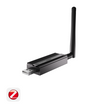
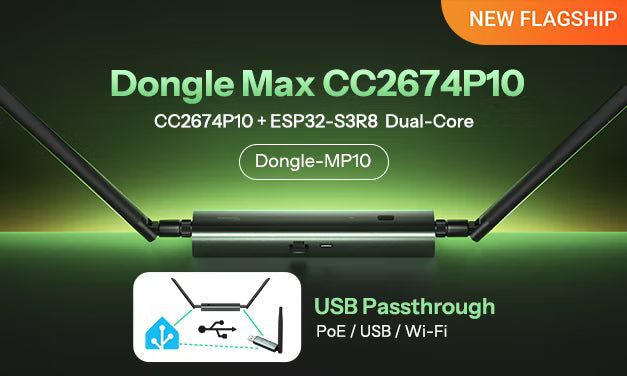
Introducing the SONOFF Dongle Max CC2674P10 (Dongle-MP10), the new flagship in the SONOFF Dongle Max lineup.
Dongle-MP10 builds on the design and core features of Dongle-M and is the first model in the Dongle Max series to offer USB passthrough. It's a high-performance PoE dongle for Zigbee and Thread. It also lets your host access compatible USB dongles over the local network, making it a central connection point for a more flexible multi-protocol smart home setup.

USB Passthrough Breaks the "Spatial Shackles" of Traditional Dongle Deployment
The most groundbreaking new feature in the upgrade from Dongle-M to Dongle-MP10 is USB Passthrough. It removes a key limitation of traditional setups by letting you use compatible USB dongles without plugging them directly into the host.
3 Limitations of a Traditional USB Dongle Setup
- Limited placement. A traditional USB dongle must plug directly into a USB port on your Home Assistant host, which limits where you can place it.
- Limited USB ports. If you use separate dongles for Zigbee, Z-Wave, and Thread, you can quickly run out of USB ports on your host.
- Wasted hardware. When you upgrade your host, older USB dongles may go unused or be replaced, even if they still work.
👉 See the Dongle-MP10 USB Passthrough Guide.

The Dongle-MP10 Solution and Practical Benefits
Connect a USB-C hub (we recommend a hub from an established brand such as Anker or UGREEN) to the Dongle-MP10. Then plug your compatible USB dongles (such as Z-Wave, Thread, or Zigbee dongles, with support prioritized for SONOFF and Home Assistant Brands) into the hub. Dongle-MP10 lets your host access those USB dongles over the local network, even if the host is in a separate server room or tucked away in a network cabinet.
👉 Explore the SONOFF USB dongles.
● Extend your host's reach. Keep your Home Assistant host in the network cabinet and set up the Dongle-MP10 and the USB hub where your dongles get the strongest signal, such as in the living room or hallway. This helps you work around interference near the host and improve wireless coverage without moving the host.
● Bring Zigbee, Z-Wave, and Thread into one setup. A single host can manage devices that use different protocols at the same time. Dongle-MP10 can pass through up to two compatible USB dongles at once, allowing devices on different protocols to work together in the same smart home system. This removes the requirement for the USB dongles to be in the same room as the host.
● Keep your existing SONOFF dongles in use and upgrade seamlessly. If you already own a compatible older SONOFF USB dongle, simply plug it into the hub connected to Dongle-MP10 and keep using it over the local network. Reusing your existing hardware can significantly reduce the cost of upgrading or expanding your system.
Dual-Chip Design with Enhanced Performance and Expanded Connectivity
Dongle-MP10 features a high-performance dual-chip architecture that pairs the TI CC2674P10 (a flagship chip for Zigbee/Thread) with the ESP32-S3R8 (its main Wi-Fi controller).
Compared with Dongle-M, Dongle-MP10 has four times as much PSRAM and a higher-performance MCU. These upgrades provide ample processing power and memory headroom for the Web Console, USB Passthrough, and additional features such as Webhooks and WireGuard, so they can run smoothly and reliably.
Key Features:
● Multiple connection options and flexible power. Dongle-MP10 can be powered via Power over Ethernet (PoE) or USB and also supports Wi-Fi connectivity. These options make it easy to set up in different network environments, from server rooms and network cabinets to home offices.
● Open-source firmware for DIY enthusiasts. Dongle-MP10 supports the official firmware and is fully compatible with ESPHome and Tasmota. These open-source options give you full local control and extensive customization options.
● Web Console management. Open the Web Console using the domain name (dongle-mp10.local) or the default IP address (192.168.42.1). From there, you can easily update or switch firmware and access built-in networking features such as MQTT and WireGuard.
● Industrial-grade construction. The aluminum alloy and polycarbonate (PC) housing resists moisture and corrosion. Dongle-MP10 meets applicable CE, FCC, ISED, RoHS, and California Proposition 65 requirements. Its suggested retail price is just €48.90. Compared with plastic-housed models with similar specifications, including some from SMLIGHT, Dongle-MP10 offers more capable hardware, better build quality, and a more competitive price.

With a single Dongle-MP10, you can connect compatible USB Dongles to your host over the network, freeing your smart home setup from the physical limits of the host's USB ports.
Whether you're an advanced user looking to streamline your existing wiring or a smart home enthusiast looking to bring multiple protocols together and reuse the hardware you already own, Dongle-MP10 offers the most powerful and flexible gateway for local control on the market today.
*Expand your setup with third-party open-source firmware. Both Dongle-M and Dongle-MP10 now support flashing ESPHome and Tasmota.
👉 If you'd like to learn more, visit the guide of Running ESPHome Firmware on SONOFF Dongle-MP10.

Commenta
Nota che i commenti devono essere approvati prima di essere pubblicati.
Questo sito è protetto da hCaptcha e applica le Norme sulla privacy e i Termini di servizio di hCaptcha.