














































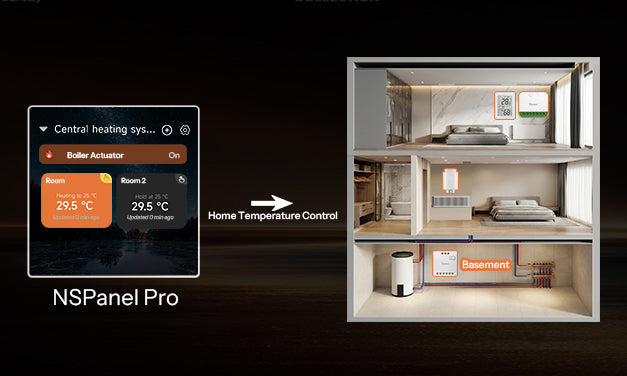
A legújabb NSPanel Pro v4.3.0 frissítés egy forradalmi új funkciót vezet be: Központi fűtés. Ez nem csupán egy helyiségi termosztát frissítése — ez egy rendszer szintű intelligens hőmérséklet-szabályozási megoldás az egész otthonod számáraTávoli koordinációt engedélyezve integrálja az egyedi helyiségi termosztátokat és a hőforrás működtetőket egy egységes, központilag kezelt és automatizált központi fűtési rendszerbe. Ez a megközelítés rendszerszinten oldja meg a több helyiség független hőmérsékletének fenntartását, miközben optimalizálja az energiafelhasználást.

Hogyan működik?
A központi fűtési funkció szíve egy két szintű virtuális termosztát architektúra (Központi hővezérlő + helyiségi termosztátok). Ezek az elemek harmonikusan működnek együtt, hogy intelligens hőmérséklet-szabályozást biztosítsanak egyetlen ponttól az egész házban.
1. szint: Központi hőműködtető
Először szükséged lesz egy működtető eszközre, amely képes vezérelni a központi hőforrásodat (pl. kazán vagy hőszivattyú). Ez lehet egy barkács modul, okos kapcsoló vagy bármilyen okos eszköz be-/kikapcsolási képességgel. Ez a lépés távoli vezérlést biztosít a fő fűtési berendezésed felett.
2. szint: Helyiségi termosztátok
Ezután létrehozhatsz virtuális "helyiségi termosztátokat" az egyes helyiségekben a hőmérséklet-érzékelő és vezérlő eszközök párosításával. Háromféleképpen konfigurálhatók:
- 1. lehetőség: Hőmérséklet-érzékelő + termosztát kapcsoló
- 2. lehetőség: Hőmérséklet-érzékelő + virtuális kapcsoló
- 3. lehetőség: Termosztatikus radiátorszelep (TRV)
Intelligens logika működés közben:
- Amikor egy helyiség hőmérséklet-érzékelője túl hideget érzékel, az ahhoz tartozó "helyiségi termosztát" hőigényt jelez.
- A beépített központi fűtési logika kihasználásával, A központi hőműködtető automatikusan aktiválja a hőforrást, amíg bármelyik helyiségi termosztát nyitva van (azaz "fűtési" módban). A hőforrás csak akkor kapcsol ki, ha az összes helyiség elérte a kívánt hőmérsékletet. Ez biztosítja, hogy az energia csak ott és akkor jusson el, ahol szükség van rá, megelőzve a felesleges fogyasztást.
Alapérték & Alkalmazási Forgatókönyvek
Ez a funkció zökkenőmentesen alkalmazkodik a különböző otthoni elrendezésekhez, a lakásoktól a villákig, kézzelfogható előnyöket nyújtva az okos otthoni élményedhez.
- 1. Forgatókönyv: Egyedi pontosságú vezérlés (Egy-egy mód)
- Hozzon létre szobatermosztátot egy egyedi helyiséghez, például hálószobához, otthoni irodához vagy stúdiólakáshoz.
- Ideális:Kis lakások vagy egyedi helyiségek, amelyek fókuszált klímaszabályozást igényelnek, lehetővé téve az adott zónában az automatikus állandó hőmérsékletet.
- 2. Forgatókönyv: Teljes házas zónakezelés (Egy-több mód)
- Ez a Központi Fűtés tipikus alkalmazása. Ha egy okos vezérlőt köt a teljes ház kazánjához, és összekapcsolja a Szobatermosztátokkal a nappaliban, hálószobákban és más helyiségekben, biztosítja, hogy a kazán csak akkor kapcsoljon be, amikor az adott zónák ténylegesen hőt igényelnek.
- Ideális: Többnyire családi házak vagy nagyobb lakások, amelyek növelik a kényelmet és a rendszer egészére kiterjedő hőmérséklet-szabályozás kényelmét.
- 3. Forgatókönyv: Komplex Rendszerintegráció (Több-több mód)
-
- A rendszer egyszerre képes több Központi Fűtési beállítást kezelni, mindegyik saját hőforrással és helyiségi vezérlő eszközökkel. Például egyetlen egységes platformról központilag kezelheti mind a „fűtőkazán + radiátorszelepek”, mind a „hőszivattyú + padlófűtési gyűjtők” rendszert.
- Ideális: Komplex, többforrású HVAC rendszerekkel rendelkező otthonok, amelyek központosított, intelligens vezérlést keresnek.
Főbb Jellemzők
- Testreszabható Végrehajtási Ütemtervek
- Minden Szobatermosztát támogatja a részletes, heti ütemterveket. Beállíthatja az "Otthon" módot (22°C) hétköznap reggel 8 órára, az "Alvás" módot (18°C) este 11 órára, és teljesen eltérő ütemtervet a hétvégékre. Az ütemezésen kívüli időszakokban a rendszer automatikusan fagyvédelem módba lép, hogy megakadályozza a csövek befagyását.
- Okos Preferenciák és Egykattintásos Szinkronizálás
- A rendszer öt beépített preferenciamintával érkezik: Komfort, Energiatakarékos, Alvás, Otthon és Távol, amelyek szintén testreszabhatók. Egy rendkívül praktikus ütemterv importáló funkció lehetővé teszi, hogy egy összetett ütemtervet egy konfigurált Szobatermosztátról egyetlen kattintással másokra is átmásoljon, jelentősen leegyszerűsítve a kezdeti beállítást.
- Rendellenességfigyelés és Értesítések
- Az új architektúrára építve a rendszer most fejlettebb állapotfigyelést kínál. Megjelenítheti az eszközök utolsó hibájának idejét vagy állapotát. Például, ha egy szoba hőmérséklet-érzékelője vagy működtetője offline állapotban van, a rendszer inaktívként jelölheti meg. Az állandó érzékelő offline állapotok riasztásokat váltanak ki. A fagyvédelem módjával együtt ezek a védelmi mechanizmusok erős biztonsági hálót alkotnak otthonod intelligens fűtési rendszeréhez.
Mi újság a v4.3.0-ban még?
- Matter Bridge frissítés: Az NSPanel Pro mostantól Matter Bridge-ként is működhet, támogatva a nem-Matter eszközök Home Assistantból harmadik fél Matter ökoszisztémákhoz való csatlakoztatását, lehetővé téve a zökkenőmentes platformok közötti vezérlést.
- Interakció és értesítés optimalizálása:
- Eszközkártya interakció optimalizálva: Az ikon megérintésével be-/kikapcsolhatod; a kártya más részére koppintva a részletek oldalára léphetsz.
- Az értesítések mostantól támogatják az egyedi csengőhangokat és üzenettartalmat.
- Hozzáadva egy opció a rendszerindítási hang kikapcsolására.
- Zigbee módváltás optimalizálása: A Koordinátor és Router módok közötti váltás már nem igényli az eszköz visszaállítását.
Összegzés
A v4.3.0 „Központi fűtés” funkciója jelentős fejlődést jelent rendszerünk számára—az egyedi helyiségek vezérlésétől a teljes otthoni környezet kezeléséig. Teljes hőmérséklet-megoldást kínál, az egyetlen szobától az egész házig, az egyszerű be-/kikapcsolástól a fejlett automatizált ütemezésekig.
Ezzel a frissítéssel egy olyan rendszert élvezhetsz, amely intelligensen kezeli az egyes zónákat, optimalizálja az energiafelhasználást, és aktívan védi otthonod kényelmét.
A v4.3.0 összes új funkciójának részletes magyarázatáért és beállítási útmutatójáért kérjük, látogass el az alábbi linkre 👇
https://forum.ewelink.cc/t/nspanel-pro-v4-3-0-officially-released-new-features-enhancements/207281
👉 Folyamatban vannak a V4.x.0 frissítések és optimalizációk. Folyamatosan fejlesztünk a visszajelzéseitek alapján. Az alábbi linken követheted a legújabb verziók megjelenését. Ha frissítés után bármilyen problémába ütközöl, ugyanitt tudsz visszajelzést küldeni. Fejlesztőcsapatunk közvetlenül kommunikál veled, hogy hatékonyabban azonosítsuk és megoldjuk a problémákat.
[Click to Learn More]
https://forum.ewelink.cc/t/nspanel-pro-roadmap-and-co-created-future/206240
Melegen üdvözlünk, hogy megoszd itt F-Droid tapasztalataidat és meglátásaidat—javaslataid és történeteid lesznek a legnagyobb motivációnk!
https://forum.ewelink.cc/c/sonoffnspanel-pro/47


Hagyjon megjegyzést
Minden hozzászólást moderálnak a közzététel előtt.
Ezt a webhelyet a hCaptcha rendszer védi, és a hCaptcha adatvédelmi szabályzata, valamint szolgáltatási feltételei vonatkoznak rá.