


Giriş
Elektrik faturanızın beklenenden yüksek olmasının nedenini hiç merak ettiniz mi, ancak hangi cihazın sorumlu olduğunu bilmiyor musunuz?
Enerji izlemeli akıllı priz, her bağlı cihazın gerçek zamanlı güç (W) ve kümülatif enerji (kWh) ölçümünü yaparak bu soruya yanıt verir. Home Assistant ile entegre edildiğinde, elektriğin nerede kullanıldığını anlamanıza yardımcı olur ve gerçek zamanlı güç verilerine dayalı otomasyonlar oluşturmanızı sağlar—örneğin, bir cihazın döngüsünü tamamlamasını algılama, bekleme gücü israfını tespit etme veya enerji tüketimi anormal hale geldiğinde uyarılar gönderme gibi.
Bu rehberde, enerji izlemeli akıllı prizlerin nasıl çalıştığını, Home Assistant için doğru olanı nasıl seçeceğinizi, nasıl entegre edeceğinizi ve gerçek enerji verilerini kullanarak pratik otomasyonlar nasıl oluşturacağınızı öğreneceksiniz.

Enerji İzlemeli Akıllı Priz Nedir?
Enerji izlemeli akıllı priz, standart bir akıllı prizde olan uzaktan kontrol, zamanlama ve otomasyon gibi tüm özellikleri sunarken, bağlı cihazın ne kadar elektrik tükettiğini de ölçer.
Home Assistant ile entegre edildiğinde, gerçek zamanlı güç (W), voltaj (V), akım (A) ve kümülatif enerji (kWh) gibi güçle ilgili verileri sunar; bu veriler panolar, otomasyon tetikleyicileri ve uzun vadeli enerji takibi için kullanılabilir.
Güç ve Enerji: Aralarındaki Fark Nedir?
Home Assistant'ta güç (W) ile enerji (kWh) arasındaki farkı anlamak önemlidir:
- Güç (W) – Bir cihazın şu anda ne kadar elektrik kullandığı.
- Enerji (kWh) – Zaman içinde ne kadar elektrik tüketildiği.
Örneğin, 100W güç çeken bir cihaz 10 saat çalıştığında 1 kWh enerji tüketir.
Home Assistant otomasyonları genellikle güç (W) kullanırken, Enerji Panosu kümülatif enerji (kWh) kullanır.
Home Assistant'ta Enerji İzlemeli Akıllı Priz Neden Kullanılır?
Enerji izlemeli akıllı priz sadece elektrik kullanımını ölçmekle kalmaz. Cihazlarınızın enerjiyi nasıl tükettiğini anlamanıza, daha akıllı otomasyonlar oluşturmanıza ve gerçek verilere dayalı daha iyi enerji kararları almanıza yardımcı olur.
Cihaz Bazında Enerji Kullanımını Takip Edin
Aylık faturanıza güvenmek yerine her cihazın tam olarak ne kadar elektrik kullandığını görün. Gerçek zamanlı güç (W) ve kümülatif enerji (kWh) verileri, cihazları karşılaştırmayı ve en çok enerji tüketenleri belirlemeyi kolaylaştırır.
Elektrik Maliyetlerini Azaltın
Enerji verileri, beklenenden daha uzun çalışan veya bekleme modunda güç tüketmeye devam eden cihazları tespit etmenize yardımcı olur. Home Assistant otomasyonlarıyla birleştiğinde, boşta olan cihazları otomatik olarak kapatabilir veya gereksiz enerji israfı artmadan önce uyarılar alabilirsiniz.
Daha Akıllı Otomasyonlar Oluşturun
Güç değişiklikleri genellikle bir cihazın gerçekte ne yaptığını yansıtır. Zamanlayıcılara güvenmek yerine, Home Assistant gerçek zamanlı güç verilerini kullanarak cihaz döngüsünün tamamlanması, şarjın bitmesi veya bekleme modunun tespiti gibi olayları algılayabilir ve otomasyonları daha doğru ve güvenilir hale getirebilir.
Olası Cihaz Sorunlarını Tespit Edin
Güç tüketimindeki beklenmedik değişiklikler anormal cihaz davranışını gösterebilir. Uzun vadeli güç desenlerini izlemek, anormal çalışmayı veya potansiyel arızaları daha ciddi hale gelmeden önce tespit etmeye yardımcı olabilir.
Hangi Cihazları Akıllı Prizle İzlemelisiniz?
Her cihaz akıllı priz enerji izleme için uygun değildir. Önemli miktarda elektrik tüketen, uzun süre çalışan veya enerji takibi ve otomasyon için faydalı tahmin edilebilir güç desenlerine sahip cihazlarla başlayın.
|
Kategori |
Tipik Cihazlar |
Neden İzlemeli? |
|
Yüksek enerji tüketen cihazlar |
Kurutucular, elektrikli su ısıtıcıları, taşınabilir ısıtıcılar |
En büyük elektrik tüketicilerini belirleyin |
|
Sürekli açık cihazlar |
Yönlendiriciler, NAS, masaüstü bilgisayarlar, monitörler, oyun konsolları |
Temel ve bekleme güç kullanımını takip edin |
|
Döngü bazlı cihazlar |
Kahve makineleri, ekmek makineleri, pilav pişiriciler, yavaş pişiriciler, bulaşık makineleri, 3D yazıcılar |
Enerjiyi döngü başına tahmin edin ve tamamlanma otomasyonlarını tetikleyin |
|
Şarj cihazları |
Telefonlar, tabletler, taşınabilir güç istasyonları, e-bisiklet şarj cihazları, elektrikli aletler |
Şarj tamamlandığını algılayın ve otomatik olarak gücü kesin |
⚠️Güvenlik Notu: Prizin belirtilen voltaj, akım veya güç sınırlarını aşan cihazlarla tüketici tipi akıllı prizleri kullanmaktan kaçının. Kritik tıbbi ekipman, endüstriyel ekipman, üç fazlı cihazlar ve yüksek başlangıç yükü olan motor veya kompresör cihazları yalnızca bu uygulamalar için özel olarak tasarlanmış ve derecelendirilmiş donanımla kullanılmalıdır.
Home Assistant için Enerji İzleme Akıllı Prizi Nasıl Seçilir?
Bir enerji izleme akıllı prizi seçmeden önce dört önemli faktöre odaklanın: doğru enerji izleme, Home Assistant uyumluluğu, doğru iletişim protokolü ve yerel kontrol. Ardından güncelleme sıklığı, güç derecesi, priz uyumluluğu ve bölgeniz için fiziksel boyutu göz önünde bulundurun.
Hangi İletişim Protokolünü Seçmelisiniz?
İletişim protokolü, kurulum karmaşıklığını, güvenilirliği ve prizlerin Home Assistant ile entegrasyonunu etkiler.
- Zigbee — Yerel kontrol, düşük gecikme, stabil mesh ağı ve düşük güç tüketimini destekler, Home Assistant kurulumları için idealdir, ancak bir Zigbee koordinatörü gerektirir.
- Wi-Fi — Mevcut yönlendiricinizle doğrudan çalışır ve bir hub olmadan kurulumu kolaydır, ancak entegrasyon kalitesi ve yerel kontrol uygulamaya bağlıdır. (İpucu: Wi-Fi cihazları için, üreticinin resmi veya topluluk destekli bir Home Assistant entegrasyonu sunup sunmadığını kontrol edin.)
- Matter — Yerel kontrol ve kolay eşleştirme ile platformlar arası birlikte çalışabilirlik için tasarlandı. Home Assistant desteği gelişmeye devam ediyor, ancak mevcut özellikler cihaza göre değişiklik gösterebilir.
-
Z-Wave — Zigbee'ye benzer şekilde yerel kontrol, düşük gecikme ve stabil mesh ağ sağlar, ancak maliyeti daha yüksektir ve piyasada daha az ürün seçeneği sunar.
Güvenilir Enerji (kWh) Verisi Sağlıyor mu?
Prizin sadece gerçek zamanlı güç (W) değil, güvenilir kümülatif enerji (kWh) raporladığından emin olun. Doğru kWh verisi uzun vadeli enerji takibi ve Home Assistant Enerji Panosu için gereklidir.
Home Assistant ile Tam Uyumu Var mı?
Cihazın ZHA, Zigbee2MQTT, Matter veya resmi/topluluk entegrasyonları aracılığıyla Home Assistant ile sorunsuz entegre olduğundan emin olun. İyi uyumluluk, güç, enerji, voltaj, akım ve anahtar varlıklarının (cihaza bağlı olarak) paneller ve otomasyonlar için kullanılabilir olmasını sağlar.
Yerel Kontrolü Destekliyor mu?
Yerel kontrol daha hızlı yanıt, daha iyi kararlılık ve geliştirilmiş gizlilik sunar. İnternet olmadığında bile çalışmaya devam ederek bulut bağımlı cihazlardan daha güvenilir otomasyon sağlar.
Enerji Verileri Ne Sıklıkla Güncellenir?
Daha hızlı raporlama, özellikle cihaz tamamlama tespiti ve şarj tamamlama gibi güç tabanlı otomasyonlarda doğruluğu artırır. Daha uzun güncelleme aralıkları otomasyon tetiklemelerini geciktirebilir veya tespit doğruluğunu azaltabilir.
Bölgenize ve Prizlere Uyar mı?
Prizin yerel priz tipi ve voltaj standartlarına (ABD, İngiltere, AB veya Avustralya) uygun olduğundan emin olun. Fiziksel boyut da önemlidir — bazı prizler yanındaki prizleri engelleyebilir veya dar alanlarda iyi oturmayabilir.
İpucu: Ülkenizde hangi priz tipinin kullanıldığından emin değilseniz, yerel priz tiplerini, voltajı ve frekansı öğrenmek için IEC Dünya Prizleri rehberine bakın.
Bölgeniz için Güvenli ve Uygun mu?
Prizin cihazınızın nominal yükünü desteklediğinden emin olun (modeline bağlı olarak genellikle 10A–16A).
Yüksek güçlü cihazları beslerken güvenliği artırmak için aşırı yük, aşırı ısınma ve ani voltaj koruması gibi yerleşik koruma özelliklerine dikkat edin.
Ayrıca ürünün bölgeniz için uygun güvenlik sertifikalarına (örneğin CE veya UL) sahip olduğundan emin olun.
Home Assistant Enerji İzleme için Önerilen SONOFF Akıllı Prizler
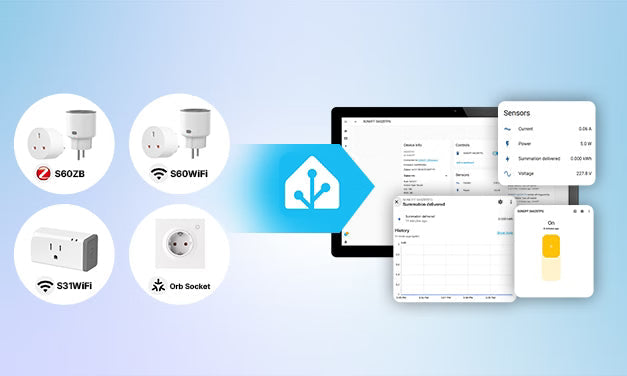
Yukarıdaki seçim kriterlerine dayanarak, aşağıdaki SONOFF modelleri enerji izlemeyi destekler ve Zigbee, Wi-Fi veya Matter kullanarak Home Assistant ile entegre olur; bu da onları farklı bölgeler ve kurulum ihtiyaçları için uygun kılar.
Hızlı Karşılaştırma
İpucu: Yeni bir Home Assistant kurulumu yapıyorsanız, önce iletişim protokolünü seçin (Zigbee, Wi-Fi veya Matter), ardından bölgenize ve kurulum ihtiyaçlarınıza uygun bir akıllı priz seçin.
|
Model |
Protokol |
Bölge |
Maksimum Yük |
Enerji İzleme |
En Uygun |
|
Zigbee |
Tip E/F, Tip G |
16A / 4000W (E/F) |
✅Evet |
Yerel kontrol ve mesh ağ isteyen Zigbee kullanıcıları |
|
|
Wi-Fi |
Tip E/F, Tip G |
16A / 4000W (E/F) |
✅Evet |
Bir hub olmadan basit bir Wi-Fi kurulumu tercih eden kullanıcılar |
|
|
Wi-Fi |
Kuzey Amerika |
15A / 1800W |
✅Evet |
Kolay tak ve çalıştır çözümü arayan ABD kullanıcıları |
|
|
Wi-Fi üzerinden Matter |
AB (Tip E/F) |
16A / 4000W |
✅Evet |
Matter ile yerleşik duvar prizi tercih eden Avrupa kullanıcıları |
S60 ZB

SONOFF iPlug Zigbee Akıllı Priz | S60 Serisi
$14.90
【Enerji İzleme】Home Assistant üzerinden gerçek zamanlı ve tarihsel enerji tüketimini izleyin. Güç kullanımınız hakkında bilgi edinin, cihaz verimliliğini artırın ve elektrik maliyetlerini zahmetsizce azaltın...
Ürünü Görüntüle- ZHA ve Zigbee2MQTT destekli Zigbee 3.0.
- Mesh kapsama alanını genişletmeye yardımcı yerleşik Zigbee yönlendirici.
- Güvenilir Home Assistant otomasyonları için yerel kontrol.
- Gerçek zamanlı güç ve kümülatif enerji verileri ile enerji izleme.
✅ Tavsiye Edilir: Zigbee tabanlı Home Assistant sistemi kuran, güvenilir yerel kontrol, Zigbee mesh genişletme ve enerji izleme isteyen kullanıcılar için.
S60 Wi-Fi

SONOFF iPlug Wi-Fi Akıllı Priz | S60 Serisi
$12.90
【Enerji İzleme】Günlük, aylık ve yıllık kümülatif enerji tüketimini kontrol ederek enerji faturalarınızda tasarruf etmenize yardımcı olur...
Ürünü Görüntüle- Bir hub gerektirmeden doğrudan Wi-Fi'ye bağlanır.
- Günlük, aylık ve yıllık tüketim istatistikleri ile enerji izleme.
- Mevcut olduğunda yerel işlem için LAN kontrolünü destekler.
- Kompakt tasarım (Tip E/F) çoğu prize uyacak şekilde yan prizleri engellemez.
✅ Tavsiye Edilir: Enerji izlemeli, ek bir ağ geçidi gerektirmeyen kolay kurulabilir Wi-Fi akıllı priz isteyen kullanıcılar.
S31 WiFi

SONOFF S31 – Enerji İzlemeli WiFi Akıllı Priz ABD Tipi
$12.90
【Kullanımı Kolay】Akıllı prize bir cihaz takın ve Wi-Fi ağınıza bağlanın...
Ürünü Görüntüle- Özellikle Kuzey Amerika prizleri için tasarlanmıştır.
- Komşu prizleri engellemeyen kompakt form (Tip E/F).
- Enerji izlemeli Wi-Fi bağlantısı.
- Basit tak ve çalıştır kurulumu.
✅ Tavsiye Edilir: Enerji izleme ve basit kurulum isteyen uygun fiyatlı Wi-Fi akıllı priz arayan ABD Home Assistant kullanıcıları için.
Orb Socket

SONOFF Orb Socket Matter Over WiFi Akıllı Avrupa Duvar Prizi | WS01TPE-E/WS01TPF-E
$19.90
【Gerçek Zamanlı Enerji İzleyici】Akıllı duvar priz, enerji tüketimini doğru şekilde takip eder ve sezgisel görsel grafiklerle sunar. Tarihsel enerji verisi incelemesini destekler, cihaz değiştirirken tek dokunuşla sıfırlama yaparak net ve hassas izleme sağlar...
Ürünü Görüntüle- Temiz ve kalıcı kurulum için yerleşik AB duvar prizi (Tip E/F).
- Geniş ekosistem uyumluluğu için Wi-Fi üzerinden Matter.
- Enerji izleme duvar prizine entegre edilmiştir.
- Aşırı yük ve dalgalanma koruması, çocuk güvenliği tasarımı.
- Apple Home, Google Home, Amazon Alexa ve SmartThings dahil olmak üzere Home Assistant ve diğer Matter uyumlu platformlarla uyumludur.
✅ Önerilir: Entegre duvar prizi tercih eden ve gelecekteki akıllı ev yükseltmeleri için Matter uyumluluğu isteyen Avrupa kullanıcıları için.
Hangisini Seçmelisiniz?
- ZHA veya Zigbee2MQTT ile zaten bir Zigbee ağınız varsa S60 ZB'yi seçin.
- Hub gerektirmeyen Wi-Fi kurulumu ve basit kurulum tercih ediyorsanız S60 Wi-Fi'yi seçin.
- Kuzey Amerika'daysanız ve kompakt bir enerji izlemeli akıllı prize ihtiyacınız varsa S31 Wi-Fi'yi seçin.
- Avrupa'daysanız ve bir priz adaptörü yerine yerleşik Matter duvar prizi istiyorsanız Orb Socket'i seçin.
Enerji İzlemeli Akıllı Prizler Home Assistant'a Nasıl Eklenir?
Aşağıda, enerji izlemeli akıllı prizlerin Home Assistant'a üç yaygın protokol kullanılarak entegrasyonu için kurulum rehberleri bulunmaktadır: Zigbee, Matter ve Wi-Fi.
Zigbee Akıllı Prizler: ZHA veya Zigbee2MQTT
Zigbee akıllı prizler, ZHA veya Zigbee2MQTT aracılığıyla Home Assistant'a bağlanır.
- ZHA (yeni başlayanlar için önerilir): Home Assistant'a entegre, kurulumu kolay.
- Zigbee2MQTT (ileri düzey): MQTT tabanlı, daha fazla cihaz ve gelişmiş özellikleri destekler.
Şuna ihtiyacınız var:
- Zigbee Koordinatörü: Bir Zigbee koordinatörü (örneğin, ZBDongle-P, ZBDongle-E).
- MQTT broker (Mosquitto) ve Zigbee2MQTT eklentisi (sadece Z2M için)
Akıllı prizi eşleştirin, ardından tercih ettiğiniz Zigbee entegrasyonu ile ekleyin. Home Assistant, cihaz türüne bağlı olarak güç, enerji, voltaj, akım ve anahtar kontrolü gibi varlıkları otomatik oluşturacaktır.
👉 İlgili Kurulum Rehberleri: Zigbee Cihazlarını ZHA ve Zigbee2MQTT ile Home Assistant'a Ekleme
Matter Akıllı Prizler: Matter entegrasyonu
Çoğu Matter akıllı priz, yerleşik Matter entegrasyonu kullanılarak doğrudan Home Assistant'a eklenebilir.
Şuna ihtiyacınız var:
- Home Assistant OS (Home Assistant'ın en son sürümünün yüklü olduğundan emin olun).
- Home Assistant'ta Matter entegrasyonunun yüklü olması gerekir.
- Akıllı telefonunuzda Home Assistant Companion Uygulaması.
- QR kodlu veya 11 haneli kurulum koduna sahip Matter özellikli cihaz.
Home Assistant mobil uygulamasını açın, Matter QR kodunu tarayın ve eşleştirme işlemini tamamlayın. Eşleştirmeden sonra cihaz, paneller ve otomasyonlar için kullanılabilir hale gelir.
👉 İlgili Kurulum Rehberi: Matter Akıllı Prizleri Home Assistant'a Nasıl Eklenir
Wi-Fi Akıllı Prizler: Marka Entegrasyonu veya HACS Eklentileri
Wi-Fi kablosuz bir ağ protokolüdür, ancak akıllı cihazların nasıl kontrol edileceğini tanımlamaz. Üreticiler genellikle özel iletişim yöntemleri uygular, bu nedenle Home Assistant entegrasyon desteği markaya göre değişir. Çoğu Wi-Fi cihazı, resmi marka entegrasyonları veya topluluk entegrasyonları aracılığıyla Home Assistant'a bağlanır.
Entegrasyon seçenekleri:
- Resmi marka entegrasyonları (üretici tarafından destekleniyorsa)
- HACS topluluk entegrasyonları
Temel Entegrasyon Adımları:
- Cihazı önce markanın resmi uygulamasıyla Wi-Fi'ye bağlayın
- Home Assistant veya HACS'ten ilgili entegrasyonu yükleyin
- Home Assistant'ta Ayarlar → Cihazlar ve Hizmetler bölümüne gidin
- Entegrasyonu ekleyin ve kurulum talimatlarını takip edin
👉 Eğer SONOFF Wi‑Fi cihazlarınız varsa, resmi eklenti entegrasyonumuzu ve öğreticimizi inceleyin:
- eWeLink Akıllı Ev Eklentisi Kullanıcı Kılavuzu
- SONOFF Wi-Fi Cihazlarını Home Assistant'a Ekleme Kılavuzu
Enerji İzleme Akıllı Prizleri için En İyi Home Assistant Otomasyonları
Enerji izleme akıllı prizleri sadece elektrik kullanımını raporlamakla kalmaz. Güç (W) ve enerji (kWh) verilerini otomasyon tetikleyicileri olarak kullanarak, Home Assistant sabit programlara bağlı kalmak yerine gerçek cihaz davranışlarına yanıt verebilir.
Cihaz Tamamlandı Bildirimi
Bir cihazın döngüsünün tamamlandığını algılamak için güç tüketimindeki değişiklikleri kullanın.
Nasıl çalışır:
- Güç artar → cihaz çalışmaya başlar.
- Güç birkaç dakika boyunca düşük veya boşta bir seviyeye döner → döngü tamamlandı.
- Home Assistant bildirim gönderir veya prizi kapatır
Yaygın Cihazlar: 3D yazıcılar, ekmek yapıcılar, pilav pişiriciler, yavaş pişiriciler ve kurutucular (sadece cihazın nominal yükü akıllı priz özellikleri dahilindeyse).
Neden faydalı: Döngünün bitip bitmediğini kontrol etmeye son.
💡Not: Birçok cihaz çalışma sırasında kısa süre duraklar, bu yüzden 3–5 dakikalık bir gecikme eklemek yanlış tetiklemeleri önlemeye yardımcı olur.
Bekleme Gücü Algılama ve Otomatik Kapatma
Birçok cihaz bekleme modundayken elektrik tüketmeye devam eder.
Nasıl çalışır:
- Gücün tanımlı bir bekleme eşiğinin altında kaldığını algılayın
- Cihaza giden gücü otomatik olarak kesin
- İsteğe bağlı olarak bildirim gönderin
Yaygın Cihazlar: Televizyonlar, bilgisayar monitörleri, oyun konsolları, hoparlörler vb.
Neden faydalı: Hayalet güç tüketimini ve gereksiz enerji maliyetlerini azaltır.
Şarj Tamamlama Tespiti
Şarj gücünü izleyin ve güç tanımlı bir eşik değerinin altına düştüğünde şarjı otomatik olarak durdurun.
Nasıl çalışır:
- Şarj gücü tanımlı bir eşik değerinin altına düşer → şarj tamamlanmıştır.
- Home Assistant tamamlanmayı algılar.
- Akıllı prizi kapatın veya bildirim gönderin.
Yaygın cihazlar: Telefonlar, tabletler, taşınabilir güç istasyonları, e-bisikletler ve elektrikli aletler.
Neden faydalı: Enerji tasarrufu sağlar, gereksiz şarj süresini azaltır ve ekstra bir güvenlik katmanı ekler.
Yüksek Enerji Kullanımı Uyarıları
Kümülatif enerji tüketimini (kWh) izleyin ve kullanım tanımlı bir sınırı aştığında uyarılar alın.
Nasıl çalışır:
- Bir cihaz veya zaman dilimi için kümülatif enerji kullanımını (kWh) takip edin.
- Tüketim önceden belirlenmiş bir eşik veya enerji sınırını aştığında bildirim gönderin.
Yaygın cihazlar: su ısıtıcıları, taşınabilir elektrikli ısıtıcılar, nem alıcılar, EV şarj cihazları (şarj yükü akıllı prizin belirtilen kapasitesi içindeyse) ve diğer yüksek enerji tüketen cihazlar.
Neden faydalı: Elektrik maliyetlerini izlemeye, enerji tüketimi yüksek cihazları belirlemeye ve beklenmedik fatura sürprizlerinden kaçınmaya yardımcı olur.
Güç ve Enerji: Hangi Ölçüt Hangi Otomasyonda Kullanılır?
|
Otomasyon |
Birincil Ölçüt |
|
Cihaz Tamamlandı Bildirimi |
Güç (W) |
|
Bekleme Gücü Tespiti |
Güç (W) |
|
Şarj Tamamlama Tespiti |
Güç (W) |
|
Yüksek Enerji Kullanımı Uyarıları |
Enerji (kWh) |
⚠️ Güvenlik İpucu: Otomasyonları etkinleştirmeden önce bağlı cihazın akıllı prizin belirtilen voltaj, akım ve güç sınırları içinde olduğundan her zaman emin olun.
Sonuç
Enerji izlemeli bir akıllı priz, Home Assistant'ta hem enerji görünürlüğünü hem de otomasyonu geliştirmek için en basit yollardan biridir. Doğru kWh raporlaması, güvenilir Home Assistant desteği ve uygun iletişim protokolüne sahip bir cihaz seçerek elektrik kullanımını takip edebilir, daha akıllı otomasyonlar oluşturabilir ve evinizin enerji tüketimini daha iyi anlayabilirsiniz.
👉 Başlamaya hazır mısınız? Home Assistant kurulumunuza en uygun enerji izlemeli akıllı prizi bulmak için SONOFF S60 ZB, S60 Wi-Fi, S31 Wi-Fi ve Orb Socket ürünlerini keşfedin.
SSS
S1: Enerji izlemeli akıllı prizler Home Assistant ile çalışır mı?
Evet, birçok enerji izleme akıllı priz Home Assistant ile çalışır, ancak uyumluluk iletişim protokolüne ve mevcut entegrasyonlara bağlıdır.
Zigbee cihazlar genellikle ZHA veya Zigbee2MQTT üzerinden bağlanır, Matter cihazlar yerleşik Matter entegrasyonunu kullanır ve Wi-Fi cihazlar genellikle üreticinin resmi entegrasyonu veya topluluk entegrasyonuna dayanır.
S2: Home Assistant için Zigbee mi yoksa Wi-Fi akıllı prizler mi daha iyi?
Hiçbiri evrensel olarak daha iyi değildir — kurulumunuza bağlıdır. Zigbee genellikle daha büyük Home Assistant sistemleri için tercih edilir çünkü yerel kontrol, düşük gecikme ve mesh ağ sunar; Wi-Fi prizler ise genellikle doğrudan yönlendiricinize bağlandıkları için kurulumu daha kolaydır. Wi-Fi cihazlar için satın almadan önce Home Assistant entegrasyonunun mevcut olduğundan emin olmak faydalıdır.
S3: Home Assistant, akıllı prizlerle enerji kullanımını takip edebilir mi?
Evet, akıllı priz hem gerçek zamanlı güç (W) hem de kümülatif enerji (kWh) bildiriyorsa. Home Assistant bu verileri panolar, uzun vadeli istatistikler ve cihaz tamamlanma tespiti veya şarj tamamlanması gibi güç tabanlı otomasyonlar için kullanabilir.
S4: Home Assistant'ın Enerji Paneli için enerji izleme özellikli akıllı prize ihtiyacım var mı?
Evet. Home Assistant'ın Enerji Paneli, gerçek zamanlı güç (W) yerine kümülatif enerji (kWh) verisi gerektirir. Bir akıllı priz yalnızca güç raporluyorsa, otomasyonlar için kullanılabilir ancak tam Enerji Paneli işlevselliği sağlamaz.
S5: Akıllı prizi Home Assistant'a nasıl eklerim?
Kurulum iletişim protokolüne bağlıdır.
● Zigbee prizler genellikle ZHA veya Zigbee2MQTT ile eklenir.
● Matter prizler yerleşik Matter entegrasyonunu kullanır.
● Wi-Fi prizler genellikle üreticinin resmi entegrasyonu veya desteklenen bir topluluk entegrasyonu aracılığıyla bağlanır.
S6: Zigbee akıllı prizler için Zigbee koordinatörüne ihtiyacım var mı?
Evet. Zigbee akıllı prizlerin Home Assistant ile iletişim kurması için bir Zigbee koordinatörüne ihtiyacı vardır. Yerleşik ZHA entegrasyonunu veya uyumlu bir USB koordinatörü ile Zigbee2MQTT'yi (örneğin, ZBDongle-P, ZBDongle-E) kullanabilirsiniz. Wi-Fi veya Matter akıllı prizler kullanıyorsanız, Zigbee koordinatörü gerekmez.
S7: Akıllı prizler bir cihazın işini bitirdiğini algılayabilir mi?
Evet, birçok cihazın Home Assistant'ın döngünün tamamlandığını algılayabileceği öngörülebilir güç desenleri vardır. Kahve makineleri, ekmek makineleri, bulaşık makineleri, 3D yazıcılar veya şarj cihazları gibi cihazlar yaygın örneklerdir, ancak eşikler cihazdan cihaza değişir.
👀 Yaygın güç eşikleri ve kurulum fikirleri için yukarıdaki otomasyon örneklerine bakın.
S8: Akıllı prizler elektrik faturalarını düşürmeye yardımcı olur mu?
Potansiyel olarak evet — ancak tasarruf, veriyi nasıl kullandığınıza bağlıdır. Enerji izleme, yüksek enerji tüketen cihazları, bekleme gücü tüketimini ve otomasyon fırsatlarını belirlemeye yardımcı olur, böylece zamanla gereksiz elektrik kullanımını azaltabilirsiniz.
S9: Yüksek güçlü cihazlarla akıllı priz kullanmak güvenli mi?
Evet, cihaz akıllı prizin belirtilen voltaj, akım ve güç sınırları içinde kaldığı sürece kullanılabilir. Her zaman üreticinin teknik özelliklerini kontrol edin ve belirtilen yükü aşan veya özel elektrik ekipmanı gerektiren cihazlarla tüketici akıllı prizlerini kullanmaktan kaçının.
S10: Akıllı prizim neden Home Assistant'ta enerji verisi göstermiyor?
Bu genellikle cihazın kümülatif enerji (kWh) yerine yalnızca güç (W) raporlaması, entegrasyonun gerekli varlığı sunmaması veya uzun vadeli istatistiklerin mevcut olmaması nedeniyle olur. Entegrasyon ayarlarını, donanım yazılımı sürümünü ve Home Assistant varlık yapılandırmasını kontrol etmek genellikle nedeni belirlemeye yardımcı olur.
Cihaz yalnızca güç (W) destekliyorsa, otomasyonlar için yine de kullanılabilir, ancak tam Enerji Paneli işlevselliği sağlamaz.

Yorum yazın
Tüm yorumlar yayınlanmadan önce incelenir.
Bu site hCaptcha ile korunuyor. Ayrıca bu site için hCaptcha Gizlilik Politikası ve Hizmet Şartları geçerlidir.