














































Wprowadzenie
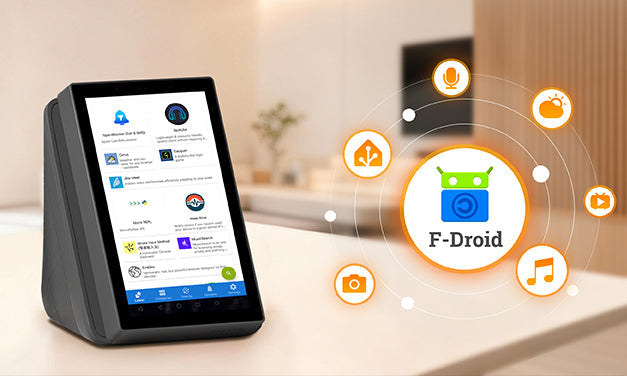
Aktualizacja oprogramowania NSPanel Pro wprowadza nowy sklep F‑Droid oraz optymalizacje wydajności na poziomie natywnego frameworka. Wystarczy zaktualizować NSPanel Pro do wersji V4.0.0 i wyższych, aby cieszyć się płynniejszym przewijaniem, szybszym czasem reakcji i lepszym wsparciem dla nowo wprowadzonych funkcji F‑Droid. To już nie tylko terminal sterujący — to inteligentna platforma aplikacji, która dostarcza zupełnie nowe doświadczenia!

Duża aktualizacja: wsparcie dla Home Assistant i różnorodnych aplikacji!
Czym jest F-Droid?
F‑Droid to darmowy i otwarty sklep z aplikacjami , który oferuje aplikacje bez reklam, szanujące prywatność i weryfikowane przez społeczność open source. Oferując spersonalizowane i kreatywne aplikacje, pozwala Ci łatwo wzbogacić życie z NSPanel Pro.
- Rewolucyjne doświadczenie: Pożegnaj się z wolnym ładowaniem i problemami z kompatybilnością. Ciesz się płynną obsługą dotykową jak w natywnych aplikacjach, responsywnymi interakcjami i znacznie mniejszym nagrzewaniem.
- Podniesione doświadczenie: Teraz możesz zainstalować oficjalną aplikację Home Assistant oraz różne inne aplikacje bezpośrednio z F‑Droid — gotowe do eksploracji i rozwoju.
Co oznacza wsparcie F‑Droid dla NSPanel Pro?
NSPanel Pro + F‑Droid przekształca ekran zamontowany na ścianie z zwykłego „pilota” w prawdziwe „Mózg inteligentnego domu” oraz „Centrum informacji na żywo.”
Czas uwolnić pełny potencjał Twojego centralnego ekranu sterowania!
Zabawne przykłady
Scenariusz 1: Centrum dowodzenia Home Assistant
- Jeśli jesteś doświadczonym użytkownikiem Home Assistant, entuzjastą technologii lub kimś, kto uwielbia zagłębiać się w personalizację inteligentnego domu, NSPanel Pro to idealny panel sterowania do głębokiej personalizacji i swobodnego majsterkowania.
- Przykład: Zainstaluj i uruchom oficjalną aplikację HA bezpośrednio na NSPanel Pro. Ekran wyświetla status wszystkich Twoich urządzeń domowych w czasie rzeczywistym, a dzięki potężnej automatyzacji HA możesz lokalnie sterować urządzeniami zarządzanymi przez HA bezpośrednio z centralnego ekranu — bez konieczności korzystania z telefonu czy komputera.
-
Kroki instalacji Home Assistant:
a. Zainstaluj aplikację
- Zaktualizuj swój NSPanel Pro do najnowszej wersji systemu.
- Przeciągnij palcem w dół od góry ekranu, aby otworzyć menu rozwijane, znajdź i stuknij „F‑Droid” ikona aby wejść do otwartego sklepu z aplikacjami.
- Możesz znaleźć „Home Assistant” pod „Najnowsze” lub „Kategorie”, lub po prostu stuknij ikonę wyszukiwania w prawym dolnym rogu, aby ją wyszukać.
- Po znalezieniu przejdź do strony szczegółów aplikacji i stuknij „Zainstaluj” przycisk.
- Po instalacji możesz znaleźć i otworzyć Home Assistant w sekcji „Zainstalowane aplikacje” w F-Droid lub bezpośrednio na liście aplikacji.

b. Skonfiguruj połączenie
- Przy pierwszym uruchomieniu aplikacja przeprowadzi cię przez konfigurację. Upewnij się, że NSPanel Pro jest podłączony do tej samej sieci lokalnej co serwer Home Assistant.
- Aplikacja automatycznie przeskanuje i wyświetli dostępne serwery Home Assistant w sieci. Wystarczy wybrać swój serwer i zalogować się, aby nawiązać połączenie.
- Jeśli twój serwer nie zostanie wykryty automatycznie, stuknij opcję „Wprowadź adres ręcznie” na dole i wpisz lokalny adres IP serwera Home Assistant.


c. Rozpocznij korzystanie
- Po pomyślnym połączeniu zostaniesz przeniesiony bezpośrednio do znanego interfejsu Home Assistant. Teraz twój NSPanel Pro zamontowany na ścianie stał się lokalnym, zawsze pod ręką centrum sterowania inteligentnym domem, ułatwiając zarządzanie wszystkim jak nigdy dotąd.

Scenariusz 2: „Wyświetlacz informacji i rozrywki” dla rodziny
Jeśli cenisz jakość życia i przytulną atmosferę w domu, NSPanel Pro ma jeszcze wiele do zaoferowania. Oto kilka aplikacji, które warto wypróbować:


🎧 AntennaPod: Twoja domowa stacja podcastów
Chcesz słuchać swoich ulubionych audycji podczas wykonywania obowiązków? Zainstaluj AntennaPod, wysoko ocenianą aplikację podcastową open‑source. Oferuje ogromną kolekcję podcastów, pozwalając zanurzyć się w wiedzy lub opowieściach w dowolnym momencie w domu.
Ale potencjał na tym się nie kończy. Sklep F‑Droid otwiera drzwi do „wolności aplikacji”:
- Dla geeków: Zainstaluj „Termux” aby przekształcić NSPanel Pro w lekkiego komputera Linux — uruchamiaj skrypty, rozwijaj i debuguj bezpośrednio.
- Dla rodzin: Zainstaluj „K-9 Mail” aby szybko sprawdzać powiadomienia o dostawie lub „Musekit” aby wypełnić Twój dom muzyką.
- Dla każdego: Odkryj morze narzędzi, aplikacji produktywności i oprogramowania kreatywnego, aby Twój ekran sterowania był naprawdę wyjątkowy.
Przydatne wskazówki
Zaawansowane ustawienia (v4.x i nowsze):
NSPanel Pro teraz obsługuje ustawienia na poziomie systemu Android przez „Zaawansowane ustawienia” funkcja:
- Dostosuj dolny pasek nawigacyjny do szybkich kontroli — pożegnaj się z uciążliwymi operacjami. Elastycznie nawiguj wstecz, przełączaj lub czyść aplikacje działające w tle oraz łatwo reguluj głośność.

- W pełni personalizuj dźwięki alarmów, odtwarzania mediów i powiadomień.
- Użyj wpisu Pamięć, aby na bieżąco monitorować zużycie pamięci urządzenia i jednym stuknięciem wyczyścić pamięć podręczną, ułatwiając zarządzanie miejscem.
Pływający przycisk powrotu:
Podczas korzystania z aplikacji firm trzecich naciśnij boczny przycisk, aby natychmiast wrócić do ekranu głównego NSPanel Pro. Przycisk zamienia się w swobodnie przesuwalną pływającą kulkę, którą można umieścić w dowolnym miejscu, aby nie przeszkadzała. Gdy chcesz wrócić, po prostu stuknij pływającą kulkę, aby natychmiast powrócić do ekranu głównego NSPanel Pro.

Uwaga: Język wyświetlany w F‑Droid jest zgodny z ustawieniem języka skonfigurowanym w nowo zaktualizowanym NSPanel Pro „Zaawansowane ustawienia.”
Zamów już teraz — doświadcz tego dziś!
Odkryj jeszcze więcej zaawansowanych funkcji i ustawień czekających na odkrycie!
https://sonoff.tech/en-us/products/sonoff-nspanel-pro-smart-home-control-panel-120-type
https://sonoff.tech/en-us/products/sonoff-nspanel-pro-smart-home-control-panel-86-type
Ogłoszenie
Uwaga:Wersja V4.x jest ciągle aktualizowana i optymalizowana. Będziemy dalej udoskonalać doświadczenie na podstawie Twoich opinii. Aby być na bieżąco z najnowszymi wydaniami wersji, odwiedź poniższy link. Jeśli napotkasz jakiekolwiek problemy po aktualizacji, możesz również przesłać opinię za pomocą tego samego linku. Nasz zespół deweloperski skontaktuje się z Tobą bezpośrednio, aby szybko zidentyfikować i rozwiązać problemy.
https://forum.ewelink.cc/c/sonoffnspanel-pro/47

Zostaw komentarz
Wszystkie komentarze są moderowane przed opublikowaniem.
Ta strona jest chroniona przez hCaptcha i obowiązują na niej Polityka prywatności i Warunki korzystania z usługi serwisu hCaptcha.