



Introduction
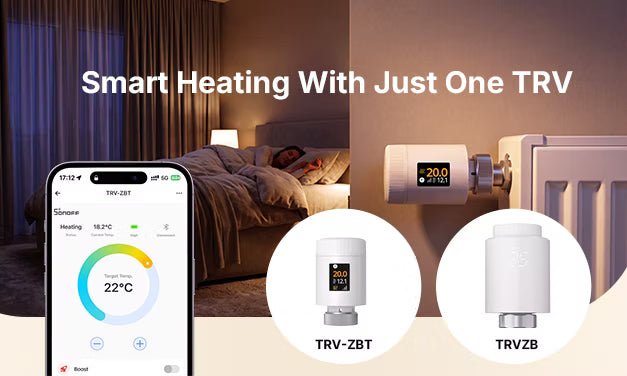
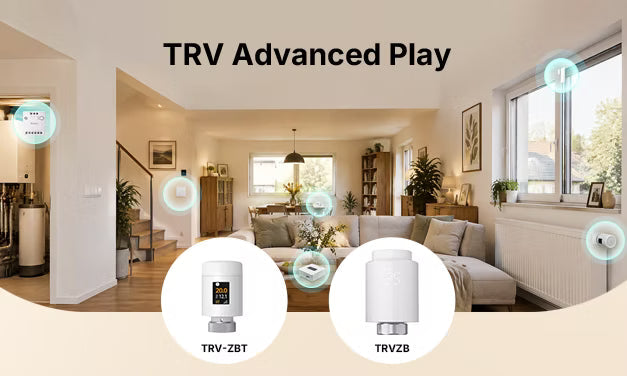
If you have just one SONOFF TRV, this guide is for you. It covers all the features and use cases available with a single SONOFF TRV.
Many users still use their TRV simply to replace manual radiator valve adjustments. In fact, by making full use of schedules, modes, and other built‑in functions, you can upgrade from simple valve control to more precise heating control by room and time of day. This improves comfort while significantly reducing heating energy consumption.
Prerequisites
❗ Both TRV-ZBT and TRVZB are Zigbee 3.0 thermostatic radiator valves (TRVs). To access their full smart features, you need a compatible Zigbee gateway or adapter to connect them to your smart home ecosystem. TRV-ZBT also supports a direct Bluetooth Low Energy (BLE) connection to the eWeLink App as an additional option for specific situations.
Connect to the eWeLink Ecosystem (Unlock Full Features)
Pair your TRV with a compatible SONOFF Zigbee gateway, such as ZBBridge-P, ZBBridge-U, Bridge-M, iHost, or NSPanel Pro. If the Zigbee signal is weak near the radiator, you can add a Zigbee router to improve network coverage. Once the TRV is paired with the gateway, all supported features become available.
Connect to Home Assistant & Other Third-Party Platforms
You'll need a Zigbee 3.0-compatible adapter or gateway. Check our official help centre for the full compatible hub list:
- TRVZB: SONOFF Help Center – TRVZB Compatible Zigbee Hubs List
- TRV-ZBT: SONOFF Help Center – TRV-ZBT Compatible Zigbee Hubs List
TRV-ZBT Only: Direct BLE Connection to eWeLink (Additional Option)
TRV-ZBT can connect directly to the eWeLink App via BLE without a gateway, allowing you to configure and control the device. This option is particularly useful in the following situations:
- Paired with a third‑party platform with limited feature support, requiring schedule editing or other advanced functions
- Poor Zigbee signal or gateway temporarily offline, requiring quick adjustments to device settings
- Paired with a third‑party platform, and you need to complete a firmware upgrade via the eWeLink App
Note: BLE provides a temporary, additional connection and does not remove the device from its existing Zigbee network or erase its pairing information and settings. After the BLE connection is disconnected, the TRV continues to operate on its original Zigbee network.
For step-by-step instructions, see: SONOFF TRV Gen2 Smart Radiator Valve Guide: Installation, Features & FAQ
1. Scheduled Temperature Control: Heating Follows Your Routine
No more manually turning heating on/off before leaving or returning home. Set a heating schedule, and your TRV will automatically adjust the temperature to match your daily routine.
For example, you can set the following temperatures for a typical workday:
|
Period |
Target Temp |
Effect |
|
Wake up |
21°C |
Warm room when you get up |
|
Away |
16°C |
Save energy while empty |
|
Homecoming |
22°C |
Comfortable warmth on arrival |
|
Sleep |
20°C |
Balanced temperature for rest |
- TRVZB (1st gen): 1 schedule plan, up to 6 temperature periods per day.
- TRV-ZBT (2nd gen): 3 independent schedule plans (one active at a time), up to 12 temperature periods per day.
- Workday Routine: For a typical workweek, with automatic temperature adjustments around commuting hours and a more relaxed schedule on weekends.
- Work-from-Home Mode: For working from home throughout the week, with no temperature setbacks for commuting hours and a consistently comfortable temperature throughout the day
- Holiday Mode: For extended absences, with a lower frost-protection temperature and scheduled preheating before you return. Switch back to your regular workday schedule when you're home.

2. Precise Temperature For More Accurate and Stable Room Temperatures
Schedules get your timing right; accurate and stable temperature control is just as important for comfort. You can improve temperature control with two built-in TRV features, without adding any extra devices.
Temperature Calibration: Adjust Readings for More Accurate Room Temperature
Mounted directly on the radiator valve, the built‑in sensor can be affected by heat from the radiator, causing its readings to differ from the actual temperature in the occupied area of the room. Temperature calibration allows adjustments from −10°C to +10°C to help align the displayed temperature with the actual room temperature.
Adaptive Mode (PID Algorithm): Dynamic valve regulation for steady room temperature
- Before Adaptive Mode: The valve opens and closes at preset levels, which can lead to temperature overshoot and repeated temperature fluctuations.
- After Adaptive Mode: The valve dynamically adjusts its opening based on the difference between the current and target temperatures. It opens wider when the room temperature is far below the target, gradually reduces the opening as the temperature approaches the setpoint, and makes small adjustments once the target is reached to minimize fluctuations.
❗ Important: When Adaptive Mode is enabled, the Valve Opening Percentage and Temp Hysteresis settings are disabled.
💡 For more details on Adaptive Mode, see TRVZB Upgrade: Smart Temperature Control for More Stable Room Temperature.
These temperature control improvements are available with a single TRV. If you want to eliminate the influence of radiator heat on temperature readings, you can pair the TRV with an external temperature sensor and use the Remote Temperature Source feature to control heating based on the actual room temperature.
For details, see: External Temperature Source: More Accurate Sensing, True Comfort.
3. Remote Access + 2 Temporary Modes for Unexpected Scenarios
Forgot heating on before leaving, want to preheat before arriving home, or simply adjust from bed? Control heating anytime via the eWeLink App. Two temporary modes handle short‑term needs without rewriting your base schedule.
Full remote control & live status
- Adjust target temperature remotely; switch between Manual / Auto / Frost Protection (OFF) modes and other App settings.
- View live room temperature, heating status, and battery level; check heating status away from home.
Two temporary modes for short‑term use
① Boost Mode – Instant rapid heat
One tap for full valve opening and fast heating. Customisable duration; automatically returns to prior mode when the timer ends. Ideal for arrival, pre‑bath heat, guest visits.
② Temp. Override Mode
Hold a fixed temperature for a set duration. Timer expires and reverts automatically.
Two ways to trigger:
- App setting "Temp. Override": Use this when you want to maintain a fixed temperature for a specific period. Set the duration, and the device will automatically return to its previous operating mode when the timer ends.
- Temporary temperature adjustment in Auto mode: If you manually adjust the temperature while Auto mode is active, the schedule remains unchanged. The original schedule resumes at the next scheduled time, so you don't need to restore it manually.
These options are suitable for short-term situations that require a consistent temperature, such as staying home temporarily, taking an afternoon nap, or keeping a baby comfortable while sleeping.

4. Built‑in Open Window Detection – Automatically Pause Heating to Reduce Energy Waste
Opening windows for ventilation in winter can quickly let heat escape.
SONOFF TRVs can detect a rapid temperature drop when a window is opened and automatically pause heating. Heating resumes when the device detects that the window has been closed.
Rules for trigger & restore
- Trigger: If the temperature drops by more than 1.5°C within 5 minutes, the device automatically detects a possible open window and stops heating immediately.
-
Alert: A window icon appears on the device screen. The TRV-ZBT also sends a push notification through the app, so you can easily check its status.
-
Resume heating:
- Automatic: If the temperature rises by more than 1.5°C within 5 minutes, the device automatically resumes its previous heating state.
- Manual: Adjust the temperature on the device or switch its operating mode to exit open-window detection immediately.
💡 TRV-ZBT also supports open-window detection with a door/window contact sensor. See: Window/Door Contact Sensor Automation – Reliable Open-Window Detection

Conclusion
These are the key features and use cases available with a single SONOFF TRV. With just one TRV and a gateway, you can move beyond manual radiator valve adjustments to scheduled heating, precise and stable temperature control, remote adjustments, and energy-saving open-window detection—without adding other smart devices.
If you have additional SONOFF devices (temperature sensors, door/window sensors, thermostat panels, etc.) and want to build a more advanced whole-home heating system with better accuracy, faster response, centralized control, and boiler integration, see our advanced guide: 👉 Advanced TRV Guide: Multi-Device Automation for Whole-Home Heating.
Related Resources
🔌 TRVZB Help Center: https://help.sonoff.tech/docs/trvzb
🔌 TRV-ZBT Help Center: https://help.sonoff.tech/docs/TRVZBT
🔌 TP-WGZBA Help Center: https://help.sonoff.tech/docs/TPWGZBA

Laat een reactie achter
Alle reacties worden gemodereerd voordat ze worden gepubliceerd.
Deze site wordt beschermd door hCaptcha en het privacybeleid en de servicevoorwaarden van hCaptcha zijn van toepassing.