














































Introduction
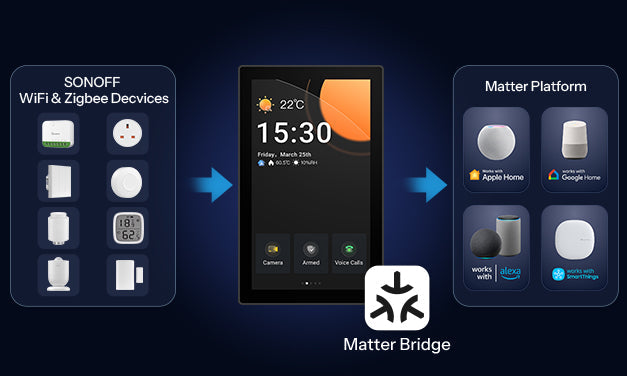
The latest firmware for NSPanel Pro now officially supports the Matter Bridge feature. As a Matter Bridge gateway, it enables one-time pairing to synchronize your existing Zigbee devices and SONOFF WiFi devices with third-party ecosystems that support the Matter standard, including Apple Home, Google Home, Amazon Alexa, and Home Assistant. There’s no need to repeatedly add devices across different ecosystems, and all devices can be controlled in real-time and integrated into automations within third-party Matter platforms.
With the release of v4.1.0, NSPanel Pro has evolved beyond local control to become a smart central gateway that supports cross-ecosystem integration, delivering an open, multi-platform, and unified home automation experience.
- Version Requirement
To synchronize SONOFF WiFi devices to Apple Home, update your eWeLink APP to v5.22.0 and NSPanel Pro to v4.2.0.
*Note: Versions prior to v5.22.0 only support synchronizing Zigbee sub-devices to Apple Home.*
- System Support Details
-
- Android Users: The eWeLink APP v5.22.0 is currently available for upgrade.
- iOS Users: The v5.22.0 version is expected to be released in January 2026. Stay tuned for updates.

How to Achieve Cross-Ecosystem Integration?
Step 1: Find the Matter Bridge Entry and Enable the Matter Pairing Code
- Entry on NSPanel Pro

- Entry on eWeLink APP
In the NSPanel Pro settings interface of the eWeLink app, you can access the Matter Bridge through the following two entry points.

Step 2: Connect NSPanel Pro to a Third-Party Matter Platform
Scan the QR code or enter the pairing numeric code in Apple Home (or Google Home/Alexa) to add NSPanel Pro as a Matter Hub to Apple Home.
Step 3: Batch Synchronize Sub-Devices
Zigbee and SONOFF WiFi sub-devices can only be synchronized via the Matter Bridge entry in the eWeLink APP.
Step 4: View and Control Sub-Devices in Real Time
On NSPanel Pro: Displays synchronized sub-device names, ID numbers, and icons in real time.

On Apple Home: Enables control and access to sub-device information.

Manage Connected
Once NSPanel Pro is paired with a third-party Matter platform, you can manage the paired platforms in the "Added Matter Platforms" section.
● Click Remove to remove the corresponding Matter platform.
● Click Remove All to remove all connected Matter Platforms.

Summary
NSPanel Pro now integrates the Matter Bridge feature, allowing one-click local synchronization of Zigbee and WiFi sub-devices to the Matter ecosystem. From now on, whether it's Apple Home, Google Home, or Alexa, you can control all devices from a single entry point, eliminating the hassle of switching between platforms.
Upgrade your experience now and unlock true whole-home smart connectivity.
Purchase Link🔗
https://sonoff.tech/en-us/products/sonoff-nspanel-pro-smart-home-control-panel-120-type
Announcement
👉 Ongoing V4.x updates and optimizations are in progress. We are continuously improving based on your feedback. You can follow the link below to stay updated on the latest version releases. If you encounter any issues after upgrading, you can also submit feedback via the same link. Our development team will communicate directly with you to help identify and resolve problems more efficiently.
[Click to Learn More]
https://forum.ewelink.cc/t/nspanel-pro-roadmap-and-co-created-future/206240
We warmly welcome you to share your experience and insights here—your suggestions and stories will be our greatest motivation!
https://forum.ewelink.cc/c/sonoffnspanel-pro/47
List of Supported Devices
-
Zigbee Devices
-
- SONOFF Zigbee
|
Product Type |
Model |
Capabilities in Matter Platform |
|
DIY Smart Switch |
ZBMINI |
On/Off Control |
|
BASICZBR3 |
On/Off Control |
|
|
ZBMINI-L |
On/Off Control |
|
|
ZBMINL2 |
On/Off Control |
|
|
MINI-ZBRBS |
On/Off Control |
|
|
ZBMicro |
On/Off Control |
|
|
ZBMINIR2 |
On/Off Control |
|
|
Smart Wall Switch |
ZBM5 1C/3C |
On/Off Control |
|
Sensors |
SNZB-01 |
Click |
|
SNZB-01P |
Click |
|
|
SNZB02DR2 |
Temperature and humidity data |
|
|
SNZB-02D |
Temperature and humidity data |
|
|
SNZB-02WD |
Temperature and humidity data |
|
|
SNZB-02LD |
Temperature data |
|
|
SNZB-02P |
Temperature and humidity data |
|
|
SNZB-02 |
Temperature and humidity data |
|
|
SNZB-03 |
Motion detected、No motion detected |
|
|
SNZB-03P |
Motion detected、No motion detected |
|
|
SNZB-04 |
Opened、Closed |
|
|
SNZB-04P |
Opened、Closed |
|
|
SNZB-05P |
1. Leak detected、No leak detected |
|
|
SNZB-06P |
Motion detected、No motion detected |
|
|
Home Appliance |
ZBCurtain |
1. Open/Close |
|
TRVZB |
1. On/Off Control |
|
|
SWV-NH |
1. Valve Configuration and Control |
|
|
SWV-BSP |
1. Valve Configuration and Control |
|
|
Smart Plug |
S26R2ZB |
On/Off Control |
|
S31 Lite ZB |
On/Off Control |
|
|
S40ZB Lite |
On/Off Control |
|
|
S60ZB Series |
On/Off Control |
-
-
Third-Party Zigbee 3.0 Devices
-
|
Category |
Device Type |
Capabilities in Matter Platform |
|
Plug |
Matter On/Off Plug-in Unit |
On/Off Control |
|
Switch |
Matter On/Off Plug-in Unit |
On/Off Control |
|
Sensor |
Motion Sensor |
Occupancy Sensing |
|
Electrical Sensor |
1.Electrical Power Measurement 2.Electrical Energy Measurement |
|
|
Vibration Sensor |
Occupancy Sensing |
|
|
Air Quality Sensor |
1.Air Quality 2.Temperature Measurement 3.Relative Humidity Measurement 4.PM2.5 Concentration Measurement 5.Total Volatile Organic Compounds Concentration Measurement 6.Carbon Monoxide Concentration Measurement 7.Carbon Dioxide Concentration Measurement |
|
|
Contact Sensor |
Boolean State |
|
|
Temperature Sensor |
Temperature Measurement |
|
|
Humidity Sensor |
Relative Humidity Measurement |
|
|
Light/Illumination Sensor |
Illuminance Measurement |
|
|
Smoke Sensor/ |
1.Smoke CO Alarm 2.Carbon Monoxide Concentration Measurement |
|
|
Water Leak Detector |
Boolean State |
|
|
Light |
Dimmable Light |
1.On/Off Control 2.Level Control |
|
Color Temperature Light; Extended color Light |
1.On/Off Control 2.Level Control 3.Color Control |
|
|
Color Dimmer Switch |
Generic Switch |
Switch |
|
Curtain |
Window Covering |
Window Covering |
|
Thermostat |
Thermostat |
1.Thermostat 2.Thermostat User Interface 3.Configuration 4.Energy Preference 5.Fan Control 6.Temperature Measurement 7.Relative Humidity Measurement 8.Occupancy Sensing |
|
Button |
Generic Switch |
Switch |
-
SONOFF WiFi Devices
|
Product Type |
Model |
Capabilities in Matter Platform |
|
DIY Smart Switch |
BASICR2 |
On/Off Control |
|
BASICR4 |
On/Off Control |
|
|
RFR2 |
On/Off Control |
|
|
MINIR2 |
On/Off Control |
|
|
MINIR4 |
On/Off Control |
|
|
MINIR4M |
On/Off Control |
|
|
4CHR3 |
On/Off Control |
|
|
4CHPROR3 |
On/Off Control |
|
|
POWR3 |
On/Off Control |
|
|
Micro |
On/Off Control |
|
|
THR316/316D |
On/Off Control |
|
|
THR320/320D |
On/Off Control |
|
|
DUALR3 Lite |
On/Off Control |
|
|
POWR316/POWR316D |
On/Off Control |
|
|
POWCT |
On/Off Control |
|
|
DUALR3 |
Switch Mode: On/Off Control; |
|
|
iFan04 |
On/Off Control |
|
|
Smart Plug |
S26R2 |
On/Off Control |
|
S31 |
On/Off Control |
|
|
S31 Lite |
On/Off Control |
|
|
S40TPB |
On/Off Control |
|
|
S40TPA |
On/Off Control |
|
|
S40TPB Lite |
On/Off Control |
|
|
S40TPA Lite |
On/Off Control |
|
|
S60TPF/TPG |
On/Off Control |
|
|
Smart Wall Switch |
TX1C/2C/3C |
On/Off Control |
|
T5 Series |
On/Off Control |
|
|
M5 Series |
On/Off Control |
|
|
Central Control Panel |
NSPanel |
On/Off Control |
|
Wire splicing connector |
D1 |
1. On/Off Control |
|
Smart Lighting |
B02-F-A19/B02-F-A60 |
1. On/Off Control |
|
B05-B-A60 |
1. On/Off Control |
|
|
B05-BL-A60/B05-BL-A19 |
1. On/Off Control |


Leave a comment
All comments are moderated before being published.
This site is protected by hCaptcha and the hCaptcha Privacy Policy and Terms of Service apply.