














































Many smart home users already have devices capable of running their own systems, whether it's a personal PC, a Raspberry Pi, a mini PC, or a NAS. Instead of relying solely on dedicated hubs, these devices can be upgraded into a Zigbee smart home gateway with the right setup.
With a SONOFF Zigbee Dongle and eWeLink CUBE, existing hardware can be transformed into a Zigbee-to-Matter hub, enabling Zigbee devices - as well as legacy WiFi devices - to integrate into the Matter ecosystem and work across multiple smart home platforms.
What's eWeLink CUBE OS? It is a free self-hosted local system that bridges SONOFF Wi-Fi and multi-brand Zigbee devices into the Matter network for Apple Home, SmartThings, Google Home, Alexa, and Home Assistant.
Build Your Own Zigbee Hub with SONOFF Dongle
The SONOFF Zigbee Dongle acts as the core communication bridge between your hardware and Zigbee devices. By simply plugging the dongle into your device, you instantly enable Zigbee capability on:
● Raspberry Pi
● Mini PC
● Old computers
● NAS devices
● Mac Mini
● Virtual machines
● ...
Combined with eWeLink CUBE, your device becomes a fully functional Zigbee smart home hub - without needing any dedicated gateway hardware.
From Zigbee to Matter - Unlock Cross-Platform Smart Home Control
One of the biggest challenges in smart homes is ecosystem compatibility. Zigbee devices typically cannot connect directly to platforms like Apple Home, Google Home, Amazon Alexa, SmartThings, etc.
This is where eWeLink CUBE's Matter Bridge comes in.
With Matter Bridge enabled, your Zigbee devices connected via the SONOFF Dongle can be exposed as Matter devices, making them compatible with major smart home platforms.
This means you can:
● Control Zigbee devices from your preferred ecosystem
● Create cross-platform automations
● Unify your smart home experience
Simple Setup - No Coding Required
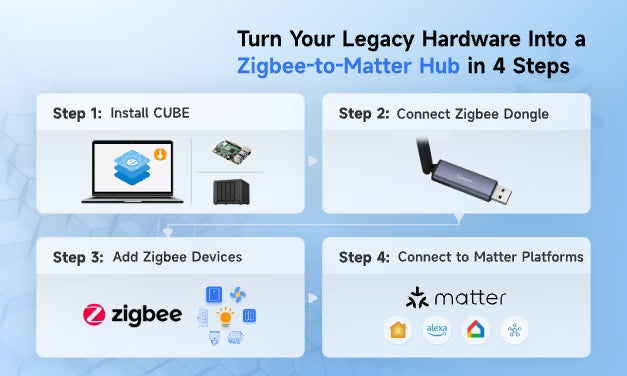
Setting up your own Zigbee-to-Matter hub is easier than you might expect.

Step 1 - Install eWeLink CUBE
Install CUBE on your hardware, such as a Raspberry Pi, PC, or NAS.
Step 2 - Plug in SONOFF Zigbee Dongle
Connect the SONOFF Dongle to enable Zigbee communication.
Step 3 - Add Zigbee Devices
Pair and manage your Zigbee devices through CUBE's intuitive graphical interface.
Step 4 - Connect to Matter Platforms
Use the built-in Matter Bridge to integrate your devices with Apple Home, Google Home, Alexa, or SmartThings.
No coding. No complex setup. Just a few simple steps.
More Than Just a Zigbee Hub
With eWeLink CUBE, your system goes beyond Zigbee. You can also integrate SONOFF WiFi devices, allowing you to build more advanced automation scenarios across different device types. This creates a more flexible and unified smart home system - all running locally on your own hardware.
Get Started Today
Plug in a SONOFF Zigbee Dongle, install eWeLink CUBE, and transform your hardware into a Zigbee-to-Matter hub in minutes.
Explore more in: https://cube.ewelink.cc/zigbee-dongles/unlock-zigbee-with-dongle


Leave a comment
All comments are moderated before being published.
This site is protected by hCaptcha and the hCaptcha Privacy Policy and Terms of Service apply.