







Overview
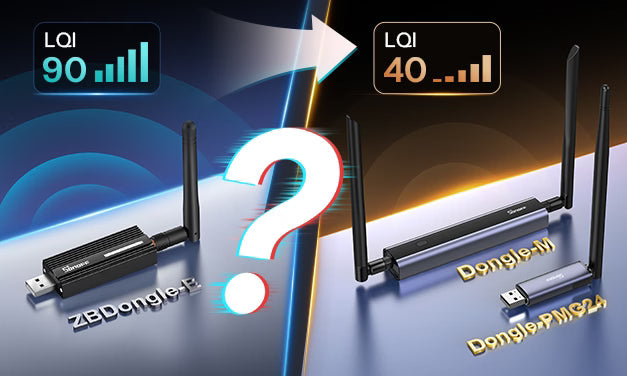
At the end of 2025, SONOFF launched the new Dongle-PMG24 USB Adapter and Dongle-M PoE Adapter, both of which quickly gained strong interest from the smart home community.
However, some users noticed something unexpected after replacing their existing ZBDongle-E with the new Dongle-PMG24 or Dongle-M: the reported LQI values of their Zigbee devices dropped significantly. This naturally raised concerns that the lower LQI values might negatively affect Zigbee network stability and device response speed.
To address these concerns, we previously conducted the first round of communication distance testing across the entire SONOFF Zigbee Dongle lineup at distances of 150 m / 250 m / 350 m, and even 450 m, and reached an important conclusion:
- LQI cannot be directly equated with actual control experience or usable communication range.
- In practical deployments, LQI is better treated as a reference indicator of link quality, rather than the sole criterion for determining whether a device is usable. Control success rate and latency performance are more representative metrics of user experience.
If you missed our previous test, you can check the article below to see how our Zigbee Dongles performed across different distances:
350m? 450m?! We Tested the Communication Distance of SONOFF Zigbee Dongles
After the article was published, many users reported feeling more confident using the new SONOFF EFR32MG24-based Dongles. At the same time, several highly technical users suggested that we also verify factors such as transmit power and antenna frequency offset, since both can influence reported LQI values.
We are confident in SONOFF's professionalism in the Dongle series. At the same time, we were also curious about the LQI values and actual performance of MG24 Adapters from other manufacturers on the market.
For this reason, we conducted the second round of distance testing, covering four MG24 Adapters from different brands. Under completely identical testing environments and conditions, we further verified the following conclusion:
- Zigbee Adapters based on the Silicon Labs MG24 SoC generally report relatively low LQI values, significantly lower than Zigbee Adapters based on the MG21 SoC (such as SONOFF ZBDongle-E and Dongle-LMG21). However, low LQI values do not noticeably affect device control success rate or control latency.
So how was this conclusion reached? And how did the different devices perform in this round of testing? Let's walk through the full testing process and data analysis.
Test Plan Overview
To ensure authentic and reliable data, we established the following testing principles:
- Real Devices: All devices were purchased from the brand's official websites or Amazon.
- Real Data: All results presented are based on actual recorded measurements during the test.
- Reproducible: Under the same conditions, our test methodology should yield comparable results.
Test Equipment

|
MG24 Adapter Information |
||||
|
Model |
Firmware Type |
Firmware Version |
Baud Rate |
Notes |
|
Dongle-M |
Zigbee NCP |
7.4.5 |
115200 |
ESP32 version V1.0.9 beta |
|
Home Assistant Connect ZBT-2 |
Zigbee NCP |
7.5.1 |
460800 |
|
|
SLZB-MR5U |
Zigbee NCP |
7.4.2 |
115200 |
|
|
SLZB-07MG24 |
Zigbee NCP |
7.4.2 |
115200 |
|
Test Locations
In this test, each manufacturer's MG24 Adapter needed to maintain a certain distance from the Zigbee Device, so we divided the equipment into two locations:
- Starting Point: The router, Raspberry Pi, laptop, and the Zigbee dongle under test were placed at this location.
The dongle was mounted on a stand at a height of 1.2 m, and its position remained unchanged throughout the test. - End Point: A downlight modified with ZBMINIR2, also fixed at a height of 1.2 m. The endpoint was gradually moved to distances of 150 m / 250 m.

Test Procedure
At each distance point, control tests were performed using a unified process:
-
MG24 Adapter status
Powered on and connected via Ethernet/Wi-Fi through TCP to Zigbee2MQTT in Home Assistant, or connected via UART to Zigbee2MQTT in Home Assistant -
Channel configuration
Zigbee channel: 25; Wi-Fi channel: 1 -
Control method
Remote device control via MQTT commands -
Control frequency
One command every 2 seconds -
Number of attempts
30 consecutive control attempts at each distance
During testing, we simultaneously recorded:
- Control success and failure
- Control latency (ms)
- Zigbee link quality indicator (LQI)
Note:
Each time a different Adapter was tested, Zigbee2MQTT was fully reset by removing the existing configuration and reinitializing the system before starting the next test.
Real Testing
To maintain consistency with the previous test, we once again traveled from Shenzhen, China (SONOFF headquarters) to Huizhou, China (SONOFF factory location), and conducted the test on the same open straight road.

This time, the devices under test were MG24 Adapters from different manufacturers.
*If the GIF does not appear, please wait.
150m:

250m:

Data Analysis
|
Distance (meter) |
MG24 Adapters |
Control Indicators |
Average Value |
Test Number |
|||||||||||||||||||||||||||||
|
1 |
2 |
3 |
4 |
5 |
6 |
7 |
8 |
9 |
10 |
11 |
12 |
13 |
14 |
15 |
16 |
17 |
18 |
19 |
20 |
21 |
22 |
23 |
24 |
25 |
26 |
27 |
28 |
29 |
30 |
||||
|
150 |
Home Assistant Connect ZBT-2 |
LQI |
40.13 |
16 |
52 |
40 |
60 |
48 |
40 |
12 |
36 |
36 |
44 |
28 |
44 |
32 |
56 |
36 |
56 |
56 |
44 |
32 |
32 |
36 |
48 |
36 |
48 |
40 |
36 |
28 |
48 |
40 |
44 |
|
Control Latency (ms) |
50.97 |
69 |
58 |
55 |
55 |
54 |
55 |
50 |
53 |
56 |
53 |
60 |
55 |
46 |
56 |
55 |
43 |
52 |
46 |
49 |
51 |
53 |
46 |
49 |
45 |
41 |
45 |
46 |
51 |
41 |
41 |
||
|
SLZB-07Mg24 |
LQI |
13.60 |
32 |
44 |
20 |
24 |
36 |
24 |
20 |
12 |
8 |
12 |
8 |
8 |
0 |
8 |
8 |
4 |
0 |
16 |
12 |
0 |
12 |
4 |
0 |
24 |
8 |
8 |
8 |
16 |
12 |
20 |
|
|
Control Latency (ms) |
63.40 |
72 |
61 |
58 |
63 |
59 |
67 |
61 |
62 |
67 |
67 |
68 |
62 |
61 |
62 |
58 |
60 |
64 |
61 |
57 |
88 |
63 |
62 |
60 |
62 |
62 |
63 |
62 |
58 |
72 |
60 |
||
|
SLZB-MR5U (UART) |
LQI |
24.93 |
12 |
24 |
32 |
32 |
28 |
28 |
28 |
32 |
24 |
64 |
8 |
24 |
16 |
32 |
12 |
32 |
8 |
28 |
20 |
32 |
20 |
40 |
24 |
24 |
24 |
24 |
24 |
24 |
12 |
16 |
|
|
Control Latency (ms) |
56.83 |
87 |
58 |
59 |
60 |
65 |
62 |
54 |
62 |
56 |
24 |
59 |
60 |
59 |
58 |
52 |
60 |
62 |
59 |
56 |
56 |
57 |
51 |
52 |
56 |
47 |
57 |
51 |
64 |
54 |
48 |
||
|
SLZB-MR5U (Ethernet) |
LQI |
15.60 |
20 |
52 |
8 |
8 |
8 |
8 |
4 |
20 |
4 |
0 |
4 |
24 |
44 |
32 |
36 |
20 |
4 |
16 |
0 |
4 |
8 |
0 |
24 |
0 |
16 |
20 |
16 |
28 |
4 |
36 |
|
|
Control Latency (ms) |
69.10 |
67 |
57 |
82 |
61 |
148 |
56 |
65 |
66 |
63 |
59 |
57 |
58 |
55 |
61 |
58 |
59 |
51 |
63 |
61 |
60 |
201 |
99 |
59 |
57 |
58 |
56 |
62 |
59 |
62 |
53 |
||
|
Dongle-M (UART) |
LQI |
48.67 |
32 |
52 |
48 |
52 |
48 |
52 |
44 |
48 |
36 |
48 |
44 |
56 |
48 |
48 |
48 |
60 |
40 |
80 |
40 |
60 |
52 |
56 |
48 |
48 |
36 |
52 |
44 |
56 |
48 |
36 |
|
|
Control Latency (ms) |
67.03 |
67 |
64 |
66 |
71 |
73 |
70 |
85 |
88 |
64 |
66 |
67 |
69 |
65 |
64 |
64 |
65 |
64 |
64 |
65 |
62 |
63 |
65 |
63 |
68 |
64 |
63 |
64 |
67 |
66 |
65 |
||
|
Dongle-M (Ethernet) |
LQI |
40.00 |
32 |
52 |
48 |
36 |
44 |
12 |
44 |
24 |
36 |
40 |
52 |
32 |
40 |
36 |
44 |
36 |
48 |
28 |
44 |
36 |
40 |
44 |
48 |
40 |
52 |
44 |
48 |
24 |
48 |
48 |
|
|
Control Latency (ms) |
60.50 |
83 |
73 |
59 |
66 |
58 |
60 |
58 |
64 |
60 |
58 |
62 |
61 |
59 |
61 |
59 |
71 |
65 |
51 |
59 |
69 |
58 |
60 |
59 |
59 |
58 |
56 |
58 |
50 |
51 |
50 |
||
|
250 |
Home Assistant Connect ZBT-2 |
LQI |
17.60 |
32 |
20 |
0 |
0 |
0 |
16 |
0 |
0 |
32 |
24 |
28 |
36 |
36 |
12 |
12 |
20 |
32 |
12 |
32 |
4 |
16 |
0 |
20 |
16 |
28 |
20 |
16 |
0 |
32 |
32 |
|
Control Latency (ms) |
74.80 |
72 |
57 |
110 |
308 |
58 |
56 |
109 |
160 |
55 |
55 |
61 |
64 |
69 |
63 |
58 |
59 |
54 |
63 |
58 |
63 |
56 |
47 |
59 |
68 |
73 |
55 |
57 |
64 |
59 |
54 |
||
|
SLZB-07Mg24 |
LQI |
- |
- |
- |
- |
- |
- |
- |
- |
- |
- |
- |
- |
- |
- |
- |
- |
- |
- |
- |
- |
- |
- |
- |
- |
- |
- |
- |
- |
- |
- |
- |
|
|
Control Latency (ms) |
- |
- |
- |
- |
- |
- |
- |
- |
- |
- |
- |
- |
- |
- |
- |
- |
- |
- |
- |
- |
- |
- |
- |
- |
- |
- |
- |
- |
- |
- |
- |
||
|
SLZB-MR5U (UART) |
LQI |
28.67 |
12 |
0 |
12 |
32 |
32 |
24 |
44 |
24 |
24 |
24 |
36 |
40 |
28 |
36 |
32 |
36 |
24 |
24 |
32 |
24 |
8 |
36 |
20 |
36 |
24 |
40 |
36 |
40 |
40 |
40 |
|
|
Control Latency (ms) |
60.97 |
79 |
83 |
58 |
58 |
56 |
54 |
60 |
60 |
59 |
62 |
59 |
57 |
62 |
61 |
62 |
60 |
55 |
60 |
55 |
72 |
75 |
60 |
59 |
60 |
54 |
64 |
58 |
54 |
56 |
57 |
||
|
SLZB-MR5U (Ethernet) |
LQI |
28.53 |
28 |
28 |
12 |
20 |
20 |
28 |
28 |
44 |
36 |
32 |
20 |
28 |
24 |
36 |
24 |
16 |
16 |
16 |
28 |
40 |
44 |
24 |
28 |
40 |
48 |
48 |
20 |
16 |
36 |
28 |
|
|
Control Latency (ms) |
60.53 |
67 |
72 |
62 |
60 |
77 |
66 |
59 |
54 |
58 |
56 |
58 |
65 |
65 |
53 |
59 |
75 |
58 |
59 |
53 |
59 |
56 |
56 |
57 |
53 |
61 |
65 |
55 |
58 |
59 |
61 |
||
|
Dongle-M (UART) |
LQI |
15.20 |
0 |
20 |
24 |
0 |
8 |
24 |
24 |
16 |
8 |
4 |
12 |
28 |
36 |
12 |
16 |
0 |
20 |
20 |
20 |
24 |
20 |
12 |
20 |
4 |
4 |
16 |
24 |
0 |
20 |
20 |
|
|
Control Latency (ms) |
65.80 |
95 |
63 |
64 |
73 |
74 |
63 |
65 |
60 |
69 |
60 |
65 |
66 |
63 |
66 |
84 |
64 |
62 |
64 |
63 |
52 |
64 |
65 |
65 |
64 |
69 |
61 |
63 |
64 |
62 |
62 |
||
|
Dongle-M (Ethernet) |
LQI |
10.53 |
20 |
0 |
12 |
20 |
8 |
8 |
16 |
0 |
16 |
8 |
12 |
12 |
16 |
12 |
40 |
4 |
4 |
0 |
8 |
0 |
16 |
16 |
24 |
12 |
8 |
4 |
0 |
0 |
16 |
4 |
|
|
Control Latency (ms) |
60.90 |
82 |
59 |
56 |
80 |
61 |
58 |
58 |
58 |
69 |
55 |
57 |
63 |
57 |
57 |
58 |
57 |
61 |
59 |
56 |
58 |
60 |
55 |
62 |
55 |
82 |
69 |
55 |
56 |
55 |
59 |
||
Test Observations
1. Except for the SLZB-07Mg24, all MG24 Adapters were able to successfully pair and control devices at both 150 m and 250 m distances. The SLZB-07Mg24 could only successfully pair devices at around 140 m.
2. At 150 m:
- The Home Assistant Connect ZBT-2 and Dongle-M (UART & Ethernet) showed similar LQI performance, with average values above 40.
- The SLZB-07Mg24 and SLZB-MR5U (UART & Ethernet) showed similar LQI performance, with average values around 10–20.
- The average control latency of all MG24 Adapters was also very close, remaining around 50–60 ms.
3. At 250 m:
- The SLZB-07Mg24 was basically unable to reliably control the device.
- The remaining MG24 Adapters showed similar average LQI values (around 10–20) and similar average control latency (around 60–70 ms).

Leave a comment
All comments are moderated before being published.
This site is protected by hCaptcha and the hCaptcha Privacy Policy and Terms of Service apply.