









Introduction
Replacing an old underfloor heating thermostat or choosing one for a new installation? It's tempting to compare smart features first, but not every thermostat works with every floor heating system.
Electric and water-based underfloor heating use different controls, and even thermostats designed for the same system may have different wiring or sensor requirements.
This guide will help you find a compatible thermostat, understand your options for upgrading, and get more from your heating with practical temperature settings, schedules, and smart controls.
Electric vs. Water Underfloor Heating Thermostats: What's the Difference?
Underfloor heating systems generally use either electric heating cables or mats, or pipes that circulate heated water beneath the floor. Both use thermostats to regulate heating, but they control their heating systems in different ways.
Electric Underfloor Heating Thermostats
Electric underfloor heating uses heating cables or mats installed beneath the floor. The thermostat typically switches the electrical heating load on and off based on the set temperature. Larger installations may use a separate contactor to handle the load.
These thermostats commonly support a floor temperature sensor to monitor floor temperature and, when configured, help prevent overheating. Electric floor heating may also require circuit protection, such as an RCD or GFCI, depending on local electrical requirements.
Water Underfloor Heating Thermostats
Water-based underfloor heating, also called hydronic underfloor heating, circulates heated water through pipes beneath the floor.
Instead of controlling electric heating cables, the thermostat typically operates an actuator or zone valve that opens or closes the flow of heated water to a heating zone. In multi-zone systems, thermostats may connect through a wiring centre that coordinates the actuators, circulation pump, and heating demand signals to the boiler or other heat source.
Electric vs. Water Underfloor Heating Thermostats at a Glance
|
Comparison |
Electric Underfloor Heating |
Water Underfloor Heating |
|
Heating method |
Electric cables or mats |
Heated water flowing through pipes |
|
Thermostat controls |
Electrical heating load, sometimes via a contactor |
Actuator, zone valve, or compatible heating controller |
|
Temperature sensing |
Room and/or floor sensor |
Usually room temperature; floor sensors may also be used |
|
Key compatibility checks |
Voltage, load rating, floor sensor, electrical protection |
Control output, actuator compatibility, power supply, wiring |
Not sure which system you have?
Check your existing thermostat's model and wiring diagram, or look for an underfloor heating manifold with pipes and valve actuators, which typically indicates a water-based system. If you're unsure, ask your installer before choosing a replacement thermostat. Electric and water underfloor heating thermostats aren't automatically interchangeable.
What Should You Look for in an Underfloor Heating Thermostat?
Before buying an underfloor heating thermostat, check that it works with your heating system and offers the controls you need. These six checks will help you avoid compatibility issues and find a thermostat that suits your home.
|
What to Check |
What to Look For |
|
1. Heating system compatibility |
Is it designed for electric or water underfloor heating? Check whether it controls a heating load, valve actuator, or heating controller. |
|
2. Electrical and Control Requirements |
Check the supply voltage, output type, and load rating.
|
|
3. Temperature Sensors |
Does it measure room temperature, floor temperature, or both? Check whether it supports the required sensor type and floor temperature limits for your installation. |
|
4. Heating Zones |
Need different temperatures in separate rooms? Check whether your system has independently controlled zones, compatible actuators, and a zone controller. For heat pumps, zone design must also account for the system's flow requirements. |
|
5. Daily Controls |
Compare manual controls, programmable schedules, and smart features such as remote temperature adjustments. Choose what suits your daily routine. |
|
6. Smart Home Compatibility |
Check the wireless protocol, gateway requirements, and smart home platform compatibility. Also check whether manual control and saved schedules work without a network connection. |
Tip: Check system compatibility, electrical requirements, and temperature sensors first. Once you've confirmed these, compare the features that matter most to your daily heating needs.
Can You Replace Your Existing Underfloor Heating Thermostat With a Smart One?
Want to replace your old underfloor heating thermostat with a smart model? It may not be a straightforward swap. Even thermostats designed for the same type of floor heating can have different wiring, sensor, and installation requirements.
Before replacing it, check these points:
● Wiring at the existing location: Does the new thermostat need a live (L) and neutral (N) supply? An older two-wire thermostat may not have the connections needed to power a new smart model.
● Existing heating controls: Check the old thermostat's wiring diagram to see how it connects to the heating system. The replacement must work with the existing control arrangement, whether that's an electrical heating load, actuator, or wiring centre.
● Reusing the floor sensor: If a sensor is already installed beneath the floor, check whether the new thermostat supports its resistance and temperature characteristics. You may need a compatible replacement sensor.
● Wall box and mounting: Will the new thermostat fit the existing wall box and mounting holes? Check that there's enough space for the wiring.
For older water underfloor heating systems, check the wiring centre and valve actuators as well as the thermostat. A smart upgrade may require changes to the existing heating controls, not just a replacement wall panel.
Before making any changes, find your old thermostat's model number and compare its wiring diagram with the new model's installation manual. If you're unsure about the wiring or compatibility, ask a qualified electrician or heating installer to check before installation.
How Do You Set an Underfloor Heating Thermostat?
The right settings depend on your heating system, flooring, and how you use each room. Start with a comfortable target temperature, then adjust your heating schedule based on how your floor and room respond.
What Temperature Should You Set?
Check whether your thermostat controls room temperature, floor temperature, or both.
● Room temperature: For whole-room heating, start with a comfortable room temperature and adjust as needed.
● Floor temperature: For warmer tiles underfoot, such as in a bathroom, use floor temperature control if supported. Follow the flooring manufacturer's temperature limits, especially for wood or vinyl.
Note: A warm floor doesn't always mean the room has reached your desired temperature.
Should You Leave Underfloor Heating On All Day?
Not necessarily. It depends on how quickly your system heats up and cools down, your home's insulation, and your daily routine.
Systems embedded in thick concrete can take hours to warm up or cool down, while thinner systems may heat up faster. The floor may also keep releasing heat after the thermostat stops calling for heating.
For slower systems, maintaining a steady temperature or using a small overnight setback may be more comfortable than turning heating off completely. A setback lowers the target temperature; it doesn't necessarily stop heating.
How Do You Set a Heating Schedule?
Work backward from when you want the room warm. For example, if you want a comfortable bathroom floor at 7 a.m., you may need to start heating earlier, depending on your heating system's response time.
Try your schedule for a few days, then adjust it based on what happens:
● Still cold when you wake up? Start heating earlier.
● Room stays too warm after you leave? Try ending the higher-temperature period earlier.
● Different weekday and weekend routines? Use separate schedules if your thermostat supports them.
● Still overheating when the weather gets warmer? Check your schedule and temperature readings first. For water-based systems, also check whether the heating water temperature and control settings are appropriate. If your boiler or heat pump supports weather compensation, consult your installer.
Smart Water Underfloor Heating Control With SONOFF TP-WGZBA
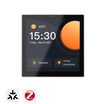
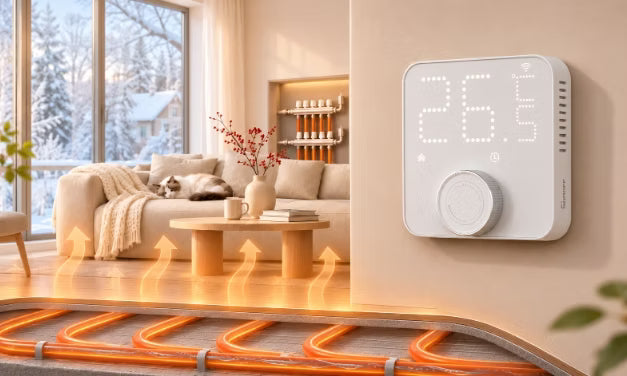
If you have water underfloor heating and want more flexible temperature control, heating schedules, or smart home integration, the SONOFF TP-WGZBA Smart Thermostat is worth considering.
Designed for hydronic underfloor heating and compatible boiler systems, it combines wall-mounted temperature control with programmable schedules, external temperature sensing, and Zigbee connectivity to help manage your daily home heating.

Key Features:
● Manage water underfloor heating: Control compatible 100–240V AC hydronic heating actuators (up to 3A), with support for normally closed (NC) and normally open (NO) types. NO actuators require the corresponding setting in eWeLink.
● Set flexible heating schedules for different routines: Create three customizable weekly heating plans, each with up to 12 temperature periods per day. Switch between plans for workdays, weekends, or holidays without setting everything up again. Saved schedules continue running during a temporary Zigbee disconnection, as long as the thermostat remains powered.
● Get more accurate room temperature control: Connect a compatible SONOFF room sensor when the thermostat's built-in reading doesn't represent the room well, or use the Temperature Offset to calibrate the reading. An optional 10kΩ NTC floor sensor (β = 3950), sold separately, provides floor temperature monitoring for overheat protection.
● Reduce Unnecessary Heating and Prevent Accidental Changes: Open-window detection helps reduce unnecessary heating during ventilation, while adjustable Temperature Hysteresis lets you fine-tune when heating starts and stops. Child Lock helps prevent accidental changes, and Anti-Freeze Mode provides additional frost protection during cold weather.
● Connect to your smart home ecosystem: Use compatible SONOFF Zigbee gateways with eWeLink for remote heating control and automation, or integrate with Home Assistant through Zigbee2MQTT or ZHA. You can also connect to Apple Home via a compatible Matter Bridge, while Alexa, Google Home, and SmartThings are supported through compatible integrations. Available features and setup requirements vary by platform, gateway, and integration method.
👀 See the compatibility chart below for supported features across different smart home platforms.

Compatibility Note: TP-WGZBA requires live (L) and neutral (N) power connections. It is not designed to directly control electric underfloor heating mats or cables. Check your existing actuators, boiler controls, and wiring before installation.
TP-WGZBA also has a separate COM/NO dry-contact output for compatible ON/OFF boiler control. To learn more about how thermostats control boiler heating systems, see the Thermostat for Boiler Heating System Guide.
👉 For more information:
● Installation and Setup: TP-WGZBA Smart Thermostat Installation and User Guide.
● Settings, Compatibility, and Troubleshooting: TP-WGZBA Help Center.
Smart Heating Ideas for Your Water Underfloor Heating
Winter days don't always go to plan. Here are three useful ideas to make your water underfloor heating better fit your daily routine with SONOFF TP-WGZBA.
Heating That Fits Your Routine
Working from home unexpectedly or heading away for the weekend? Your usual heating schedule may no longer suit your plans.
Switch between your saved Home, Work, or Holiday heating plans in eWeLink without setting up a new schedule. You can also adjust the temperature remotely when plans change. Just allow enough time for your underfloor heating to respond.

Control Heating Based on a More Representative Room Temperature
The thermostat says it's warm enough, but you're still reaching for a blanket on the sofa?
Place a compatible SONOFF temperature sensor where you want to monitor room temperature, and use its reading to control heating with TP-WGZBA instead of relying solely on the thermostat's built-in sensor.

Reduce Heating When You Open a Window
Opening the bedroom window for fresh air on a cold morning? You don't need to remember to turn down the heating.
With built-in open-window detection or a compatible SONOFF door/window sensor connected through a supported gateway, TP-WGZBA can automatically switch to a non-heating state when an open window is detected, reducing unnecessary heating during ventilation. The floor may still release stored heat afterward.
Underfloor Heating Thermostat FAQs
Q1: Why Is My Underfloor Heating Floor Cold Even When the Room Is Warm?
If your thermostat controls room temperature, heating may stop once the room reaches its target, even if the floor no longer feels warm.
Check whether your thermostat supports floor temperature control or a floor sensor. Some systems can monitor or limit floor temperature, but not maintain a specific floor temperature independently. Always follow your flooring manufacturer's temperature limits.
Q2: Can an Underfloor Heating Thermostat Control a Boiler?
Yes, if the thermostat and boiler use compatible control interfaces.
For example, the SONOFF TP-WGZBA has a COM/NO dry-contact output for boilers with a compatible potential-free ON/OFF thermostat input.
Some water underfloor heating systems use a wiring centre or separate controller to coordinate heating demand. Check your boiler's control requirements and existing wiring before installation.
Q3: Will Underfloor Heating Still Work if Wi-Fi or Zigbee Goes Down?
It depends on the thermostat. Some models can continue local temperature control and saved schedules without an internet or gateway connection, although remote access and connected automations may be unavailable.
For SONOFF TP-WGZBA, local temperature control and saved schedules are designed to continue during a temporary Zigbee disconnection, provided the thermostat remains powered.
Q4: Can I Connect an Underfloor Heating Thermostat to Home Assistant?
Yes, if your thermostat is supported by a compatible integration. Check the exact model, connection protocol, and available controls.
SONOFF TP-WGZBA supports Zigbee2MQTT (version 2.14.0 or later). ZHA integration currently requires additional configuration for full functionality. Check the TP-WGZBA setup guide for the latest requirements.
Q5: Why Is My Thermostat Still Heating After Reaching the Set Temperature?
This may be due to temperature hysteresis, which determines when heating starts and stops around your target temperature. It helps prevent frequent switching caused by small temperature changes.
For example, with a target of 22°C and hysteresis set to ±0.5°C:
● Heating stops when the room temperature reaches 22.5°C.
● Heating starts again when the temperature drops to 21.5°C.
With SONOFF TP-WGZBA, you can adjust the heating start and stop thresholds in the eWeLink app's device settings.

Leave a comment
All comments are moderated before being published.
This site is protected by hCaptcha and the hCaptcha Privacy Policy and Terms of Service apply.