














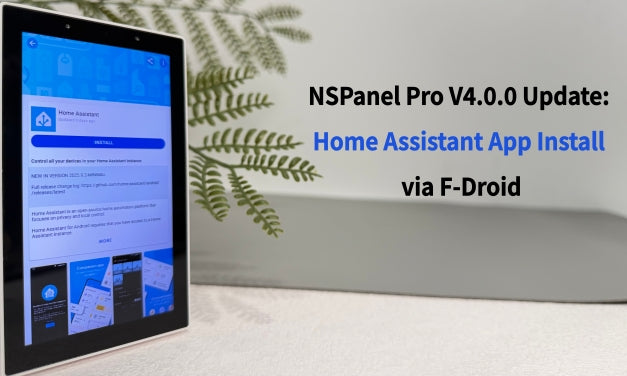
Introduction
We’ve always envisioned the NSPanel Pro as more than just a control screen — it’s the central hub of your smart home. To deliver a smoother and more powerful experience, we’ve spent the last four months restructuring and optimizing the device’s technical stack.
With the release of version 4.0.0, NSPanel Pro takes a major leap forward: screen swiping and overall responsiveness are now faster and smoother than ever. Even more exciting, NSPanel Pro now supports F-Droid, allowing you to download official apps like Home Assistant and more.

What’s New in V4.0.0
A Smoother Control Experience
We’ve optimized the underlying structure to provide a smoother swiping experience and faster response times. Whether you’re navigating between device dashboards or checking automation status, your daily interactions with NSPanel Pro will feel more fluid and responsive.
Support for F-Droid
One of the biggest highlights of this update is F-Droid.
F-Droid is a free and open-source app store offering applications that are ad-free, privacy-respecting, and verified by the open-source community. Starting from NSPanel Pro V4.0.0, you’ll find a new F-Droid entry in the NSPanel Pro drop-down menu. With just one tap, you can explore and download the apps you need.
Example: Running Home Assistant on NSPanel Pro
For example, you can now directly install the official Home Assistant app from F-Droid. Once installed, it can be launched right from NSPanel Pro, bringing you full compatibility with the official HA app.
- The app version in F-Droid may differ slightly from the latest release, but it ensures stable and official support.
- Importantly, running F-Droid apps will not affect NSPanel Pro’s original features. Your existing device setups and automations remain intact. For instance, if your NSPanel Pro is configured to trigger security alerts, it will continue to do so seamlessly, you can still receive the alerts from NSPanel Pro.
NOTE:
You can click the link below for a comprehensive understanding of F-Droid:
F-Droid New Features Bring Unlimited Possibilities!Your NSPanel Pro, More Than Just a Control Panel.
Web Shortcut Removal
In earlier versions, the Web Shortcut feature provided a convenient way to keep quick-access pages for Home Assistant, Cast, and other services. However, prolonged usage of Web Shortcuts could sometimes affect device performance.
Now that NSPanel Pro officially supports F-Droid, users can install applications directly for a more stable, reliable, and higher-quality experience. Therefore, the Web Shortcut feature will be phased out, but basic quick access to web pages will remain available.
We understand this change may cause inconvenience to some users and sincerely appreciate your understanding and support as we continue improving NSPanel Pro.
Try Version 4.0.0
Starting September 19, NSPanel Pro V4.0.0 will be rolled out in phases, and some devices will receive the update in advance.
*After upgrading, please check whether both Settings → APP Version and OS Version are at 4.0.0 or above. If not, please continue upgrading. If the issue still cannot be resolved, please contact us.
👉 Note: We are still optimizing the V4.0.0 version, now temporarily suspending individual pushes of this version. We will continue to optimize based on current feedback until a stable version is released. Please stay tuned for push updates on the latest stable version. Thanks for your understanding.
If you have encountered any issues after upgrading to V4.0.0, please submit your feedback through the link below. Our developers will communicate directly with you to help you identify and resolve issues more quickly.
https://forum.ewelink.cc/t/nspanel-pro-v4-0-2-optimized-version-released/205842
Conclusion
With version 4.0.0, NSPanel Pro is entering a new stage:
- A faster and smoother control interface.
- Access to a huge range of apps via F-Droid.
This update reflects our ongoing commitment to NSPanel Pro. We look forward to your feedback as you try out the new version — together, let’s make NSPanel Pro even better.
Thank you for your continued support of SONOFF.


8 comments
Joanna Z
Reply to Adam: Hi Adam, among the three current NSPanel Pro models, the 86 and 120 versions use Android v8, while the new Gen2 uses Android v11. If you would like a higher-performance model in this series, you may consider NSPanel Pro Gen2. We may consider using a newer Android version in future products.
Joanna Z
Reply to Denis Gillier: Hi Denis, could you please describe the specific issue you’re experiencing? If ADB is enabled, you can tap the device information section repeatedly on the About screen to display the “Enable ADB” option. If the problem persists, please send us some screenshots or a short video showing the issue so that we can investigate further. Thank you!
Jens
Nice! I got it today :-) Please make it possible, to add App Shortcuts in the drop-down Menu, or make it swipe-able like with the web shortcut before, Thank you!
Adam
Is there any likelihood that there will be an Android OS upgrade (from Android v8.1/SDK 27 to v9/SDK 28) in the future?
Denis Gillier
Hello,
I bought a new NSPAnel, and I’m stuck in 3.0.
(I have another one in ADB mode to install HA app, but it looks like the new one is also in ADB mode even if I did not do anything about it).
Any solution ?
Tks,
Denis
Leave a comment
All comments are moderated before being published.
This site is protected by hCaptcha and the hCaptcha Privacy Policy and Terms of Service apply.