









Introduction
Looking for a Zigbee dongle for Home Assistant? A Zigbee dongle lets Home Assistant communicate directly with Zigbee sensors, switches, lights, plugs, and other devices. It can replace multiple proprietary hubs and keep many automations running locally.
However, choosing a dongle involves more than comparing radio range or chipset specifications. The most important questions are:
- Will you use ZHA or Zigbee2MQTT?
- Is your Home Assistant server in a good location for a USB radio?
- Do you need Zigbee only, or Thread as well?
- Are you starting a new network or migrating an existing one?
This guide explains those decisions, compares current SONOFF options, and covers installation, placement, migration, and common problems.
Quick Answer: Which Zigbee Dongle Should You Choose?
The right choice depends on software compatibility, firmware, placement, and network design. No single Home Assistant Zigbee dongle is best for every installation:
- For ZHA → choose a currently supported TI or Silicon Labs coordinator with stable Zigbee coordinator firmware. For example, Dongle-PP10 and Dongle-PMG24 are newer options.
- For Zigbee2MQTT → prioritize a coordinator and firmware combination listed in the current Zigbee2MQTT adapter documentation. TI and Silicon Labs platforms are both common choices.
- For a simple USB setup → choose a USB coordinator when your Home Assistant server can be placed in a good RF location, such as Dongle-PP10, Dongle-PMG24, ZBDongle-E, or ZBDongle-P.
- For crowded USB ports or limited space → choose a compact dongle, such as the Dongle-LMG21, which is specifically designed for a smaller, space-saving USB setup.
- For servers in racks, basements, or poor RF locations → choose an Ethernet/PoE coordinator so the radio can be positioned independently of the server, such as Dongle-M.
-
For future Thread use → choose hardware with supported Zigbee and Thread firmware options, and check whether you plan to use dedicated radios or a supported multiprotocol setup.
What Is a Zigbee Dongle, and Do You Need One for Home Assistant?
A Zigbee dongle is a radio adapter that lets Home Assistant communicate directly with Zigbee devices. For normal Home Assistant use, it runs coordinator firmware and acts as the coordinator of your Zigbee network.
A dongle is the hardware, while the coordinator describes its Zigbee network role. Some compatible dongles can also be flashed for other roles, such as a Zigbee router or OpenThread RCP.
✅ You normally need a Zigbee dongle if your Home Assistant system does not already have a compatible Zigbee radio and you want to connect Zigbee devices directly.
❌ You may not need one if you already use Home Assistant hardware with a built-in Zigbee radio, a supported network coordinator, or a vendor hub you plan to keep.
ZHA vs. Zigbee2MQTT: Choose Your Zigbee Software
ZHA and Zigbee2MQTT both connect Zigbee devices to Home Assistant, but they manage the network differently.
|
ZHA |
Zigbee2MQTT |
|
|
Installation |
Built into Home Assistant |
Requires Zigbee2MQTT and MQTT |
|
Management |
Inside Home Assistant |
Dedicated Zigbee2MQTT interface |
|
Best for |
Simpler setup and maintenance |
More detailed configuration |
|
Device support |
Zigpy and ZHA quirks |
Zigbee2MQTT converters |
- ZHA is simpler for many users because it is built into Home Assistant and keeps device management in one interface.
- Zigbee2MQTT requires an MQTT broker and an additional service, but provides detailed device pages, logs, configuration options, and an extensive supported-device database. Device support varies by model: some devices expose more features in Zigbee2MQTT, while others work equally well—or better for a particular use case—in ZHA. Check the exact device model before deciding.
👉 For a deeper comparison of features, read ZHA vs. Zigbee2MQTT: The Best Zigbee Integration for Home Assistant?
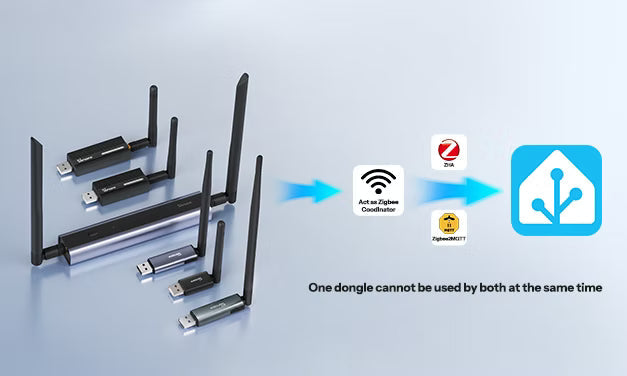
❗Important Note: A single Zigbee dongle cannot be used by ZHA and Zigbee2MQTT at the same time. Each integration requires its own coordinator and a separate Zigbee network. If you run both networks, using different Zigbee channels can help reduce interference between them.
👇If you prefer a step-by-step installation walkthrough, you can also follow the tutorials on the official SONOFF YouTube channel:
Install and set up the SONOFF Zigbee dongle with ZHA:
Install and set up the SONOFF Zigbee dongle with Zigbee2MQTT:
What to Look for in a Home Assistant Zigbee Dongle?
Work through this checklist before selecting a Zigbee dongle for Home Assistant.
ZHA and Zigbee2MQTT support
Check the adapter against the current Home Assistant ZHA documentation and Zigbee2MQTT adapter list. Not every Zigbee dongle is supported equally across both platforms, and the required adapter type or firmware may differ by chipset.
Tip: All SONOFF Zigbee dongles covered in this guide support both ZHA and Zigbee2MQTT.
Radio chipset and firmware
The chipset determines which radio protocol and firmware family the integration uses. Common platforms include Texas Instruments CC26xx hardware and Silicon Labs EFR32 hardware.
A supported chipset can still fail if the dongle has the wrong firmware role. For a new Zigbee network, it must run coordinator firmware — not router or OpenThread firmware.
USB vs network-connected coordinators (Ethernet/Wi-Fi, optionally powered by PoE)
USB coordinators are simple and economical when the Home Assistant server is in a suitable location with low RF interference.
Ethernet or PoE lets you place the coordinator independently of the server, which can be valuable when Home Assistant runs inside a metal rack or at the edge of the building.
Zigbee, Thread, or both
Some radios can run Zigbee, Thread, or multiprotocol firmware. For example, SONOFF has demonstrated simultaneous Zigbee and Thread operation on the ZBDongle-E with MultiPAN firmware.
👉 Multiprotocol is Not Dead — ZBDongle-E Revives Zigbee + Thread Potential
However, multiprotocol support and recommended deployment vary by software platform, so check the current Home Assistant and Zigbee2MQTT requirements before choosing this configuration.
Migration support
If replacing a coordinator, verify that ZHA or Zigbee2MQTT supports migration between both radio families. Do not assume that changing dongles will always preserve paired devices.
Zigbee Device Compatibility is not Determined by the Dongle Alone
A common misconception is that purchasing a particular coordinator guarantees support for every Zigbee device. In practice, compatibility depends on several layers:
- The dongle's radio chipset.
- The installed coordinator firmware.
- ZHA, Zigbee2MQTT, or another Zigbee application.
- The device-specific handler or converter.
- How closely the device follows the Zigbee standard.
For example, a sensor may pair successfully but still lack a configuration option if that feature has not been implemented by the platform. Check the platform's device database before purchasing thermostats, locks, energy meters, or other feature-rich devices.
Check the ZHA integration documentation or Zigbee2MQTT supported devices before buying a critical device.
Best Zigbee Dongles For Home Assistant: Quick Recommendations
SONOFF offers Home Assistant Zigbee coordinators across both Texas Instruments and Silicon Labs platforms, including established USB models and newer USB, Ethernet, and PoE options.
With broad support across ZHA and Zigbee2MQTT, multiple firmware options, and several generations of widely used hardware, the lineup covers both simple and more flexible Home Assistant installations.
Compare the models below by connection type, chipset, firmware options, and installation needs.


SONOFF Dongle Max Zigbee/Thread PoE Dongle | Dongle-M
$42.90
A network-capable EFR32MG24 coordinator with Ethernet, Wi-Fi, USB, and PoE, designed for flexible placement away from the Home Assistant server. It also provides a web console and advanced network-management features.
View Product
SONOFF Dongle Plus CC2674P10 Zigbee/Thread USB Dongle | Dongle-PP10
$35.9
Built on the newer-generation TI CC2674P10 USB dongle with firmware options for Zigbee coordinator, Zigbee router, and Thread RCP roles. Top quality, future-proof, ideal for lots of rooms and devices, professional's choice.
View Product
SONOFF Zigbee/Thread USB Dongle | Dongle Plus MG24
$35.9
An EFR32MG24 USB adapter with stable Zigbee, Thread, and MultiPAN support. Higher antenna gain for medium to large networks, clean, reliable local operation. Higher processing performance and stable operation.
View Product
SONOFF Dongle Lite MG21 Zigbee/Thread USB Dongle | Dongle-LMG21
$24.9
A compact EFR32MG21 dongle that leaves room around adjacent USB ports. Simple, proven stability and ease of use. Lightweight, stable, and beginner-friendly.
View Product
SONOFF Zigbee 3.0 USB Dongle Plus | ZBDongle-E
$24.9
An established EFR32MG21 / Silicon Labs Ember-based USB coordinator with an external antenna and support for ZHA and Zigbee2MQTT. Classic, affordable, good quality, well-supported EZSP solution, entry-level choice.
View Product
SONOFF Zigbee 3.0 USB Dongle Plus | ZBDongle-P
$24.9
A widely used CC2652P adapter with Z-Stack USB coordinator firmware. Classic, affordable, good quality, entry-level choice.
View Product
Quick Recommendations by Use Case
- Established and affordable: ZBDongle-P or ZBDongle-E
- Newer hardware and Future Zigbee/Thread firmware flexibility: Dongle-PP10, Dongle Plus MG24
- Compact USB setup: Dongle-LMG21
- Flexible Ethernet/PoE placement: Dongle-M
- Future Zigbee/Thread firmware flexibility: Dongle-PP10 or Dongle-PMG24
👉 See the SONOFF Dongle Choosing Guide for the full specification comparison.
How to Set Up a Zigbee Dongle in Home Assistant?
Option 1: Set Up the Dongle with ZHA
- Connect the dongle. An extension cable is recommended for USB, but it does not apply to Ethernet or PoE.
- Open Settings > Devices & services.
- If Home Assistant discovers the adapter, select Configure.
- Otherwise, select Add Integration > Zigbee Home Automation and choose the dongle's serial port.
- Select the radio type that matches the chipset and firmware.
- Create the network and put the first Zigbee device into pairing mode.
Home Assistant may show /dev/ttyUSB0. When available, /dev/serial/by-id/... is safer because it normally remains stable if USB numbering changes. /dev/ttyUSB0 may change after a restart or after another USB device is connected.
If you choose the SONOFF Zigbee dongle, please see How to Use SONOFF Dongle Plus on Home Assistant
Option 2: Set Up the Dongle with Zigbee2MQTT
- Install an MQTT broker and Zigbee2MQTT.
- Identify the coordinator's stable serial path.
- Select the serial port and adapter type required by its firmware.
- Enable the Home Assistant integration in Zigbee2MQTT.
- Start Zigbee2MQTT and permit devices to join.
Do not configure the same adapter in ZHA. If Home Assistant automatically discovers it while you intend to use Zigbee2MQTT, ignore the ZHA discovery prompt or remove the incomplete ZHA configuration.
Always check the Zigbee2MQTT supported adapter list because recommended adapter names and firmware requirements can change.
Zigbee Coordinator Placement and Wi-Fi Interference: The Step Most Users Miss
Moving the coordinator away from the host computer can improve reliability. USB 3.0 devices, SSDs, Wi-Fi equipment, metal enclosures, and computers can create or reflect interference around 2.4 GHz.
For a more reliable network:
● Use a USB extension cable, preferably the supplied one, if included.
● Keep the antenna away from USB 3.0 devices.
● Avoid placing the coordinator inside a metal cabinet.
● Review overlap between Zigbee and 2.4 GHz Wi-Fi channels.
● Add mains-powered routers before distant battery devices.
● Avoid changing the Zigbee channel after pairing devices unless necessary.
How to Migrate a New Zigbee Coordinator?
Before changing hardware:
- Back up Home Assistant, ZHA, or Zigbee2MQTT.
- Record the firmware, channel, PAN information, and serial configuration.
- Confirm that migration is supported between the old and new radio platforms.
- Keep the original coordinator unchanged until the migration is verified.
- Test mains-powered routers and critical devices before declaring success.
ZHA provides coordinator backup and migration tools for supported adapters and can usually preserve the existing network.
Zigbee2MQTT migration depends on coordinator backup/restore support; cross-adapter migration is currently supported primarily for Z-Stack and Ember-based coordinators. Always verify the exact source/destination combination.
👉 SONOFF coordinator migration guide: How to Migrate Your Zigbee Coordinator to the New SONOFF Dongle?
Troubleshooting: Common Home Assistant Zigbee Dongle Problems
Home Assistant cannot find the Zigbee dongle
Try another USB port, confirm the required driver, and check whether Home Assistant can access the USB device. Virtual machines and Docker installations may require explicit USB passthrough.
Zigbee2MQTT cannot open the serial port
ZHA or another application may already be using the coordinator. Stop the competing integration and configure a stable serial path.
Zigbee devices pair but later go offline
Move the coordinator away from interference, add powered routers, and avoid pairing every device beside the coordinator before moving it to a distant room.
The dongle is detected as the wrong device type
Check whether it is running coordinator, router, Thread, or multiprotocol firmware.
For supported SONOFF models, the SONOFF Dongle Flasher can identify the adapter and install compatible firmware.
Home Assistant Zigbee Dongle FAQs
Q1: What is a Zigbee dongle used for in Home Assistant?
It acts as the coordinator that creates a Zigbee network and connects compatible Zigbee devices to Home Assistant for local monitoring and control.
Q2: What is the typical range of a Home Assistant Zigbee dongle?
Open-space range can indicate the radio and antenna performance of a Zigbee dongle under ideal conditions.
In real indoor environments, however, coverage is affected by walls, floors, building materials, 2.4 GHz interference, antenna placement, transmit power, and the presence of Zigbee routers.
Therefore, there is no single indoor range that applies to every Home Assistant installation.
Q3: Can Home Assistant use Zigbee without a dongle?
Yes, if the Home Assistant hardware already has a compatible Zigbee radio or the devices connect through a supported hub or network coordinator. Otherwise, a dongle is required for direct Zigbee communication.
Q4: Can ZHA and Zigbee2MQTT share one Zigbee dongle?
No. Both need exclusive control of the coordinator. Running ZHA and Zigbee2MQTT together requires two coordinators and two separate Zigbee networks.
Q5: Does a Zigbee dongle work with every Zigbee device?
No. Device compatibility also depends on the Zigbee application, firmware, and device-specific handlers or converters. Some devices may pair successfully but not expose every feature.
Before purchasing, check the exact device model:
● Check the ZHA device compatibility list
● Check the Zigbee2MQTT supported device list
Q6: Is a Zigbee dongle the same as a Zigbee hub?
Not exactly. A dongle provides the radio coordinator; Home Assistant and ZHA or Zigbee2MQTT provide the management software. A commercial hub normally combines both.
Q7: Do I need to flash a new SONOFF Zigbee dongle?
Usually not. Models sold as coordinators normally ship with coordinator firmware. Flash only for a supported update or a different role.
If needed, you can use the official SONOFF Dongle Flasher to identify supported models and install compatible firmware.
Q8: Can a Zigbee dongle run Zigbee and Thread together?
Yes, some hardware can. SONOFF's Silicon Labs-based dongles — ZBDongle-E, Dongle-LMG21, Dongle-PMG24, and Dongle-M — all have available MultiPAN firmware options that support Zigbee and Thread on the same radio.
SONOFF has also demonstrated simultaneous Zigbee and Thread operation on the ZBDongle-E using MultiPAN firmware.
👉 Multiprotocol is Not Dead — ZBDongle-E Revives Zigbee + Thread Potential
However, MultiPAN firmware availability does not mean every Home Assistant or Zigbee2MQTT deployment officially supports or recommends the same multiprotocol setup.
Check the exact model, firmware, and software requirements before using Zigbee and Thread simultaneously.
Q9: Is a USB or PoE Zigbee coordinator better for Home Assistant?
USB is simpler when the server is well positioned.
Ethernet or PoE is better when the coordinator needs to be placed away from the server.
Neither connection type is inherently better for every installation.
Q10: Will changing Zigbee dongles require pairing every device again?
Not always. Some supported migrations preserve network data, while others require re-pairing. Back up the network and verify the exact source and destination radio support before migrating.

Leave a comment
All comments are moderated before being published.
This site is protected by hCaptcha and the hCaptcha Privacy Policy and Terms of Service apply.